52
AUTO CLOCK SETUP
TV MENU
TV MENU
/
AUDIO ADJUSTMENT
TIME SETTING
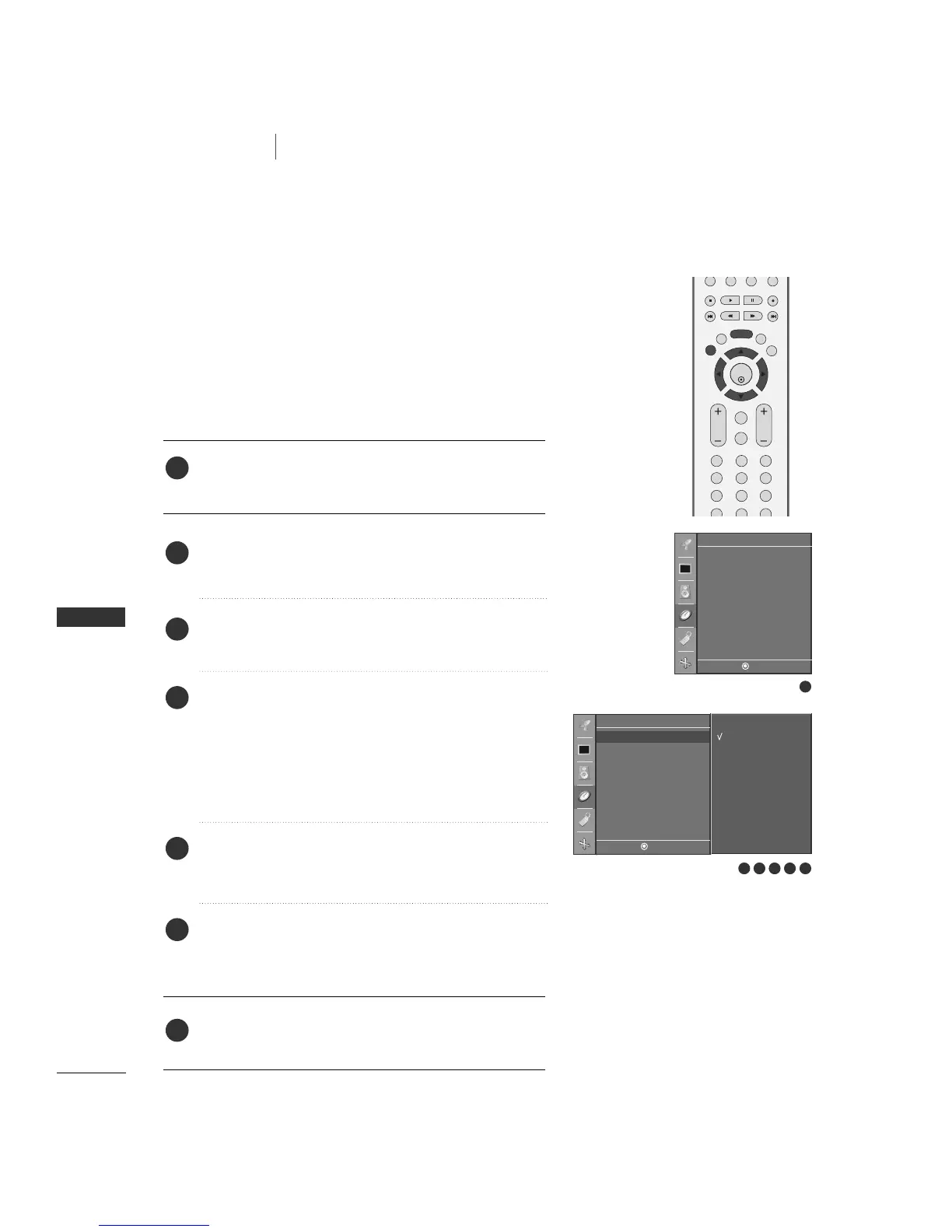
Press the
MMEENNUU
button and then
DD
//
EE
button to select
the
TTiimmeerr
menu.
Press the
GG
button and then
DD
//
EE
button to select
CClloocckk
.
Press the
GG
button and then use
DD
or
EE
button to select
AAuuttoo
.
Press the
GG
button and then use
DD
or
EE
button to select
your viewing area time zone. Your choices are:
AAuuttoo
,
NN..SS..TT
(?? Standard Time),
AA..SS..TT
(Alaska Standard Time),
EE..SS..TT
(Eastern Standard Time),
CC..SS..TT
(Central Standard
Time),
MM..SS..TT
(Mountain Standard Time),
PP..SS..TT..
(Pacific
Standard Time).
Press the
GG
button and then use
DD
or
EE
button to set
PPBBSS cchhaannnneell
.
Press the
GG
button and then use
DD
or
EE
button to select
AAuuttoo
,
OOffff
,
OO nn
, depending on whether or not your viewing
area observes Daylight Saving time.
Press
EEXXIITT
button to return to TV viewing or press
MMEENNUU
button to return to the previous menu.
The time is set automatically from a PBS channel signal.
The PBS channel signal includes information for the current
time provided by the broadcasting station.
Set the clock manually if the current time is set incorrectly by
the auto clock function.
1
2
3
6
5
4
7
1
4 5
Timer
DE F G
MENU
Auto
Manual
Time zone
Auto
PBS Channel
TV 2
Daylight Saving
Auto
Clock
Off timer
On timer
Auto off
Timer
DE F G
MENU
Clock G
Off time
On time
Auto off
6
2 3


 To Next Page