13
ENG
ENGLISH
ASSEMBLING AND PREPARING
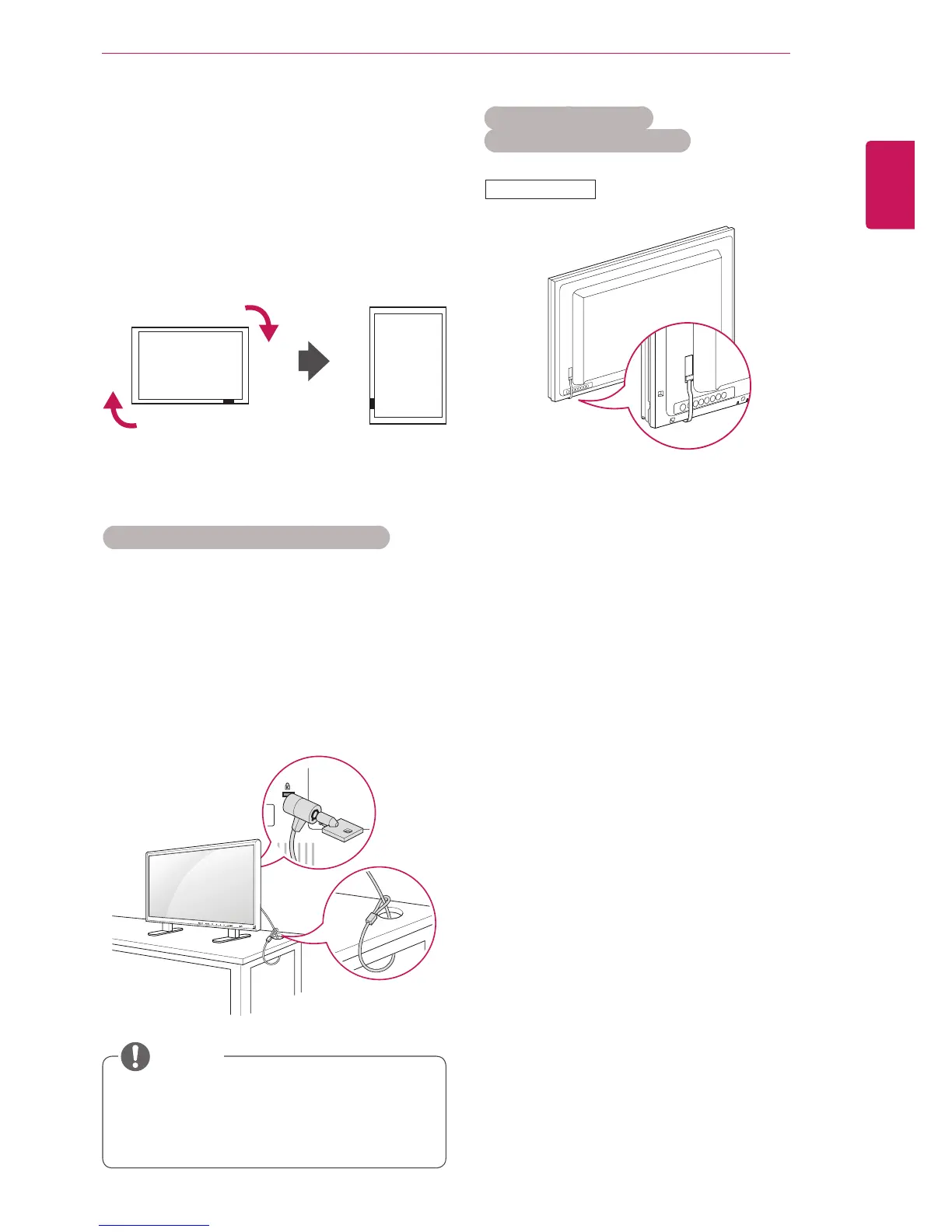
Portrait Layout
-Onlyonsomemodels.
WheninstallinginaPortraitLayout,rotatethe
monitorclockwise90degrees(whenfacingthe
screen).
Using the Kensington security system
TheKensingtonsecuritysystemconnectoris
locatedatthebackoftheMonitorset.Formore
informationofinstallationandusing,refertothe
manualsuppliedwiththeKensingtonsecurity
systemorvisit
http://www.kensington.com
.
ConnecttheKensingtonsecuritysystemcable
betweentheMonitorsetandatable.
TheKensingtonsecuritysystemisoptional.
Youcanobtainadditionalaccessoriesfrom
mostelectronicsstores.
NOTE
Using the FFC/IR PCB
(Only for 47VX30AF model)
1
Removethesecuringtapefirst.
2
DonotpullouttheFFC,asthismaycause
damage.
3
Becarefulnottodamagetheproductduring
installation.
47VX30AF



 To Next Page