51
ENG
ENGLISH
CUSTOMIZING SETTINGS
Picture ID
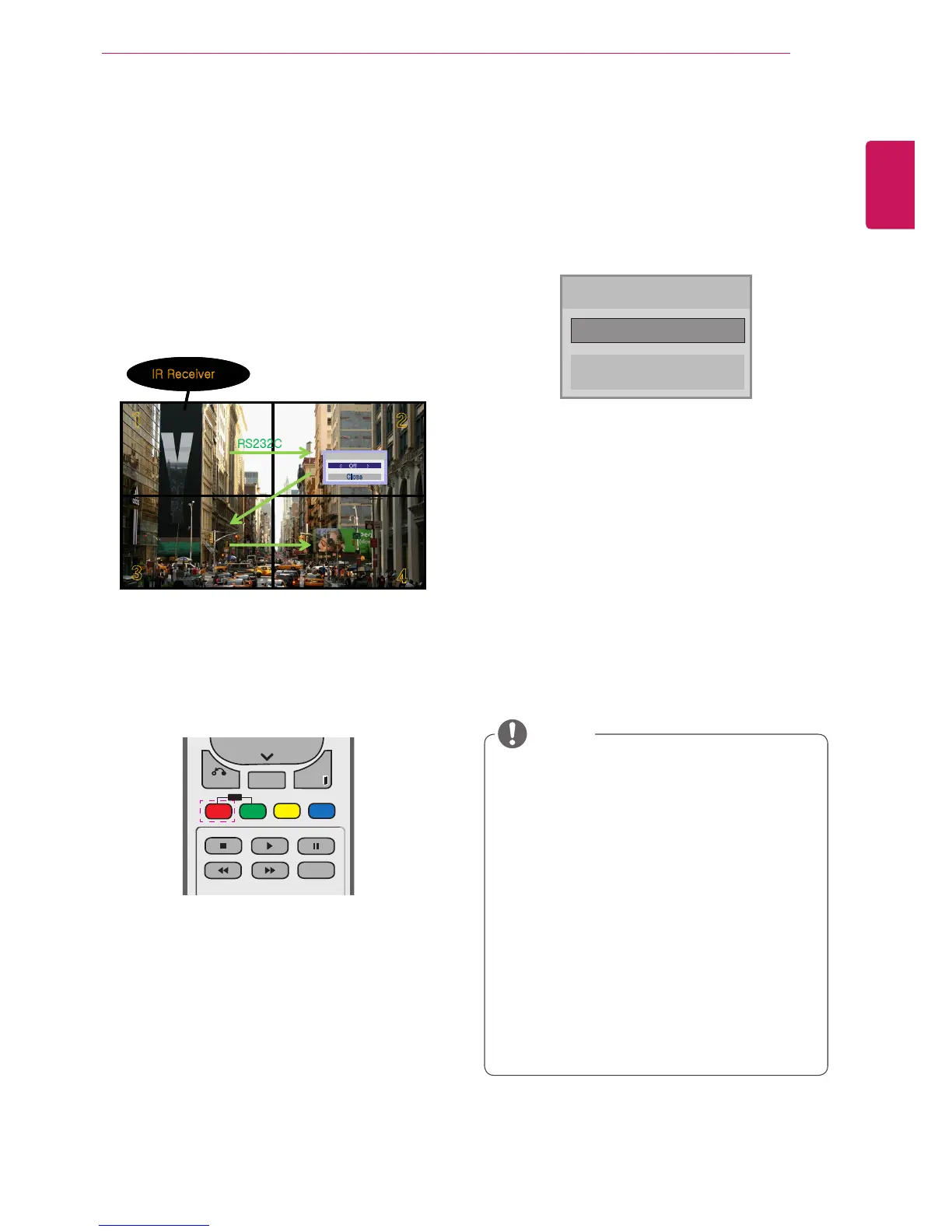
PictureIDisusedtochangethesettingsofa
specicdisplayusingasingleIRreceiverfor
multi-vision.ThesetreceivingtheIRsignal
communicateswithanothersetviaanRS232
connection.EachsetisidentiedbyaSetID.If
youassignthePictureIDusingtheremotecontrol,
onlydisplayswiththesamePictureIDandSetID
canbecontrolledremotely.
1 PresstheredONbuttonontheremotecontrol
toassignthePictureID.
2 Ifyoupresstheleft/rightbuttonsorpressthe
ONbuttonrepeatedly,thePictureIDcycles
throughOFFand0to4.AssigntheIDyou
want.
IfyouassigntheSetIDtoeachsetwith
multi-vision,andthenassignthePictureID
usingtheredbuttonontheremotecontrol,
thekeycommandisdisplayedfortheset
withthesameSetIDandPictureID.Aset
withdifferentSetIDsandPictureIDscannot
becontrolledbyIRsignals.
Formoreinformationonhowtoassignthe
SetID,see"SetID"onpage44.
PleaserefertotheInstallationManualfor
moreinformationonTotalSetIDassignment.
Forexample,ifthePictureIDisassignedto
2,theupperrightdisplay(SetID:2)canbe
controlledbyIRsignals.
Foreachset,youcanchangethesettings
forthePICTURE,AUDIO,TIME,NETWORK
andMYMEDIAmenusorthehotkeyson
theremotecontrol.
IfyoupressthegreenOFFbuttonforPicture
IDs,thePictureIDsforallsetsareturnedoff.
Ifyouthenpressanybuttonontheremote
control,allsetswillstartworkingagain.
PictureIDwillbedisabledwhileusingthe
MYMEDIAmenu.
NOTE
Picture ID
Close
◀
Off
▶



 To Next Page