7
ENG
ENGLISH
ASSEMBLING AND PREPARING
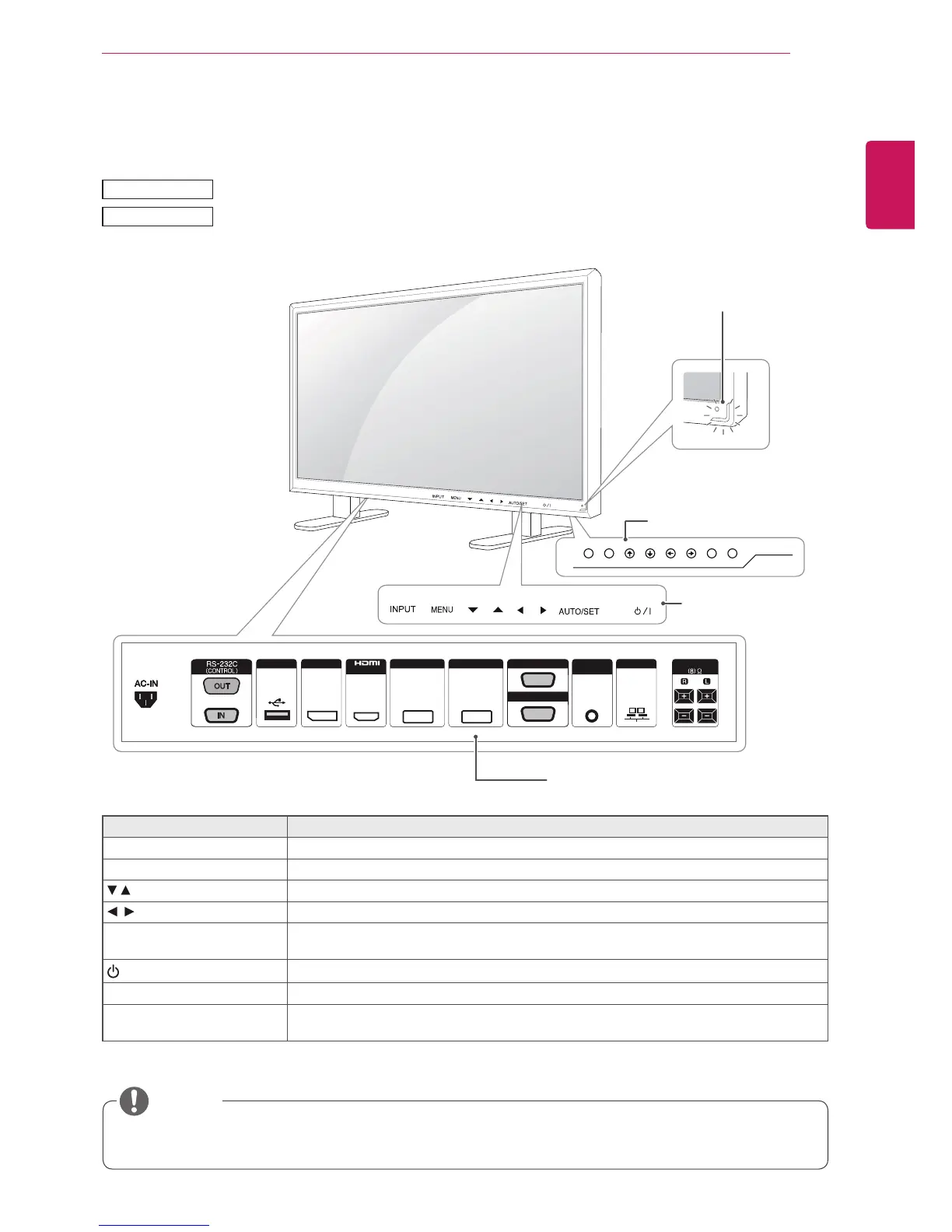
USB DP LANAUDIO
IN
DVI IN DVI OUT
IN
SPEAKER
RGB/AV
/COMPONENT OUT
RGB/AV
/COMPONENT IN
YoucansetthePowerindicatortoonoroffbyselectingOPTIONinthemainmenu.
Parts and buttons
Screen Marks Description
INPUT Changestheinputsource.
MENU Accessesthemainmenus,orsavesyourinputandexitsthemenus.
Adjusttheupanddown.
Adjuststhevolumelevel.
AUTO/SET Displaysthecurrentsignalandmode.
Pressthisbuttontoadjustthescreenautomatically(availableonlyinRGBmode)
/I
Turnsthepoweronoroff.
IRReceiver Thisiswheretheunitreceivessignalsfromtheremotecontrol.
PowerIndicator ThisIndicatorlightsupbluewhenthedisplayoperatesnormally(onmode).Ifthedisplay
isinsleep(EnergySaving)mode,thisindicatorcolorchangestoamber.
Connection panel
Screen Buttons
Screen Marks
NOTE
42VS20
42VX30MS
Power Indicator
LEDOn:Powerison
LEDOff:Powerisoff



 To Next Page