45
ENG
ENGLISH
CUSTOMIZING SETTINGS
AUDIO settings
1
PressMENUtoaccessthemainmenus.
2
PresstheNavigationbuttonstoscrolltoAUDIOandpress
OK.
3
PresstheNavigationbuttonstoscrolltothesettingor
optionyouwantandpressOK.
-Toreturntothepreviouslevel,pressBACK.
4
Whenyouarefinished,pressEXIT.
Whenyoureturntothepreviousmenu,pressBACK.
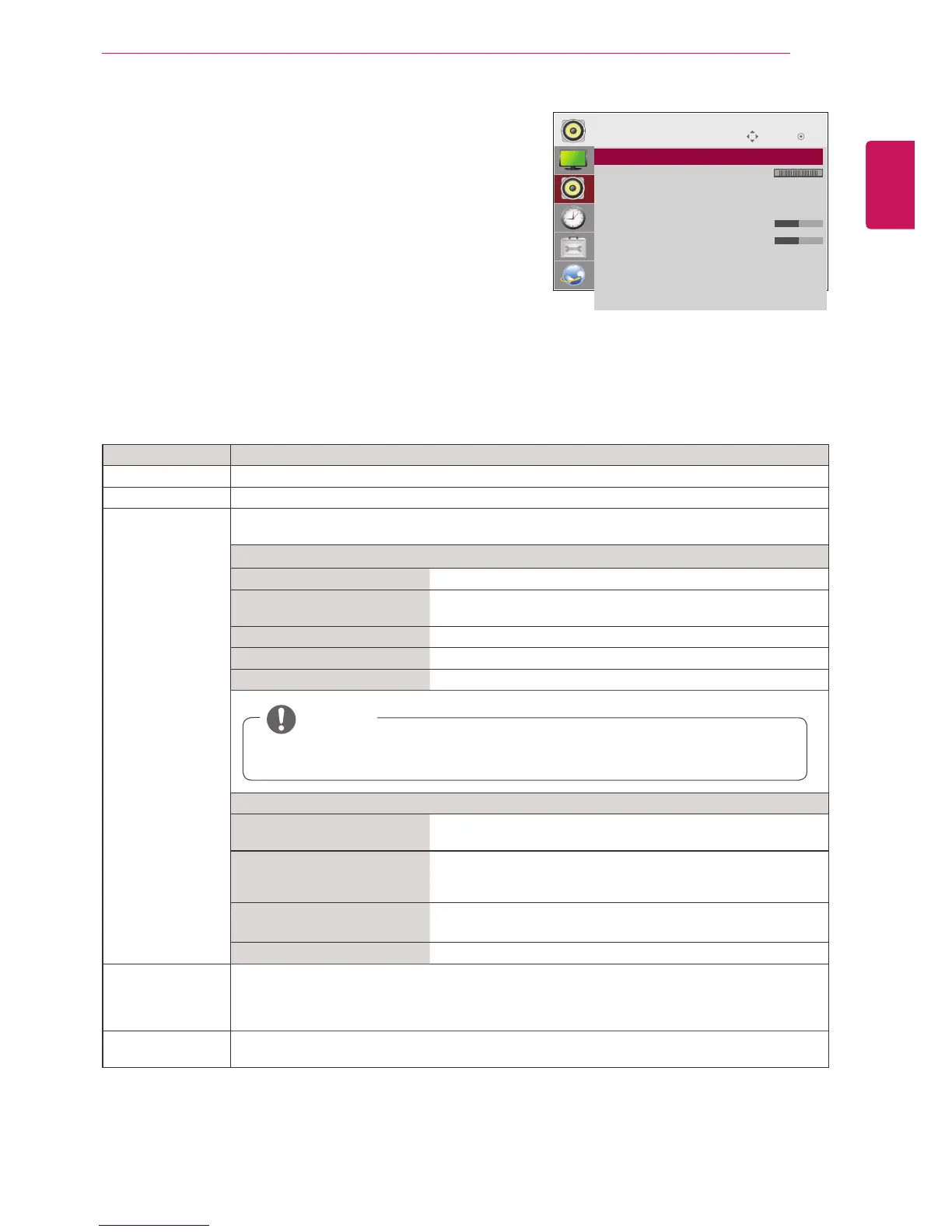
Theavailableaudiooptionsaredescribedinthefollowing:
Move
OK
AUDIO
ꔋ
• Clear Voice II : Off
• Balance 0
• Sound Mode : Standard
• Infinite Sound: Off
• Treble 50
• Bass 50
• Reset
• Digital Audio Input
• Speaker : On
L R
Setting Description
Clear Voice ll Bydifferentiatingthehumansoundrangefromothers,ithelpsuserslistentohumanvoicesbetter.
Balance Adjustsbalancebetweentheleftandrightspeakersaccordingtoyourroomenvironment.
Sound Mode Thebestsoundtonequalitywillbeselectedautomaticallydependingonthevideotypethatyou're
currentlywatching.
Mode
Standard Themostcommandingandnaturalaudio.
Music Selectthisoptiontoenjoytheoriginalsoundwhenlisteningto
themusic.
Cinema Selectthisoptiontoenjoysublimesound.
Sport Selectthisoptiontowatchsportsbroadcasting.
Game Toenjoydynamicsoundwhenplayingagame.
Option
InfiniteSound LG'sInfinitySoundoptionprovides5.1channelstereosound
fromtwospeakers.
Treble Controlsthedominantsoundsintheoutput.Whenyouturnup
thetreble,itwillincreasetheoutputtothehigherfrequency
range.
Bass Makestheoutputsoundsofter.Whenyouturnupthebass,itwill
increasetheoutputtothelowerFrequency.
Reset Resetsthesoundmodetothedefaultsetting.
Digital Audio
Input
HDMI/Display Port:OutputsthesoundofdigitalsignalfromHDMIanddisplayportsthroughthe
monitorspeaker.
Audio In:OutputsthesoundthroughthemonitorspeakerbyconnectingHDMIanddisplayports
totheAudioInport.
Speaker ON:Enablessoundtothemonitorspeaker.(*Themonitorspeakerissoldseparately.)
OFF:Disablessoundtothemonitorspeaker.Usethisoptionwhenusinganexternalsounddevice.
NOTE
Ifsoundqualityorvolumeis notatthelevelyouwant,itisrecommendedtouseaseparate
hometheatersystemorampliertocopewithdifferentuserenvironments.



 To Next Page