37
ENG
ENGLISH
ENTERTAINMENT
Timeelapsed/Duration
002.B02.mp3
00:31/04:04
filename
Non-supportedfilesaredisplayedthepre-
viewimagebyicononly .
Abnormalfilesaredisplayedintheformof
bitmap .
Adamagedorcorruptedmusicdoesnotplay
butdisplays00:00inplaytime.
Amusicdownloadedfromapaidservicewith
copyrightprotectiondoesnotstartbutdis-
playsinappropriateinformationinplaytime.
IfyoupressOK, buttons,screensaveris
stopped.
ThePLAY( ),Pause( ), , ,
buttonsontheremotecontrolarealsoavail-
ableinthismode.
Youcanusethe buttontoselectthenext
musicandthe buttontoselecttheprevi-
ousmusic.
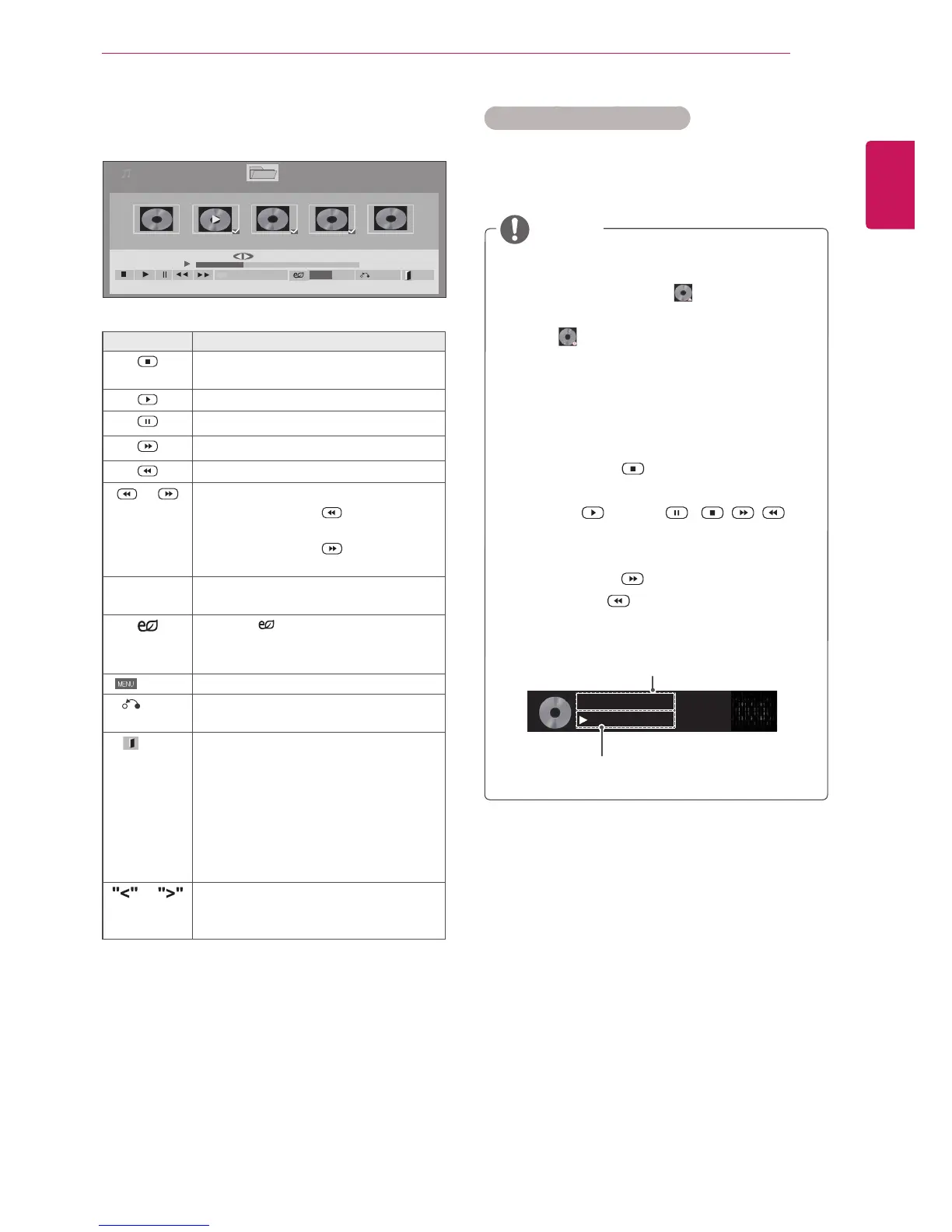
6 Controlplaybackbyusingthefollowingbuttons.
Page1/1
MusicList
Drive1 Page1/1
3file(s)Marked
004.-B04.mp3
00:00
005.-B05.mp3
00:00
006.-B06.mp3
00:00
007.-B07.mp3
00:00
008.-B08.mp3
00:00
005.-B05.mp3
02:30/03:25
Hide Exit
Option
MENU
PlaywithPhoto
Button Description
Stopsplayingbackthefileandmoves
backtothemusiclist.
Playsamusicfile
Pausesorresumesplayback
Skipstothenextfile
Skipstothepreviousfile
or Whenplaying,
Whenyoupressthe button,the
previousmusicfilewillbeplayed.
Whenyoupressthe button,thenext
musicfilewillbeplayed.
Green
button
Startplayingtheselectedmusicfiles
andthenmovetothePhoto List.
ENERGY
SAVING
Pressthe ENERGY SAVINGbutton
repeatedlytochangethebrightnessof
yourscreen.
Option
ShowtheOptionmenu.
Hide
Hidestheoptionwindow.
Todisplaytheoptions,pressOK.
EXIT
WhenyoupresstheEXITbuttonwhile
theMusicplayerisdisplayed,onlythe
musicwillbestoppedandtheplayerwill
notreturntonormalviewing.
WhenyoupresstheEXITbuttonwhile
themusicisstoppedorwhilethemusic
playerishidden,theplayerwillreturnto
normalviewing.
or
Whenusingthe<or>buttonduring
playbackacursorindicatingtheposition
canbeplayed.
Tips for playing music files
ThisunitcannotsupporttheID3Tag
embeddedMP3files.
NOTE



 To Next Page