ENGLISH
61
USING THE TOUCH SCREEN
Landscape
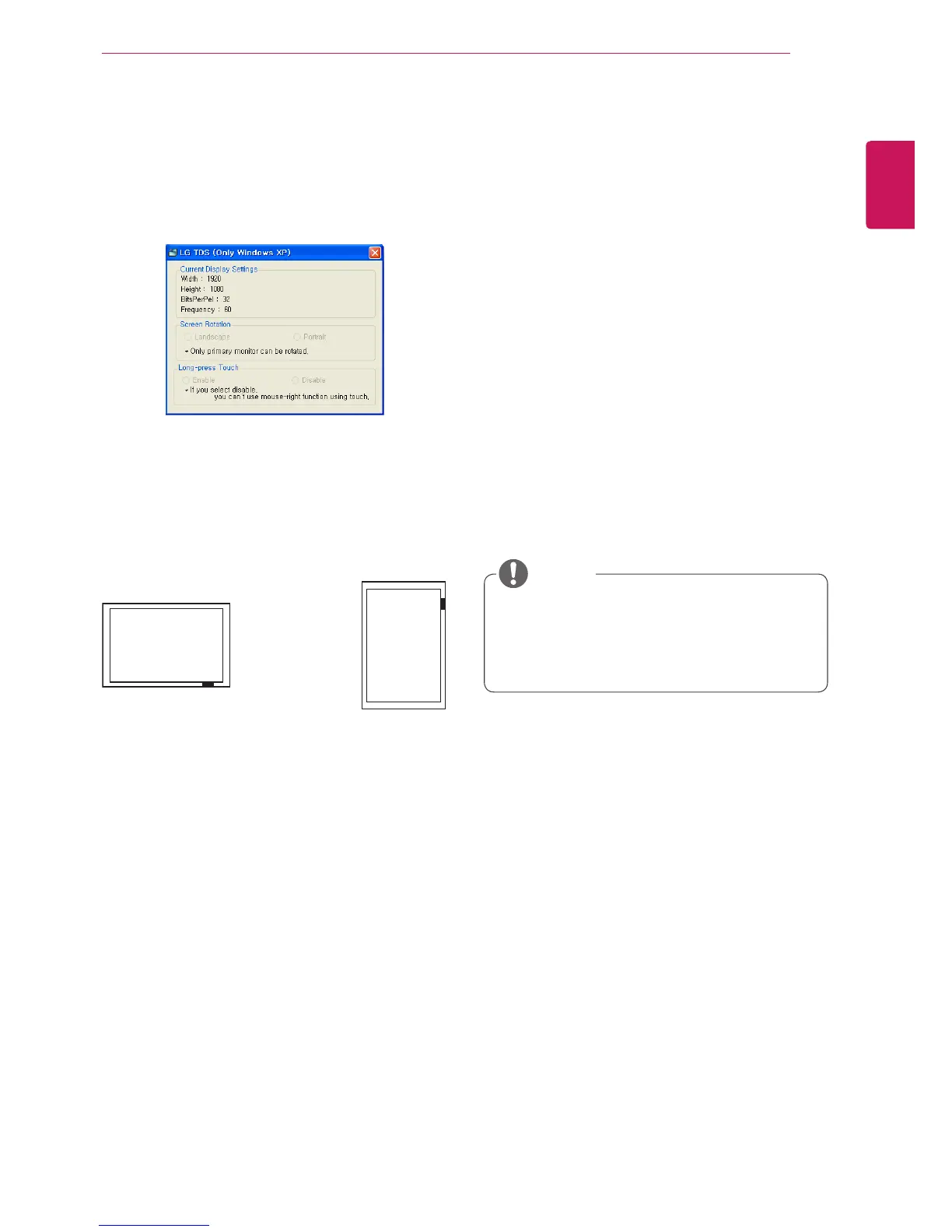
How to Use LG TDS
LG TDS is required to enable portrait mode and
the long-touch on Windows XP.
y Current Display Settings
Displays the current screen information.
y Screen Rotation
Touch screen rotation settings
* Portrait mode supports only a 90˚
counterclockwise screen rotation.
- Landscape: No rotation
- Portrait: 90˚ rotation counterclockwise
y
LG TDS is only supported in Windows XP.
y
You must install .NET Framework 3.5 on
Windows XP before installing this program.
NOTE
Portrait
.y Long-press Touch
Whether to enable the mouse's right click
function (context menu), when you touch and
hold the screen.
- Enable: Enables the mouse's right click function
(context menu) when a long-touch is applied.
- Disable: Disables the mouse's right click
function (context menu)



 To Next Page