18
ENG
ENGLISH
USING THE MONITOR
HDMI
DP OUT
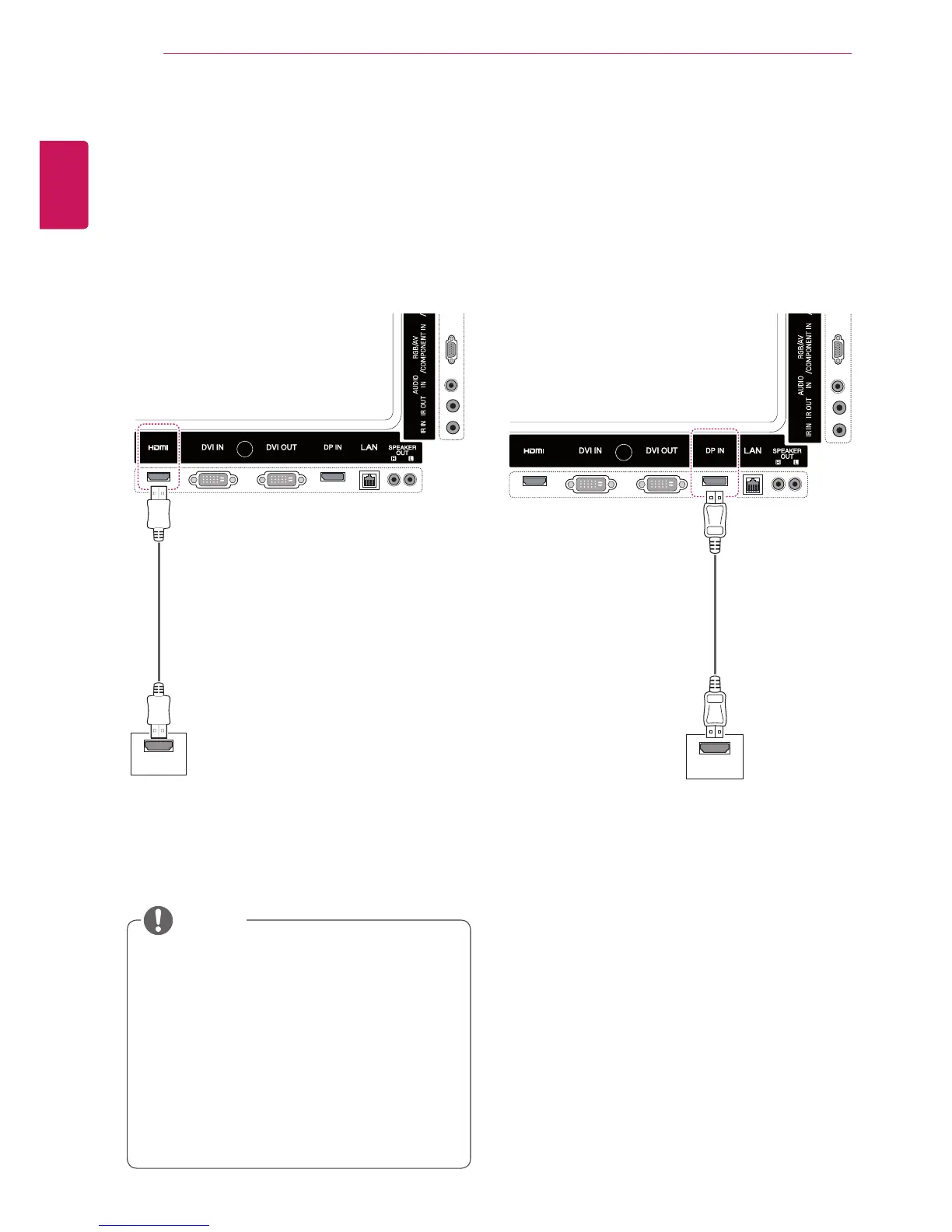
HDMI connection
Transmits the digital video and audio signals from
your PC to the Monitor. Connect the PC and the
Monitor with the HDMI cable as shown in the
following illustrations.
Select HDMI input source.
Display Port connection
Transmits the digital video and audio signals from
your PC to the Monitor. Connect the PC and the
Monitor with the Display Port cable as shown in
the following illustrations.
Select Display Port input source.
y
Use a High Speed HDMI™ Cable.
y
Please check the PC environment if you
cannot hear the sound in HDMI mode. Some
PCs require you to manually change the
default audio output to HDMI.
y
If you want to use HDMI PC mode, you must
set PC/DTV to PC mode.
y
When HDMI PC is used, a compatiblity
problem might occur.
NOTE
(not included)
(not included)



 To Next Page