9
ENG
ENGLISH
ASSEMBLING AND PREPARING
2
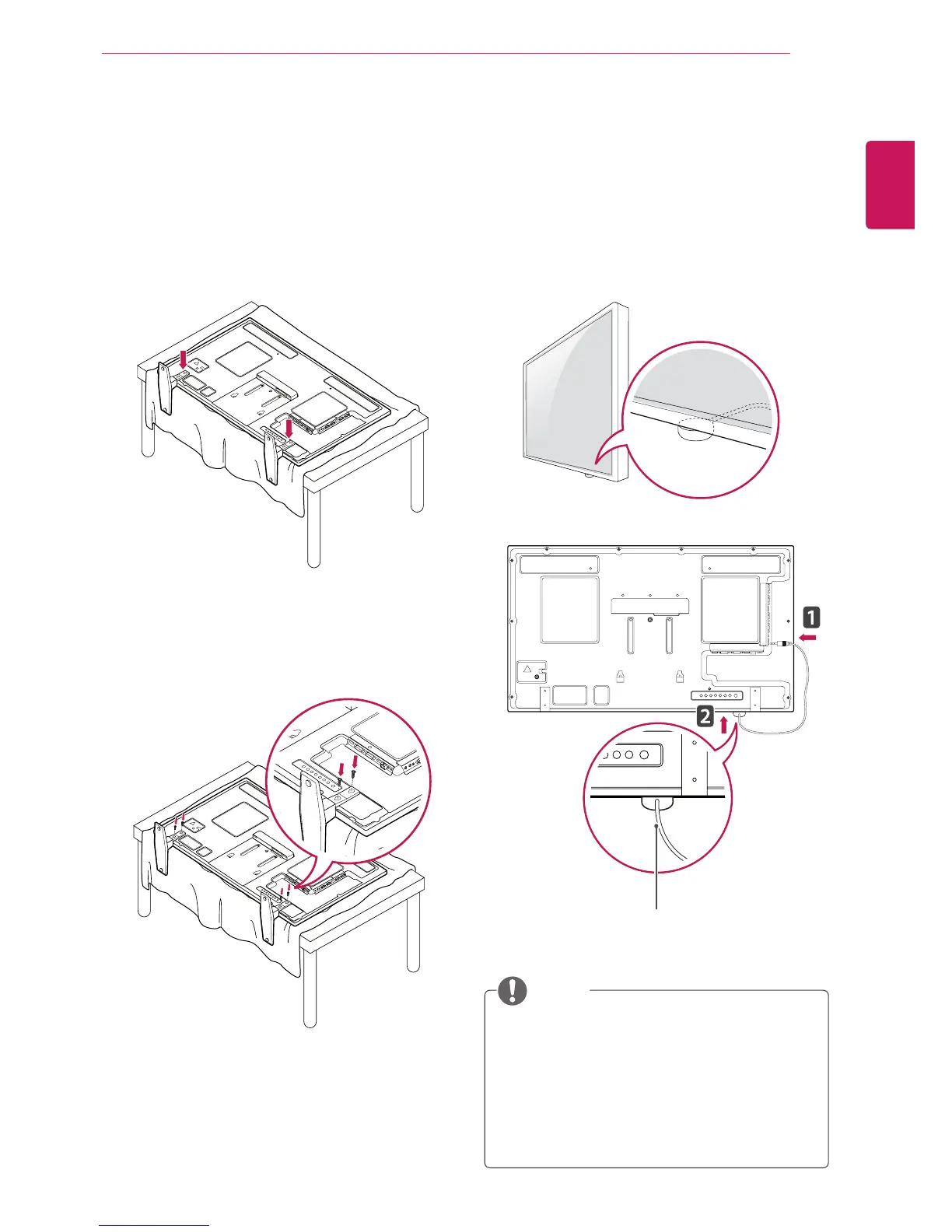
Use the screws to secure the stand on the rear
side of the product as shown in the diagram.
Connecting the stand
- Only on some models.
1
Place a soft cloth on the table and put the
product with the screen facing downward.
Connect the stand as shown in the following
picture.
Using the IR Receiver
IR Receiver cable
This allows a remote control sensor to be placed
in a custom location. Then that display can control
other displays via an RS-232C cable. Install the IR
receiver towards the front of the set.
y
When you see from the back of the set, if
the IR receiver cable does not face front, the
signal reception range may shorten.
y
The IR receiver is made with a magnet.It is
detachable at the bottom (typical installation)
or back (wall installation) of the set.
y
Make sure the power cable is disconnected.
NOTE



 To Next Page