Introduction
Remote C:ontro! Key Functions
......._- h
MODE::- l
[- o F s,BK}
EZ PIC EZSOUND SAP CC
CCC) CZ) CCD CZD
ADJUST
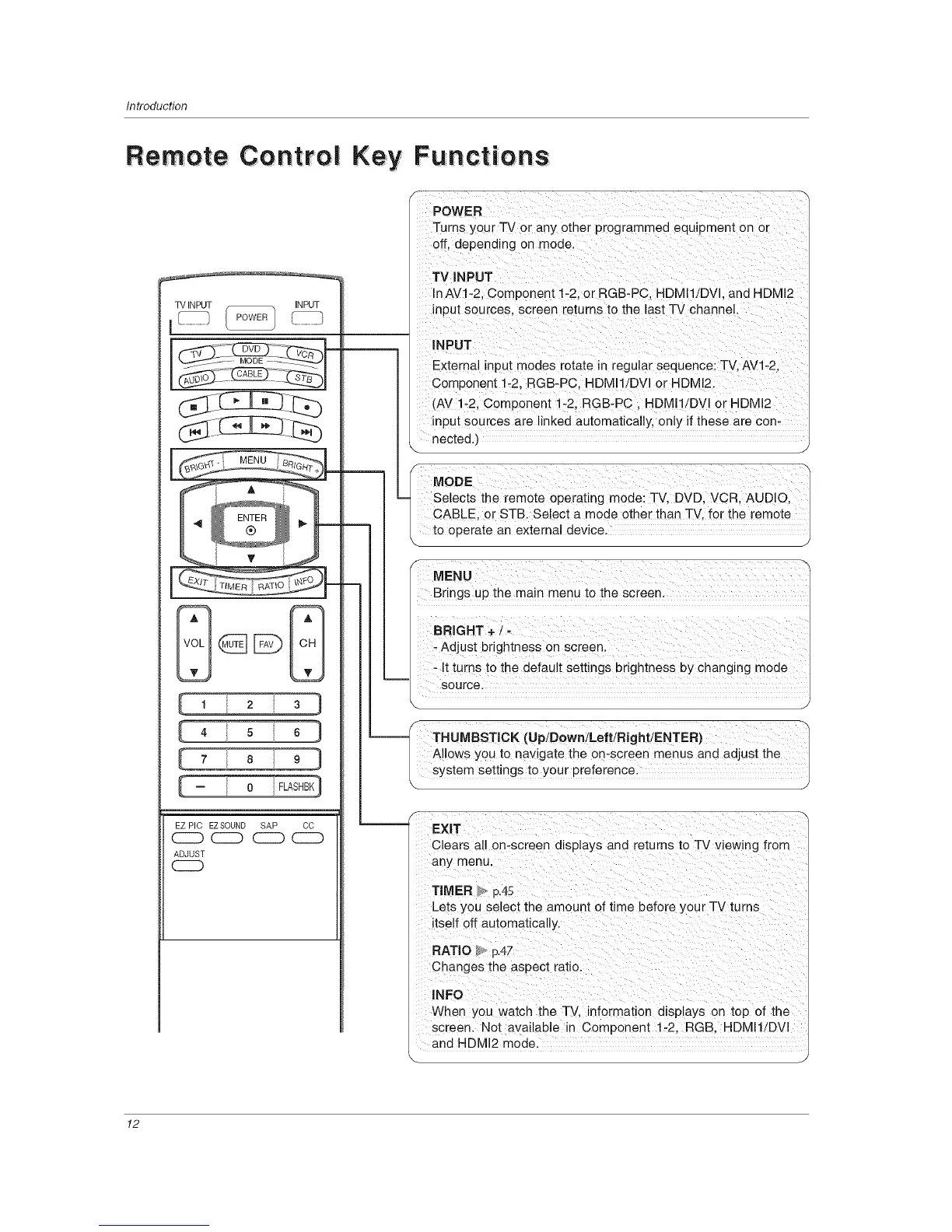
Turns your TV or any other programmed equipment on or
InAV! _2; ComPonent 1:2; or RGB-PC, HDMI!!DVl, and HDM!2
input sources, screen returns t0 the last TV channe!.
_ ' INPUT
External input modes rotate in regular sequencei Tv, AVl:2,
Competent i_21RGB-PC, HDM!!/DVI 0r HUM!2,
(AV !-2, C0mp0nent !-2; RGB:PC, HDMI!/DV! or HDM!2
input sources are linked automatically, only if these are con-
nected.)
m
MODE
-_ Selects the remote operating mUdei TV, DVD, VCRI AUDiOI _
CABLE, or STB. Select a mode other than TV, for the remote
to 0peiaie an eXtema! device,
Brings up the main menu to the screen.
- It turns to the default settings brightness by changing mode
-- source,
\ J
--_ THUMBSTICK (UpiDowniLeftiRight/ENTER)
Allows you to navigate the on:screen menus and adjust the
_. s_stem settings t0yourprefeience
Clears all on-screen displays and returns to TV viewing from
any menu,
Lets you select the amount of time before your TV turns
itse!f eft automatical!y.
RATIO> p,4z
Changes the aspect ratio,
_NFO
When you Watch the T_, infoirnaiion displays on top of the
screen. Not available in Component i_2, RGB, HDMI1/DVl
and HDMI2 mode.
,.. y
12



 To Next Page