Introduction
TV INPUT _ INPUT
1
EZ PIC EZSOUND SAP CC m,
CCC) CCC) CCC)
ADJUST i
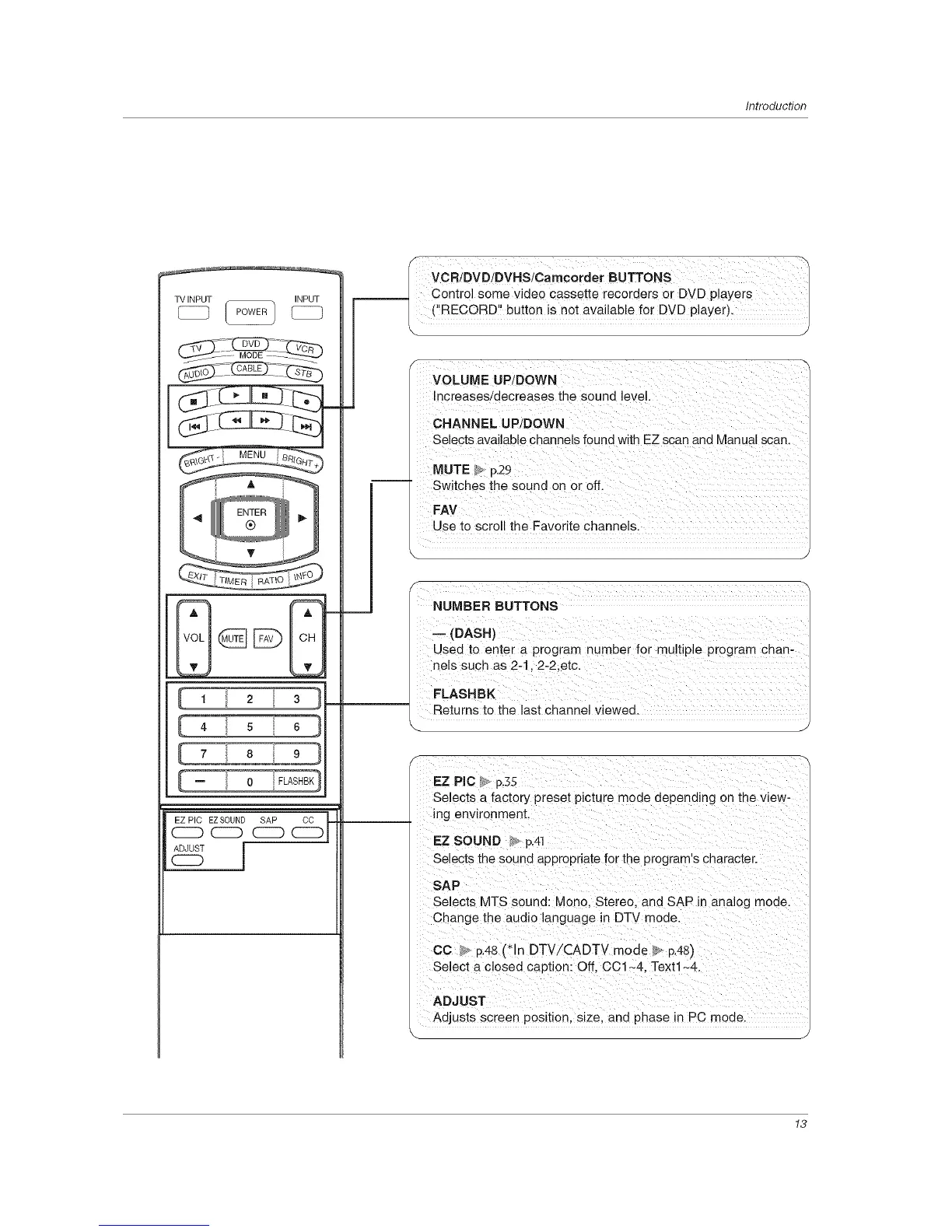
VCBiOVOJBVNSJC",.c,,.,o'BU 'ONS
control some video cassette recorders or DVD players
( RECORD button is net available for DVD player).
Increases/decreases the sound level.
CHANNEL UPiDOWN
Selects availab e channels found with EZ scan and Manual scan
Use to scroll the Favorite channels.
J
NUMBER BUTTONS
Used to enter a program number f0r mu!tipie program chan-
Returns to the last Channel viewed.
J
Selects a factory preset picture mode depending on the view-
ing environment.
EZSOUND_ p141
Selects the Sound appropriate for the progra ms character.
sap
Selects MTS sound: Mono, Stereo, and SAP in analog mode.
Change the audio language in DTV mode.
Adjusts screen position, size, and phase in PC mode.
13



 To Next Page