Installation
r .............................................
AUD0N nEM_E
@@
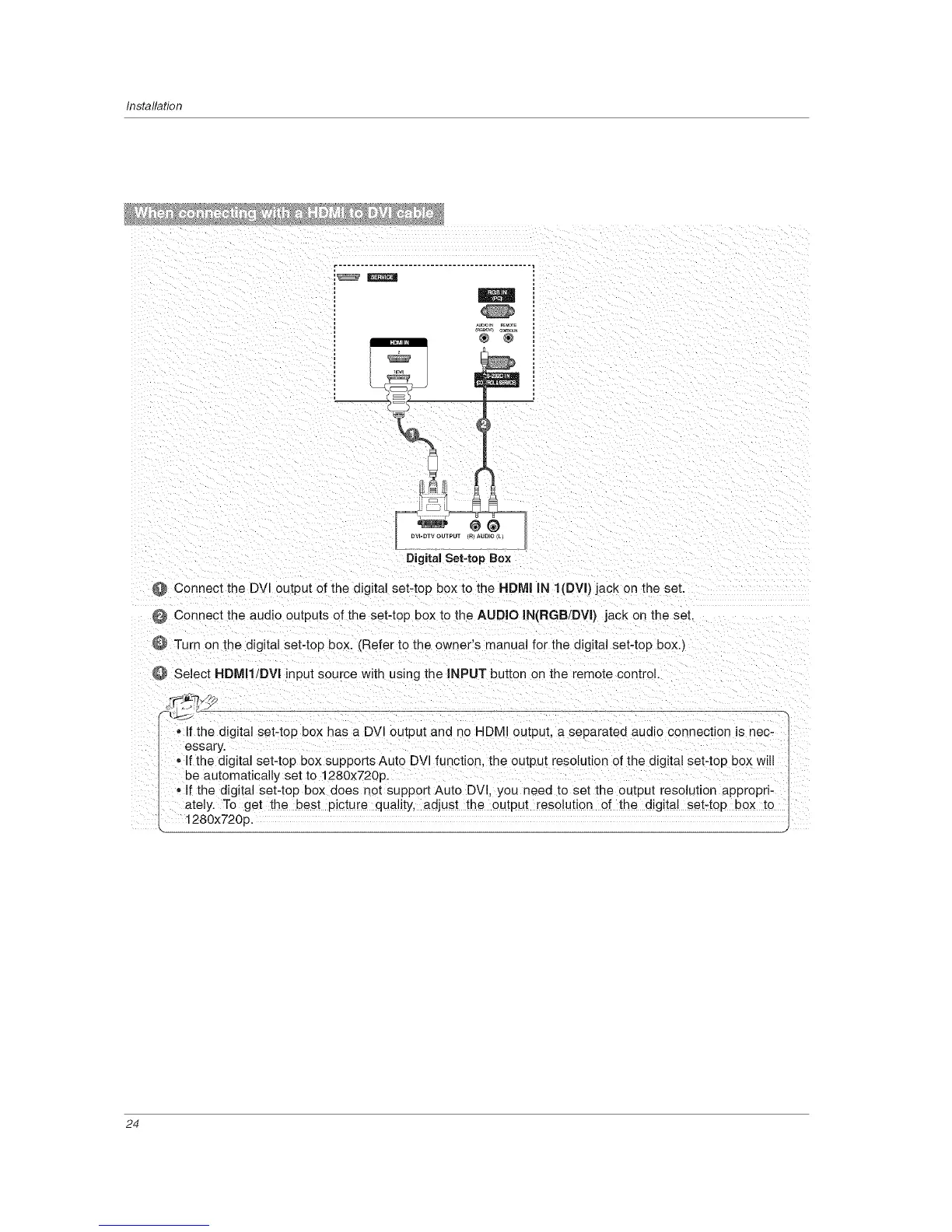
DVI-DTV OUTPUT m AU[}IO _L_
Digital Set-top Box
@ Connect the DVl output of the digital set-top box to the HDMI IN I(DVI) jack on the set.
Connect the audio outputs of the set-top box to the AUDIO IN(RGB/DVI) jack on the set.
9 Turn on the digital set-top box. (Refer to the owner's manual for the digital set-top box.)
Select HDMI1!DVI input source with using the INPUT button on the remote control.
If the digital set-top box has a DVI output and no HDMI output, a separated audio connection is nec-
essary.
o If the digital set-top box supports Auto DVl function, the output resolution of the digital set-top box will
be automatically set to 1280x720p.
• If the digital set-top box does not support Auto DVl, you need to set the output resolution appropri-
ately. To get the best picture quality, adjust the output resolution of the digital set-top box to
1280x720p.
24



 To Next Page