Operation
Option Menu Features continued
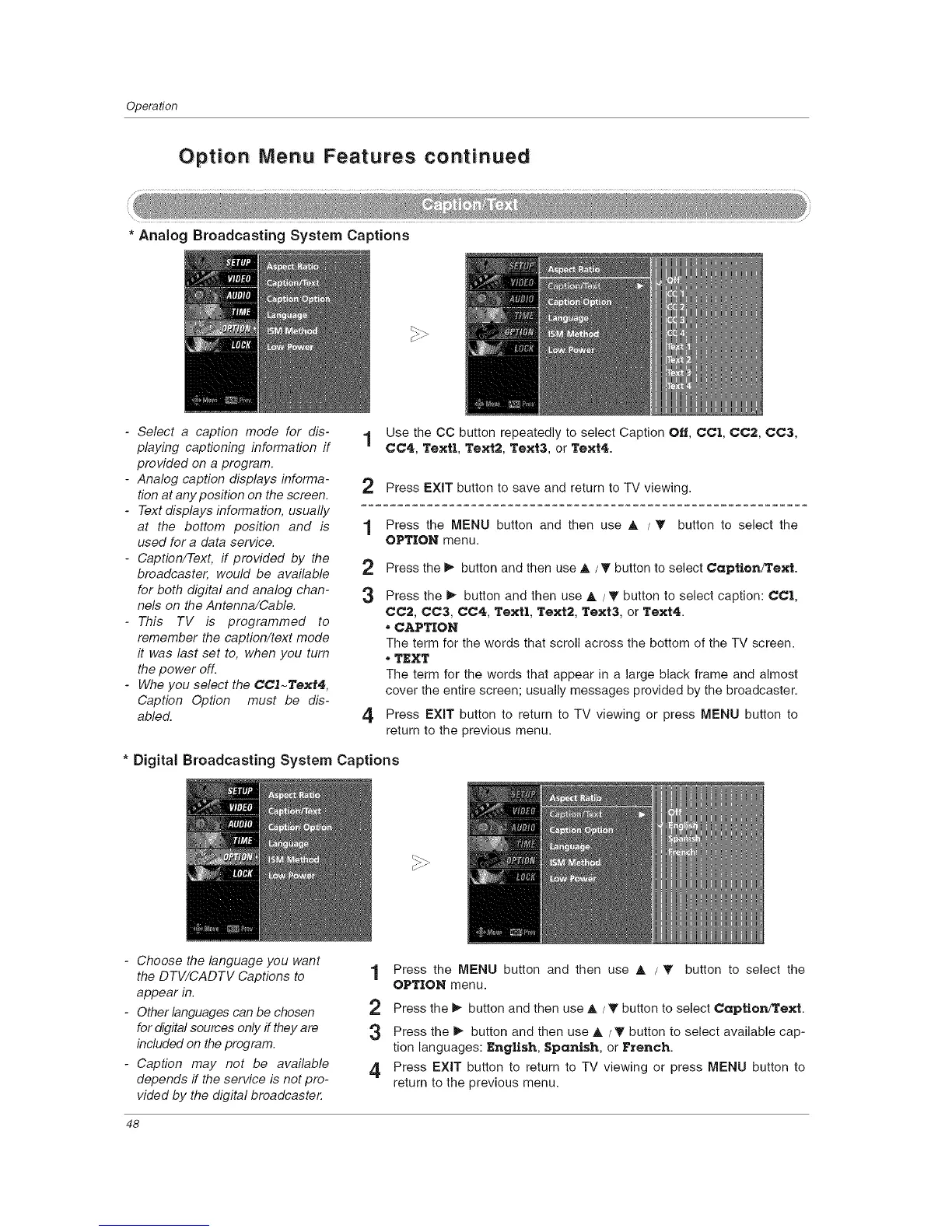
* Analog Broadcasting System Captions
- Select a caption mode for dis-
playing captioning information if
provided on a program.
- Analog caption displays informa-
tion at any position on the screen.
- Text displays information, usually
at the bottom position and is
used for a data service.
- Caption/Text, if provided by the
broadcaster, would be available 2
for both digital and analog chan- 3
nels on the Antenna/Cable.
-This TV is programmed to
remember the caption/text mode
it was last set to, when you turn
the power off.
- Whe you select the CC']-Text4,
Caption Option must be dis-
abled. 4
1 Use the CO button repeatedly to select Caption Off, CCI, CC2, CC3,
CC4, Textl, Text2, Text& or Text4.
2 Press EXIT button to save and return to TV viewing.
1 Press the MENU button and then use A /T button to select the
OPTION menu.
Press the _ button and then use A/T button to select Captlon/Text.
Press the I_ button and then use A / T button to select caption: CCI,
CC2, CC3, CC4, TexU, Text2,Text& orText4.
*CAPTION
The term for the words that scroll across the bottom of the TV screen.
*TEXT
The term for the words that appear in a large black frame and almost
cover the entire screen; usually messages provided by the broadcaster.
Press EXIT button to return to TV viewing or press MENU button to
return to the previous menu.
* Digital Broadcasting System Captions
- Choose the language you want
the DTV/CADTV Captions to
appear in.
- Other languages can be chosen
for digital sources only if they are
included on the program.
- Caption may not be available
depends if the service is not pro-
vided by the digital broadcaste_
Press the MENU button and then use A / T button to select the
OPTION menu.
1
2 Press the _ button and then use A / T button to select Captlon/Text.
3 Press the _ button and then use A /T button to select available cap-
tion languages: English, Spanish, or F_tench.
4 Press EXIT button to return to TV viewing or press MENU button to
return to the previous menu.
48



 To Next Page