83
Control
Due to our policy of continuous product innovation, some specifications may change without notification.
©LG Electronics U.S.A., Inc., Englewood Cliffs, NJ. All rights reserved. “LG” is a registered trademark of LG Corp.
HMI SCREENS
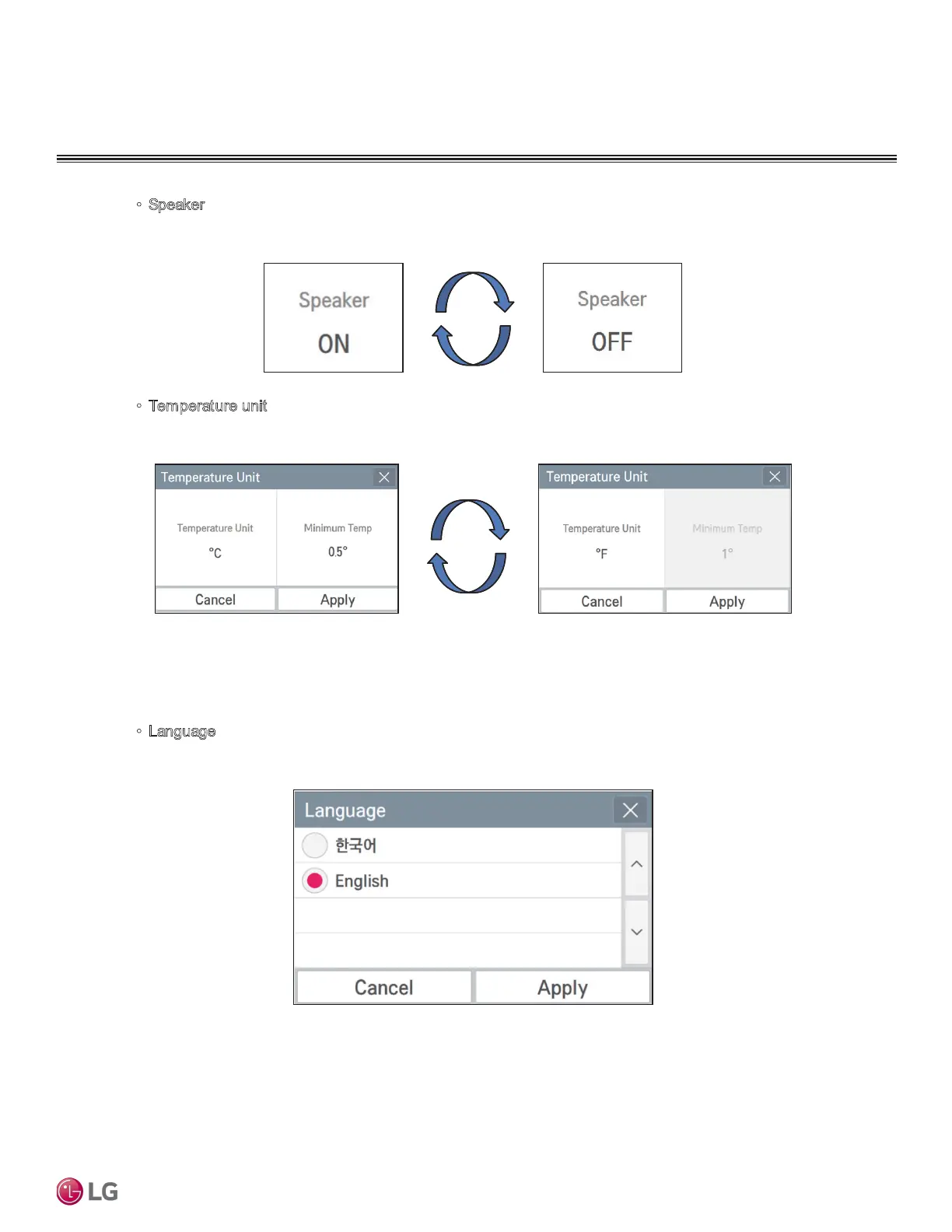
• Speaker
In the System, whenever you press the touch speaker area, it toggles between Use and Do not
use. There is no separate Apply button.
•
Temperature unit
In the System, when you press the temperature unit area, a window to change the temperature
unit is displayed.
In the screen, when you press temperature unit area, the temperature unit is changed. In Cel-
sius unit, the minimum temperature unit can be selected between 1 °C and 0.5 °C. When you
press Apply, the setting is applied, and if Cancel is pressed, the previous setting is maintained.
•
Language
In the System, when you press language setting area, the window to set the language is dis-
played.
Select the desired language, and press Apply button. If Cancel is pressed, the previous setting
is maintained.


 To Next Page