43
Control
Due to our policy of continuous product innovation, some specifications may change without notification.
©LG Electronics U.S.A., Inc., Englewood Cliffs, NJ. All rights reserved. “LG” is a registered trademark of LG Corp.
OPTIONAL SETTINGS
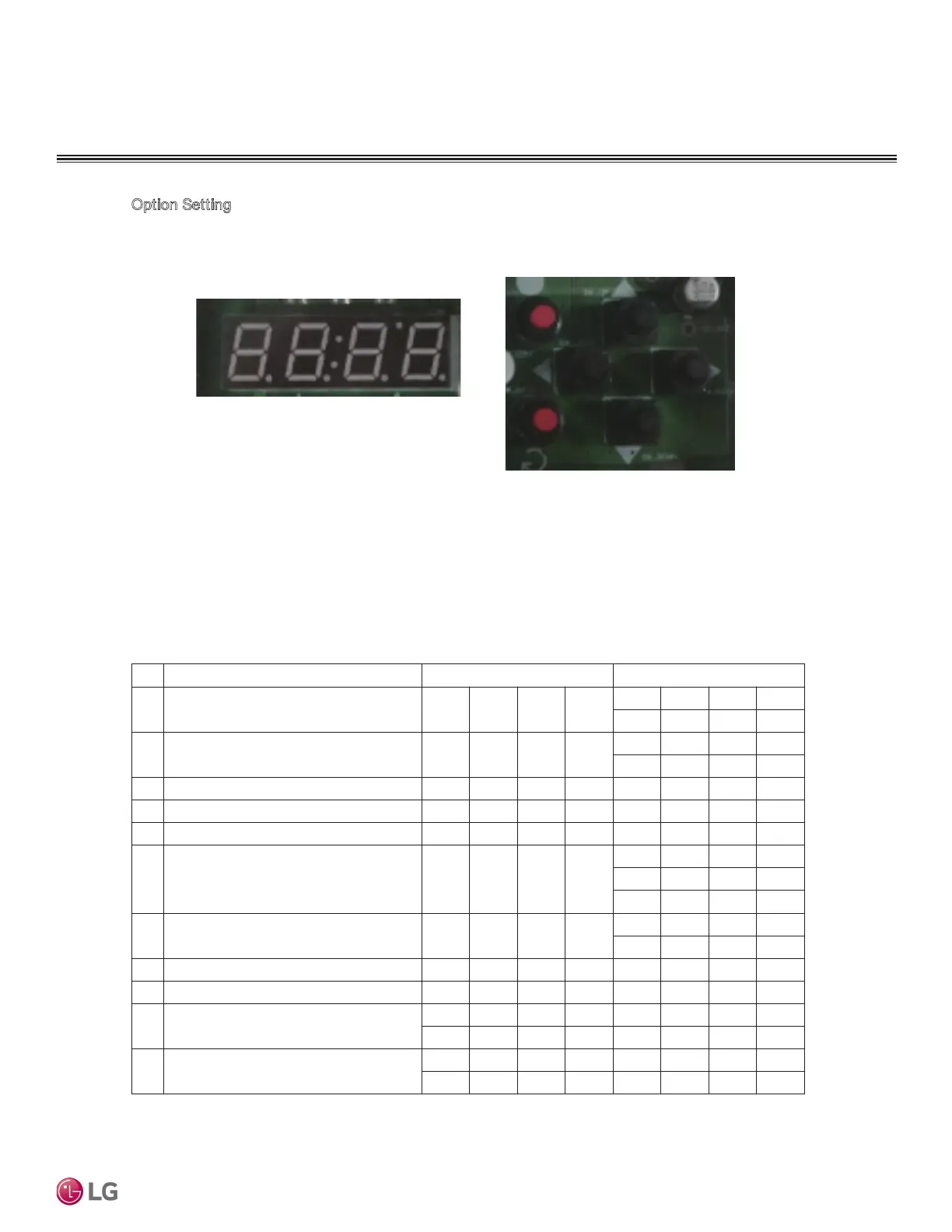
Option Setting
Press SW_COMF Button to move to O Level Setting Screen.
Press Up or Down (▲▼) Button to go to a desired function.
If the desired function shows, press SW_COMF Button.
Then, the Screen moves to 1 Level Setting.
Press Left or Right ( ) Buttons to go to a desired function. And Press SW_COMF Button to
set the function.
To go to the previous, press SW_BACK Button.
<Screen>
<Button>
Description Screen Displays(0 Level) Screen Displays(1 Level)
1 Start/Stop O P E R
R U N
S T O P
2 Cooling/Heating CYC L
H E A T
C O O L
7ET-Cerutarepmet tnioptes gnilooC3
4 Heating setpoint temperature H - T E 4 5
5 Load outflow Temperature
6 Control Mode SYS 1
L O C
D I S T
S C H E
7 Remote Mode SYS 2
C O N T
B U S
1RDDAsserddA lortnoC lartneC8
9 Maximum Operation Frequency H I - R 110
10 Capacity of product
H P 4 0
C O 4 0
11 Version
1 0
S V 1 0


 To Next Page