16 Ceiling Cassette-Type Air Conditioner
Temperature Setting/Room Temperature checking
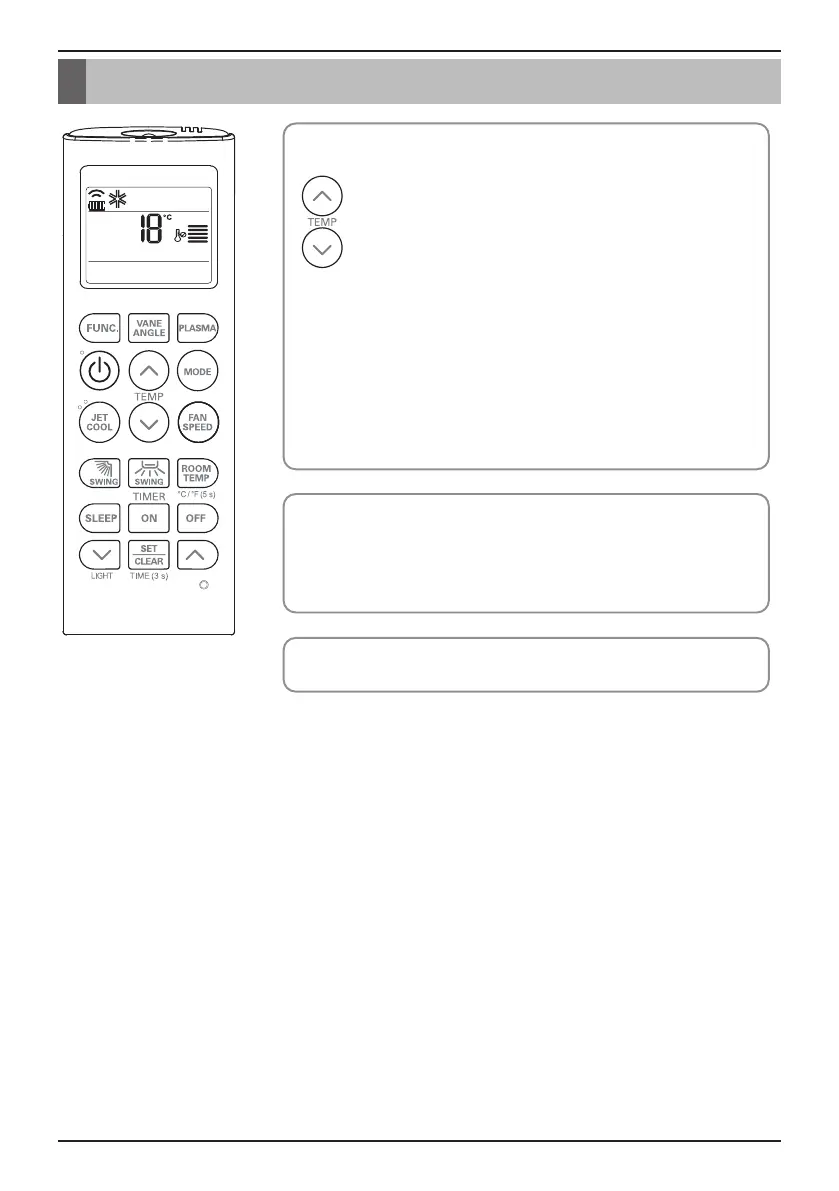
We can simply adjust the desired temperature
• Press the buttons to adjust the desired temperature
: Increase Temp. per one time pressing
: Decrease Temp. per one time pressing
Room temp: Indicate the current room temperature
Set temp: Indicate the temperature that user want to set
<Cooling Mode>
The cooling mode doesn't work if desired temperature is higher than
room temperature Please lower the desired temperature
<Heating Mode>
The heating mode doesn't work if desired temperature is lower than room
temperature Please increase the desired temperature
Whenever press ROOM TEMPERATURE button, the room temperature
will be displayed within 5 seconds.
After 5 seconds, it turns to display the desired temperature.
Because of location of remote controller, the real room temperature and
the this displayed value can be different.
Press ROOM TEMPERATURE button for 5 seconds, temperature unit
change Celsius to Fahrenheit or Fahrenheit to Celsius.
Temperature Setting/Room Temperature checking


 To Next Page