22 Ceiling Cassette-Type Air Conditioner
Timer
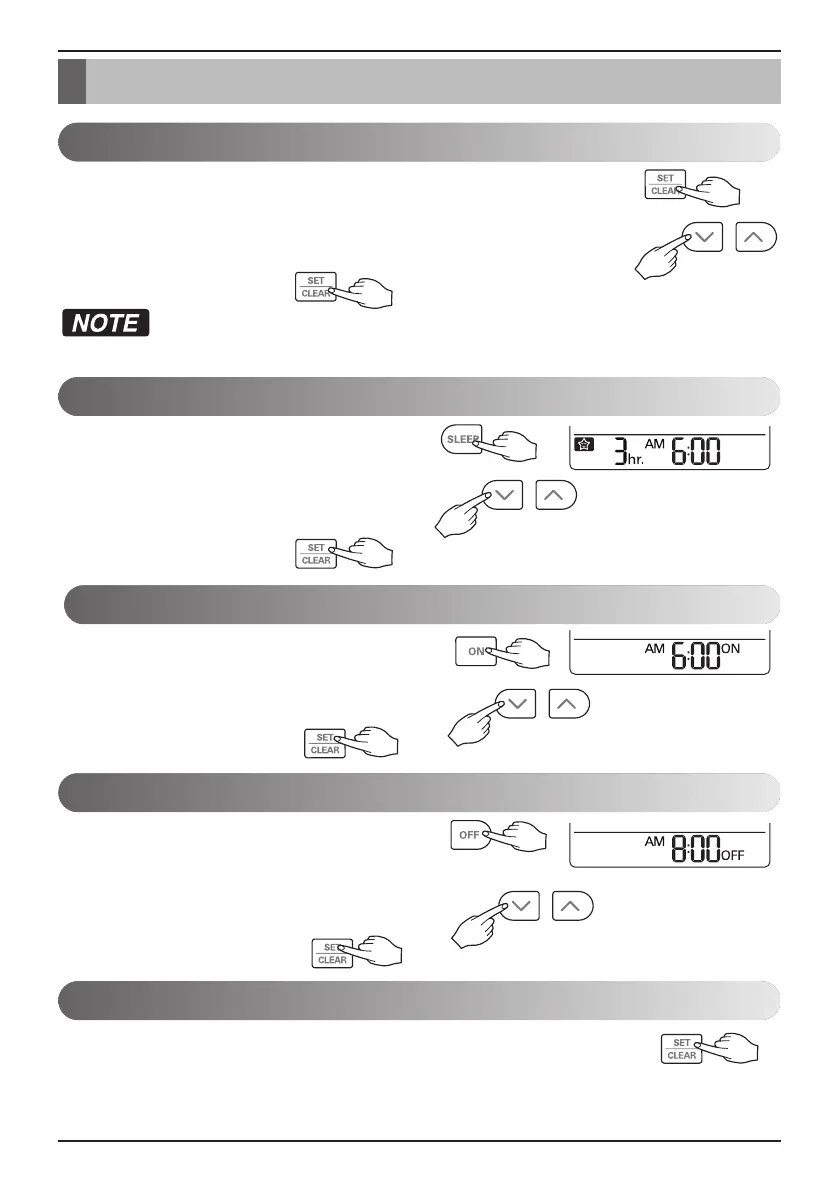
1. Press the SET / CLEAN button for 3 seconds.
2.
Press TIME SETTING buttons until the desired time is set. (If you press down
the button for a long time, it will change quickly in the units of 10 minutes.)
3. Press the SET / CLEAR button.
Check the indicator for A.M. and P.M.
1. Press the SLEEP button.
2. Press TIME SETTING buttons until the desired time is set.
(7 hours is the maximum setting)
3. Press the SET / CLEAR button.
1. Press the ON button.
2. Press TIME SETTING buttons until the desired time is set.
3. Press the SET / CLEAR button.
On Timer Setting
Sleep Timer Setting
Setting the Current Time
Timer
1. Press the OFF button.
2. Press TIME SETTING buttons until the desired time is set.
3. Press the SET / CLEAR button.
Off Timer Setting
To cancel the Timer Setting
• If you wish to cancel all timer setting, press the CLEAR ALL button.
• If you wish to cancel each timer setting, press the each timer button to turn timer sleep or on or off as you
want. And then press the SET/CLEAR button aiming the remote controller at the signal receptor. (The timer
lamp on the air conditioner and the display will go off.)


 To Next Page