11
EN
Setting the Current Time
1
Insert batteries.
x The icon below blinks at the bottom of the
display screen.
2
Press or button to select the minutes.
3
Press SET/CANCEL button to finish.
NOTE
x The On/Off Timer is available after setting the
current time.
Using the °C/°F Conversion Function
This function changes unit between °C and °F
x Press and hold
℃↔℉ [5 s]
SWING
button about 5 seconds.
Operating the Air Conditioner
without the Remote Control
You can use the ON/OFF button of the indoor unit to
operate the air conditioner when the remote control
is unavailable.
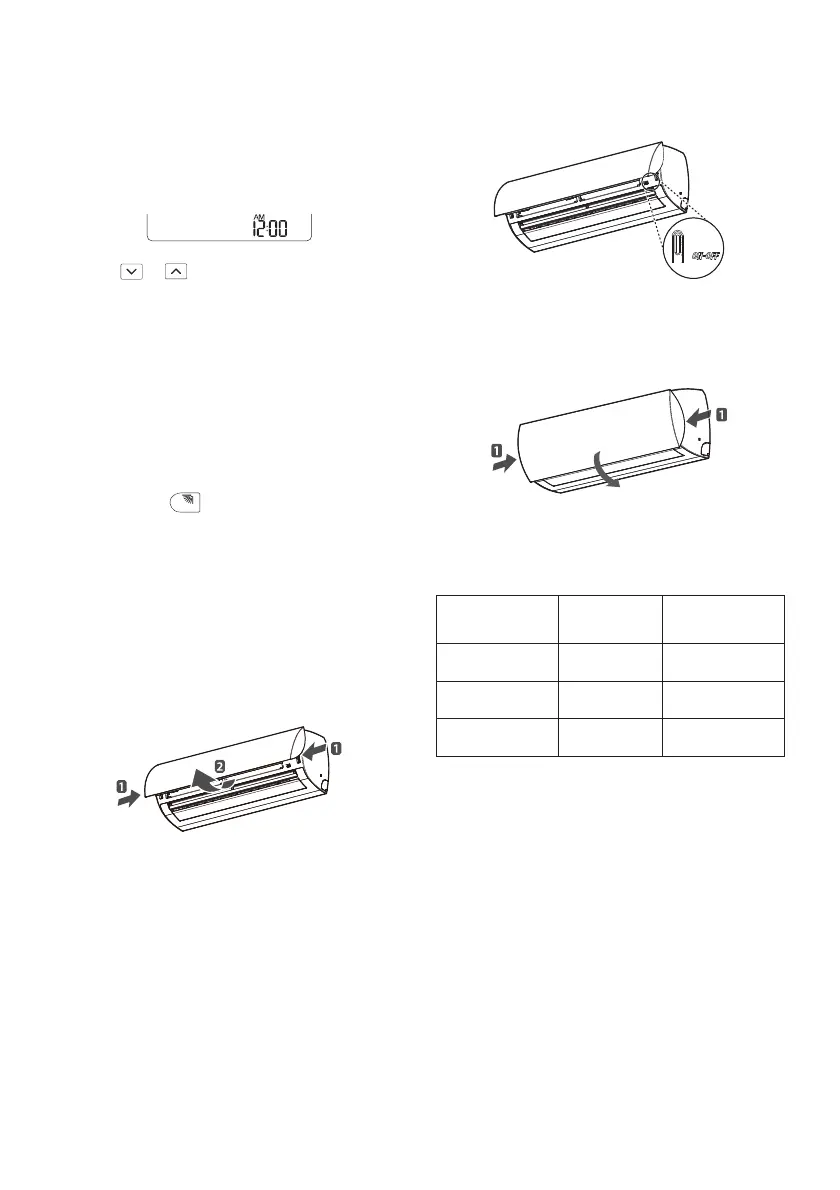
1
Open the front panel.
x Lift up both sides of the panel slightly.
2
Press the ON/OFF button.
3
Close the front panel as soon as you press the
ON/OFF button.
x Lift down both sides of the panel slightly.
x For cooling and heating models, the operation
mode changes, depending on the room
temperature.
Room Temp. Set Temp.
Operation
Mode
Below 21°C 24°C
Heating
Operation
Above 21°C and
below 24°C
23°C
Dehumidifying
Operation
Above 24°C 22°C
Cooling
Operation
x For cooling-only models, the temperature is set
to 22 °C


 To Next Page