23
Setting Sound Effects with Headset or Earphones
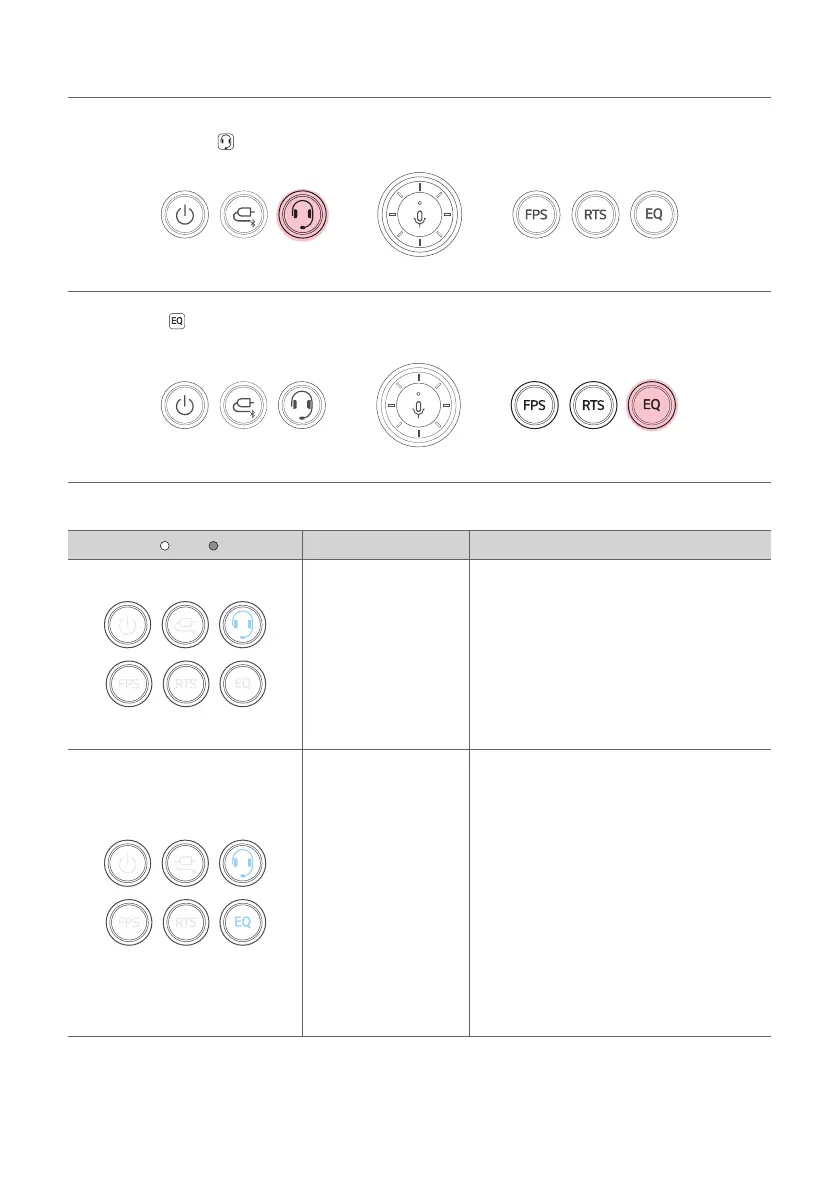
a Plug in the headset or earphones wire to connect it to the speaker.
b Press the Headset
button to activate the Headset mode.
c Use the EQ button to select desired sound effects.
Sound Effect Settings
LED ( Off / On) Function Description
Headset
It is an output state in which the sound
effect is not applied.
EQ
- DTS Headphone: X
- Custom
You can customize the EQ settings in EQ on
the LG XBOOM app.
(On the headset mode, initial setting for EQ is
DTS Headphone : X.)
- DTS Headphone: X : Enjoy the sound of
games or AR/VR in true immersive 3D
with a headset or earphones.
- Custom :
- YoucanmodifythesoundeldEQ
specially tuned for gaming to suit your
specicgamesandtastes.
- Youcansavealeoruseasavedle
on the LG XBOOM app.


 To Next Page