Operating 35
Operating
4
Playing the iPod
You can enjoy the media les with your iPod. For
details about iPod, refer to the iPod’s User Guide.
Preparation
y
To view iPod’s Videos and Photos on the TV
screen.
-
Be sure to use the video connection through
the VIDEO OUT jack on the rear panel of this
unit. Select the appropriate video input mode
on the TV.
-
Depending on the iPod, make sure that select
Videos > Video settings, and then set TV Out
to Ask or On from your iPod.
For details about Video Settings, refer to the
iPod User Guide.
-
The viewing photos is available only if this unit
is in iPod IN mode and you can view photos
only as a slide show. You have to start a slide
show on your iPod to view a photo on a TV.
For details about a slide show, refer to the iPod
User Guide.
y
Before connecting the iPod, turn this unit o and
reduce the volume of this unit to its minimum.
y
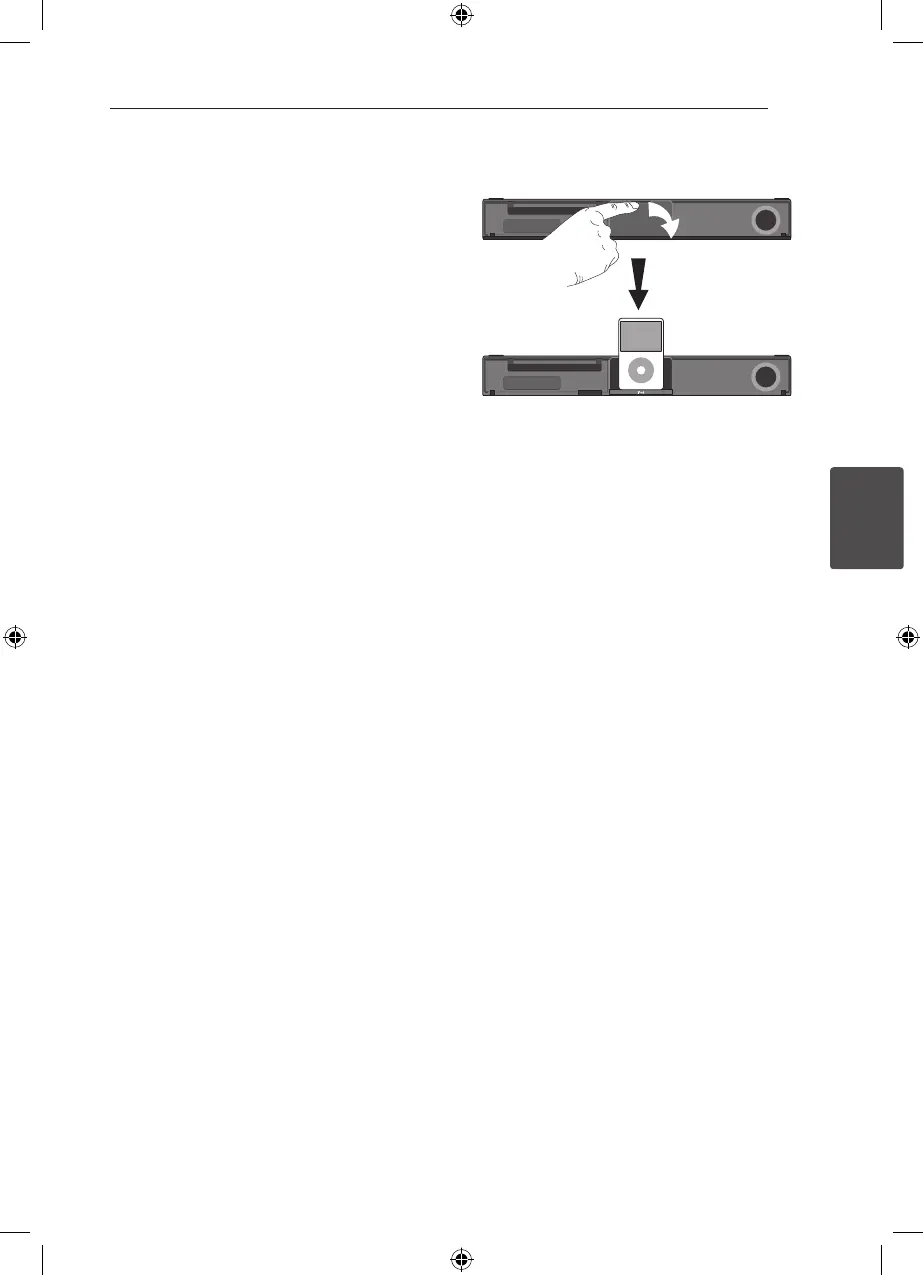
Connect the iPod rmly.
To open the iPod Dock, pull iPod dock.
y
If you turn this unit on, your iPod is automatically
turned on and recharging starts.
y
If your iPod is completely discharged, charge the
battery rst.
HT906SC-R0_BDEULL_ENG_4740.indd 35 2011-02-19 �� 1:58:14



 To Next Page