2-21
ONE POINT REPAIR GUIDE
20. Wi-Fi FUNCTION DOESN’T WORKING
20-1. Wi-Fi module
20-1-1. Solution
Replace Wi-Fi module or IC501 on MAIN board.
(This chip is so hard to change IC, so we recommend to change PCB.)
20-1-2. How to troubleshoot (Countermeasure)
1) Check Wi-Fi cable state.
2) If it is OK, change the Wi-Fi module, and try again.
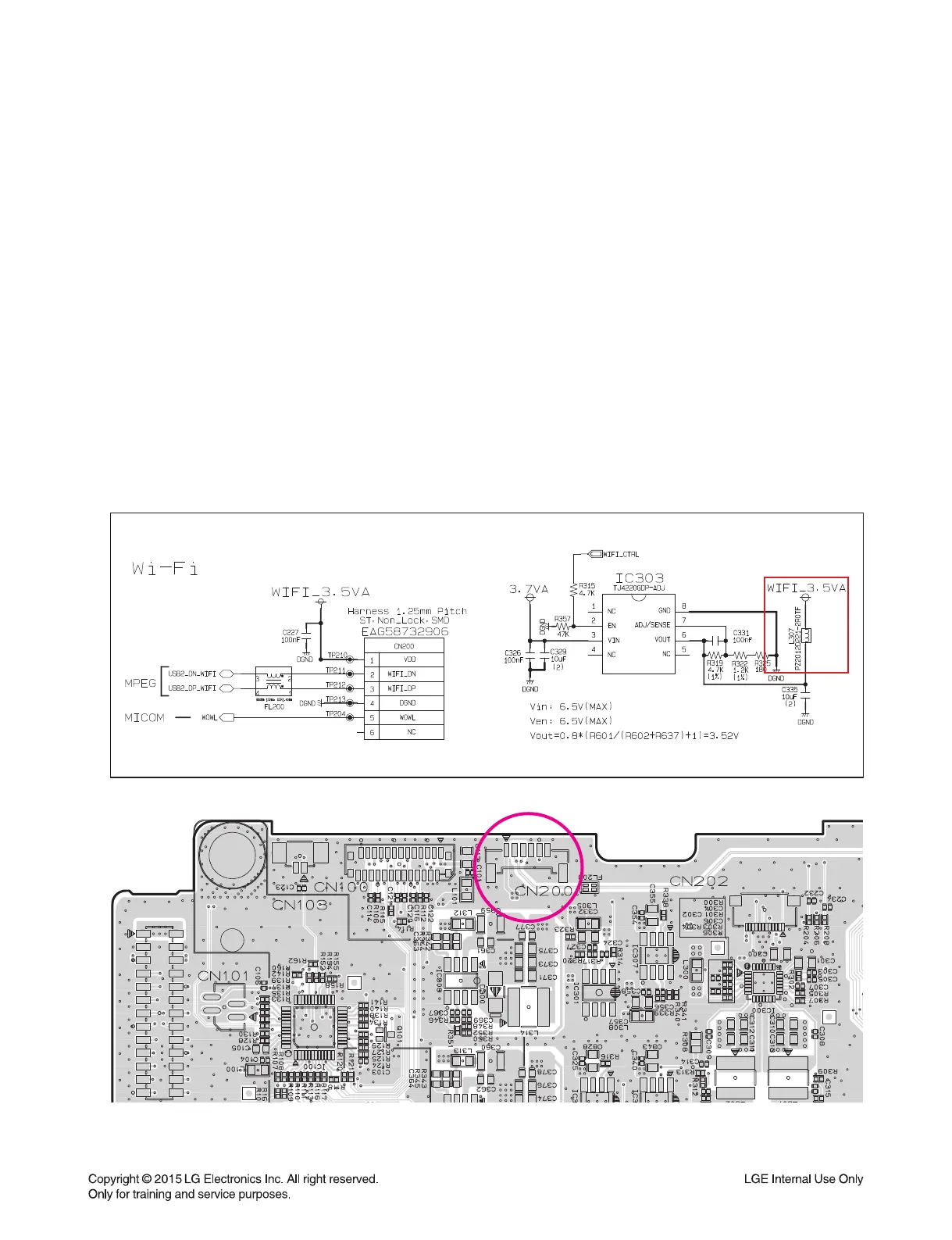
3) If it still doesn’t work, check WIFI_3.5VA (L307)
4) If It is abnormal, check 3.7 VA of IC303 pin3.
If it is weird, follow the stage 4-1 (IC309).
5) If it is OK, check the state of WIFI_CTRL (R315). It should be high.
6) If it still doesn’t work, follow the stage 12-1 (IC501).
20-1-3. Service hint (Any picture / Remark)
< MAIN board top view >
CN200


 To Next Page