13
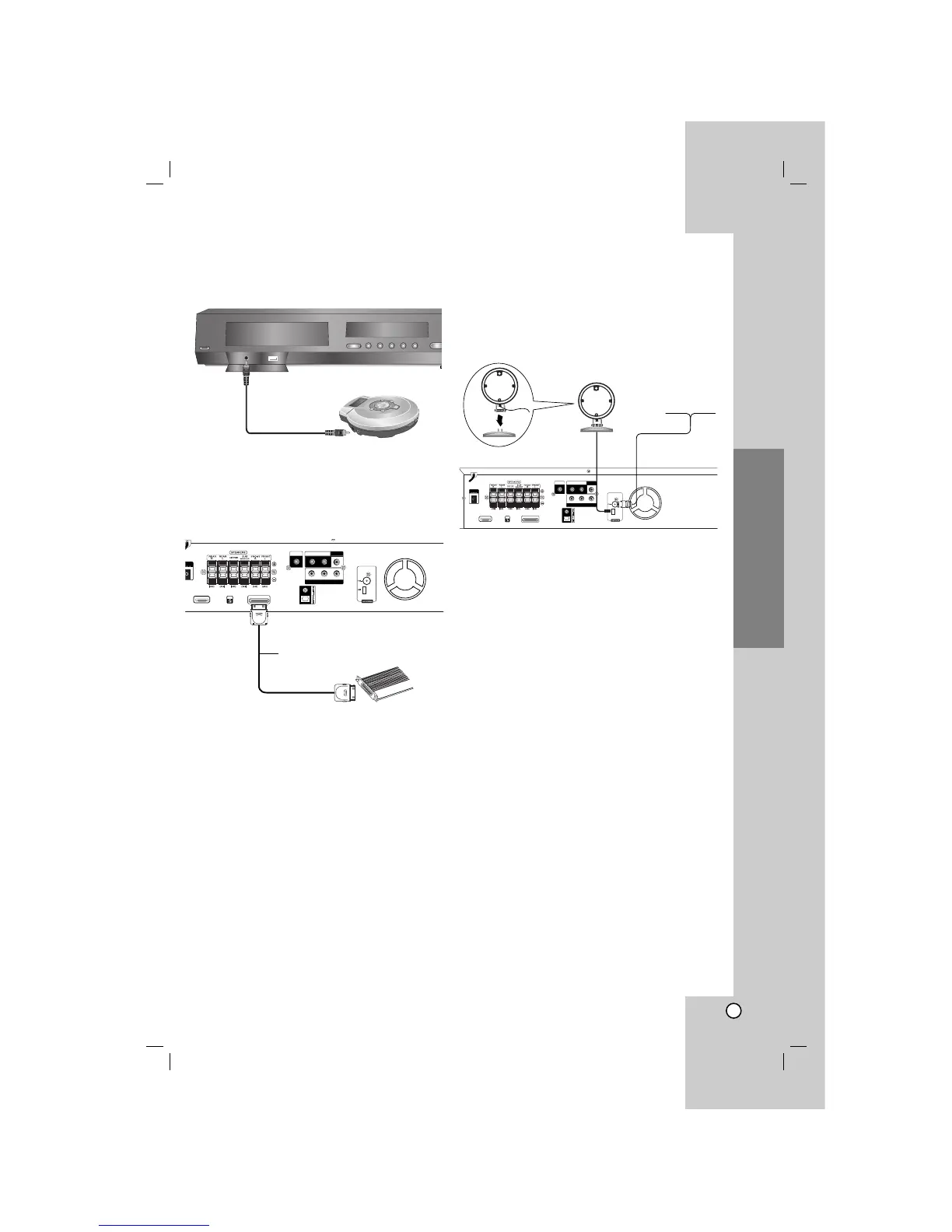
AUDIO IN connection
Connect a output of portable device (MP3 or PMP etc)
to the AUDIO input connector.
iPod connection
Connect the iPod connector on the rear of the DVD/
CD Receiver to the dock connector of iPod using an
iPod cable (I).
Notes:
Depending on the type of iPod, you may need to
insert one of the dock adapters into the dock slot
before you station your iPod.
Adjust the volume to a moderate level before you
connect your iPod and this unit.
Antenna Connection
Connect the supplied BAND antenna for listening to
the radio.
Connect he FM Wire antenna to the FM antenna
connector.
Connect the AM Loop antenna to the AM antenna
connector.
Notes:
Be sure to fully extend the FM wire antenna.
After connecting the FM Wire antenna, keep it as
horizontal as possible.
To prevent noise pickup, keep the AM Loop antenna away
from the DVD/CD Receiver and other components.
Installation and Setup
Portable device
To AUDIO OUT
To AUDIO IN



 To Next Page