15
Assembling and Connecting to
the Speakers
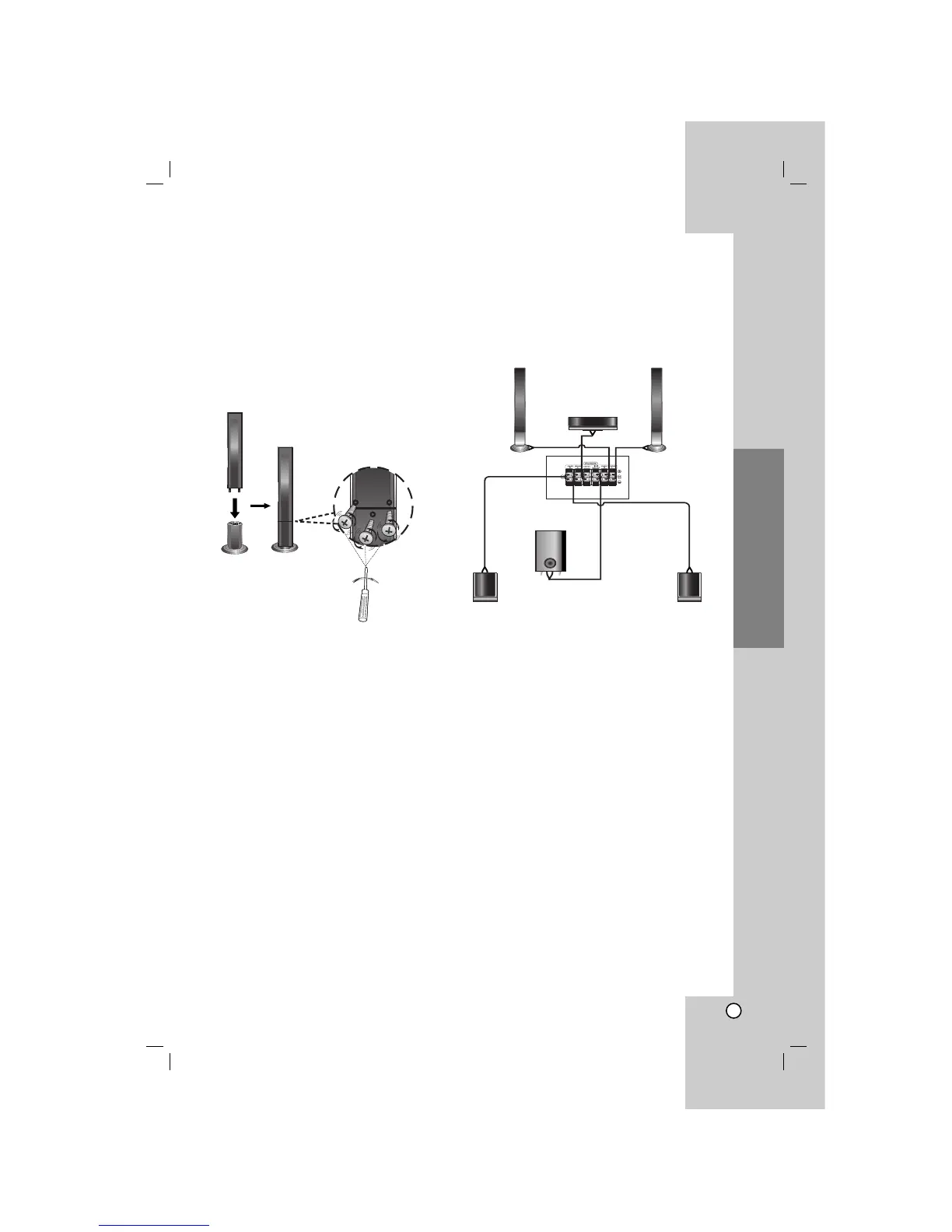
The front speakers are detached from the speaker
stands. Connect the speaker cables and assemble the
front speakers from speaker stands as illustrated.
1. Connect the speaker cables to the appropriate
terminals on the bottom of each front speaker.
2. Attach the front speakers to the speaker stands by
rotating the screw.
Speaker System Connection
Connect the speakers using the supplied speaker
wires.
To obtain the best possible surround sound, adjust the
speaker parameters (volume, distance, etc.).
Notes:
• Be sure to match the speaker wire to the
appropriate terminal on the components: + to + and
– to –. If the cables are reversed, the sound will be
distorted and will lack bass.
• If you use front speakers with low maximum input
rating, adjust the volume carefully to avoid
excessive output on the speakers.
Installation and Setup
Front speaker
(Right)
Front speaker
(Left)
Rear speaker
(Right surround)
Rear speaker
(Left surround)
Subwoofer
Center speaker



 To Next Page