EasyManua.ls Logo

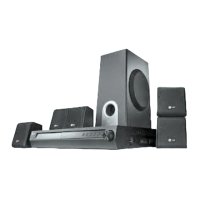
LG LH-E9674 - User Manual

LG LH-E9674
40 pages
Print Icon
To Next Page IconTo Next Page
Loading...
5-DVD Changer
Home Theater System
OWNER’S MANUAL
MODEL: LH-E9674
(Main Unit: LH-E9674
Speakers: LHS-96PAF/LHS-96PAC/
LHS-96PAS/LHS-96PAW)
Before connecting, operating or repairing this product,
please read this instruction booklet carefully and
completely.
LH-E9674PA_NA1ULLA_ENG
For service/
support Call:
Toll Free Number
1-800-243-0000
FOR THE WARRANTY TERMS & CONDITIONS,
PLEASE REFER TO BACK COVER OF THIS MANUAL.
R
USB

Table of Contents

Other manuals for LG LH-E9674

Questions and Answers

  • K
    Kimberly TannerAug 15, 2025
    What to do if my LG Home Theater System has no power?
    • K
      Kelly PerezAug 15, 2025
      If your LG Home Theater System isn't powering on, the power cord might be disconnected. Ensure the power cord is securely plugged into the wall outlet.
  • M
    Melissa HuntAug 18, 2025
    Why is there no picture on my TV from my LG LH-E9674?
    • R
      Robert DavisAug 18, 2025
      If you're not getting a picture from your LG Home Theater System, there could be several reasons: 1. The TV might not be set to receive the DVD signal output. Select the correct video input mode on your TV. 2. The video cable might not be securely connected. Ensure the video cable is properly connected to the jacks. 3. The connected TV might be turned off. Turn on the TV.
  • J
    jessicasmithAug 21, 2025
    What to do if the remote control of my LG Home Theater System is not working?
    • T
      Thomas BeanAug 21, 2025
      If the remote control for your LG Home Theater System isn't working correctly, consider these potential causes: * Ensure the remote control is pointed at the remote sensor on the unit. * Make sure you are using the remote control within a range of about 20 ft (6 m). * Remove any obstacles that might be blocking the path between the remote control and the unit. * Try replacing the batteries in the remote control with new ones.
  • J
    Jenny SmithAug 25, 2025
    Why does my LG LH-E9674 have no sound or very low sound?
    • A
      Amy WilsonAug 25, 2025
      If you are experiencing no sound or very low sound from your LG Home Theater System, consider the following: 1. The equipment connected with the audio cable might not be set to receive the DVD audio signal output. Select the correct input mode on the receiver. 2. The audio cables might not be securely connected. Ensure the audio cable is securely connected to the jacks. 3. The equipment connected with the audio cable might be turned off. Turn on the equipment connected with the audio cable. 4. The audio connecting cable might be damaged. Replace it with a new one.
  • B
    Beverly CruzAug 27, 2025
    What to do if my LG LH-E9674 DVD/CD Receiver does not start playback?
    • V
      Victoria AndersonAug 27, 2025
      If your LG Home Theater System's DVD/CD Receiver isn't starting playback, here are some things to check: * Ensure a disc is inserted, and that the DVD or audio CD indicator in the DVD display is lit. * Verify that the inserted disc is playable, checking the disc type, color system, and regional code. * Make sure the disc is placed with the playback side down. * Confirm the disc is correctly placed within the guide on the disc tray. * Clean the disc if it's dirty. * If a menu is on the TV screen, press the SETUP button to turn it off. * If the Rating level is set, cancel the Rating function or change the rating level.
  • S
    Sheila WilliamsAug 30, 2025
    How to fix loud hum or noise heard from LG LH-E9674 Home Theater System?
    • S
      Steven GreenAug 30, 2025
      If you're hearing a loud hum or noise from your LG Home Theater System, try the following: * Clean the disc, as it may be dirty. * Ensure the speakers and components are securely connected. * Move your TV away from the audio components, as the DVD/CD Receiver may be located too close to the TV.
  • K
    Kenneth JohnsonSep 2, 2025
    Why can't I tune into radio stations on my LG Home Theater System?
    • C
      Cheryl PatelSep 2, 2025
      If you're unable to tune into radio stations on your LG Home Theater System, consider these points: 1. Check that the antenna is securely connected. 2. If the signal strength is weak, try tuning into the station manually. 3. If no stations have been preset, you may need to preset the stations.
  • D
    davidwilliamsSep 5, 2025
    Why is the playback picture poor on my LG LH-E9674?
    • N
      Nathan DuarteSep 5, 2025
      If the playback picture on your LG Home Theater System is poor, the disc may be dirty. Try cleaning the disc.
  • L
    linalexisSep 8, 2025
    Why the power is on, but the DVD/CD Receiver of my LG LH-E9674 does not work?
    • K
      Kelly MullinsSep 8, 2025
      If the power is on, but the DVD/CD Receiver isn't working, make sure a disc is inserted. Check that the DVD or audio CD indicator in the DVD display is lit.
  • L
    Linda ClarkSep 12, 2025
    How to adjust the front panel display brightness on LG Home Theater System?
    • V
      Virginia GarzaSep 12, 2025
      To adjust the brightness of the front panel display on your LG Home Theater System, press DIMMER on the Remote Control.

Summary

IMPORTANT SAFETY INSTRUCTIONS

Introduction

Remote Control Operation Range

Details the effective distance and angle for using the remote control.

Remote Control Battery Installation

Guides on how to properly install batteries into the remote control.

Front Panel

Remote Control

Rear Panel

Installation and Setup

Setting up the unit

Instructions for initial placement and setup of the main unit.

Audio Connection to Optional Equipment

Details how to connect the unit for audio output to external devices.

HDMI Connection

Instructions for connecting the unit to an HDMI-compatible TV or monitor.

Assembling and Connecting to the Speakers

Steps for assembling front speakers and connecting them to the unit.

Speaker System Connection

Instructions on connecting all supplied speakers for surround sound.

Speaker Positioning

Recommendations for optimal placement of speakers for surround sound.

Selecting the Input;Output Source

How to choose different input sources and output modes for the unit.

GENERAL OPERATION

5.1 Speaker Setup

Configuration for the built-in 5.1 channel surround sound system.

Operation

Playback Setup

Steps for opening, selecting, and playing discs.

Special DVD Features

Information on DVD-specific features like menus and camera angles.

Additional Features

Covers Time Search, Marker Search, and Last Scene Memory functions.

XM Satellite Radio Operation

Activating Your Service

Steps for activating XM Satellite Radio service.

Selecting the XM Satellite Radio

How to choose XM bands and channels.

Controlling your TV with the Supplied Remote Control

Controlling other TVs with the Supplied Remote Control

Troubleshooting

Maintenance and Service

LG LH-E9674 Specifications

General IconGeneral
BrandLG
ModelLH-E9674
CategoryHome Theater System
LanguageEnglish

Related product manuals