34
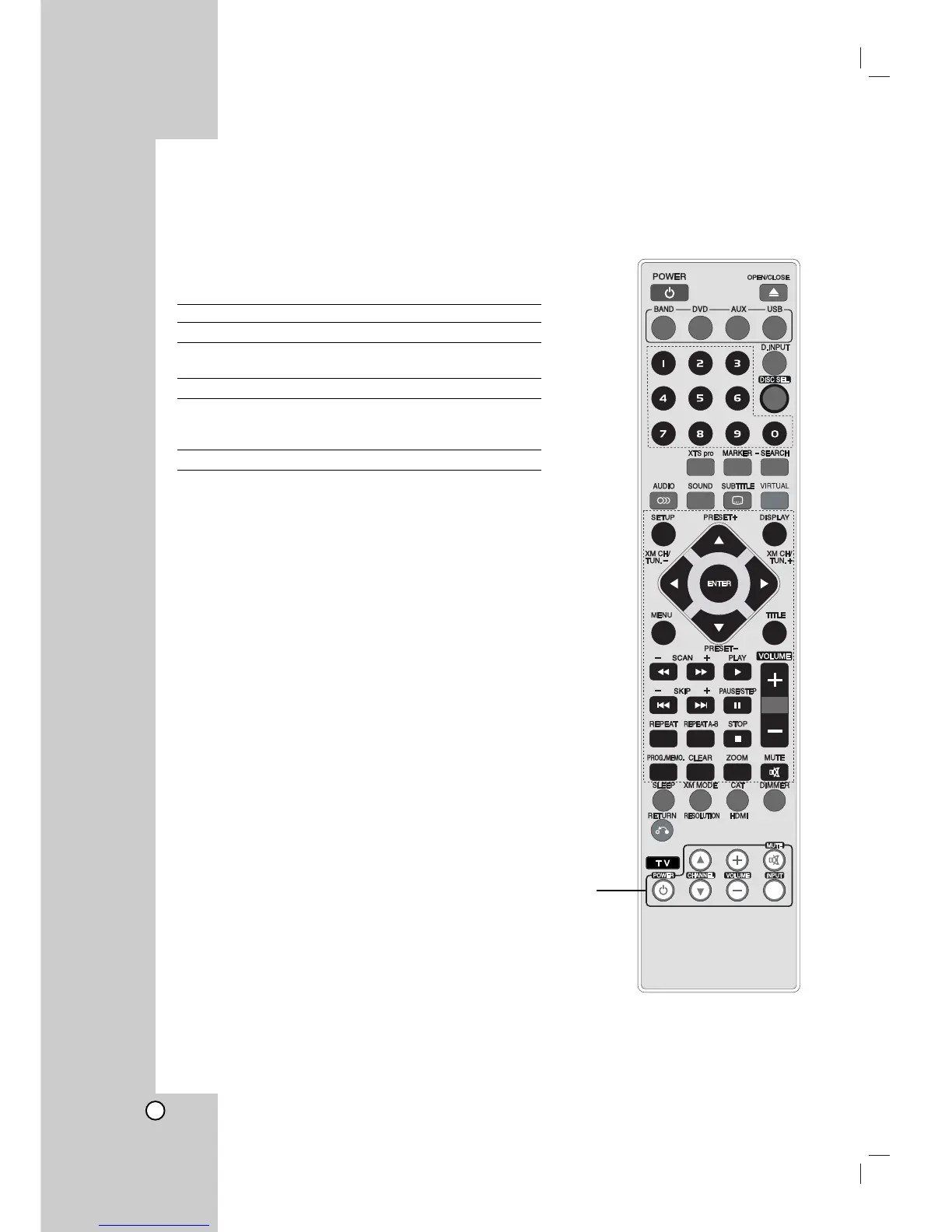
Controlling your TV with the
Suppllied Remote Control
You can control the sound level, input source, and power
switch of your LG TV with the supplied Remote Control.
You can control your TV using the buttons below.
By pressing You can
TV POWER Turn the TV on or off.
CHANNEL(v / V) Scans up or down through
memorized channels.
VOLUME +/– Adjust the volume of the TV.
TV INPUT Switch the TV’s input source
between the TV and other input
sources.
MUTE Turns on or off TV sound.
Note:
Depending on the unit being connected, you may not be able
to control your TV using some of the buttons.
Controlling other TVs with the
Supplied Remote Control
You can control the sound level, input source, and power
switch of non-LG TVs as well. If your TV is listed in the table
below, set the appropriate manufacturer code. (refer to 35
page)
1. While holding down TV POWER button, press the number
buttons to select the manufacturer code for your TV
(Refer to table on the right column).
2. Release TV POWER button.
TV Control Buttons



 To Next Page