33OPERATION
ENGLISH
Pan Sensing
The cooking-element sensors located below the
cooktop surface require certain cookware
conditions to be met before the induction cooking
elements can operate.
If a cooking element is activated and no cookware
is detected, or the cookware does not meet the
correct conditions, the cooking zone may not heat.
If the problem is not corrected,
v appears on the
Power Level Indicator and the affected cooking
element will beep six times and automatically
deactivate after twenty seconds.
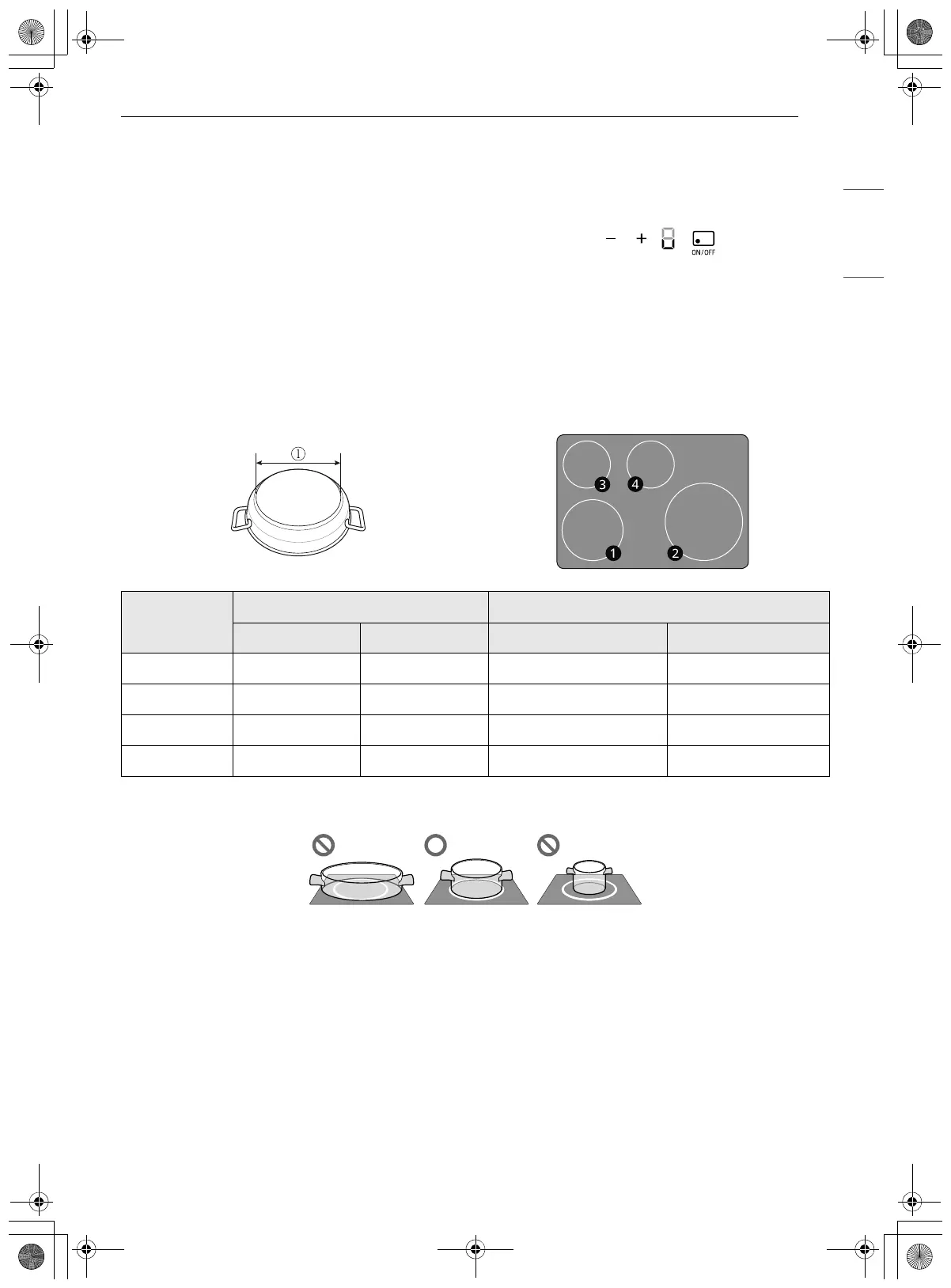
Minimum and Maximum Pan Size
There are four cooking elements on the induction cooktop. Each element requires a appropriate pan size
to be used effectively. The bottom size of the pan must be between the maximum and minimum diameter
A for proper cooking to occur.
The pan must make full contact with the glass surface without the bottom of the pan touching the metal
cooktop trim.
If the correct induction cookware—centered on any of the active cooking elements—is too small, the pan
does not heat.
Cookware Compatibility Indicator
The cookware compatibility indicator shows how
efficiently the cookware will heat on the induction
cooktop elements.
1 Turn off all cooktop elements in use.
2 Put enough water in the cookware to cover
the bottom. Place the cookware on the center
of the desired cooktop element.
• Select an element that is appropriate for the
size of the cookware.
3 Set the power level on the selected element to
9.
Cooking Area
Heater
Diameter of Pan Bottom A
Type Size (inch) Min. Max.
a
Induction 8 7.5 inch (190 mm) 9.2 inch (224 mm)
b
Induction 11 9.5 inch (241 mm) 11.8 inch (300 mm)
c
Induction 6 5.5 inch (140 mm) 7.0 inch (178 mm)
d
Induction 6 5.5 inch (140 mm) 7.0 inch (178 mm)
en-us_main.book.book Page 33 Wednesday, March 27, 2024 11:27 AM



 To Next Page