22
Connecting via Bluetooth
Bluetooth is a technology that wirelessly connects electronic products around you. Connect the product to a TV
via Bluetooth and enjoy your TV audio in high quality.
Watching TV after connecting it wirelessly
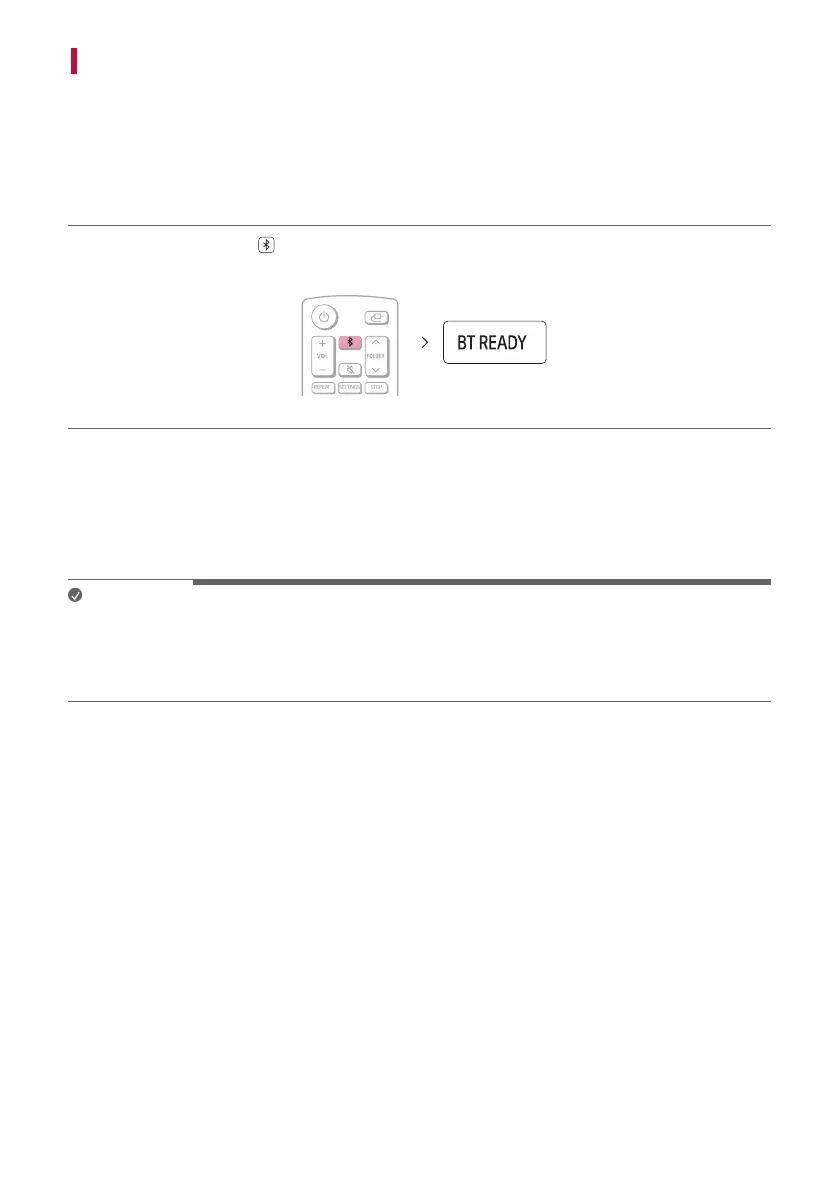
a Press the Bluetooth pair button on the remote control. After a moment, “BT READY” appears on the
status display.
b Press the Settings button on the TV remote control and enter the [Speaker] menu to set the output speaker
to [Bluetooth].
c Find and tap “LG-MR11(XX)”.
d When the product is connected to the TV via Bluetooth, you can see the status display change from
“PAIRED” (Connected) [ “Connected TV name” [ “BT” (Ready to use).
Note
• For Bluetooth devices, characters that cannot be displayed (ex. Korean Hangul) are shown as ‘-’ on the product
status display.
• Press the INFO button on the remote control to check the name of the connected Bluetooth device. You will
see the name of the connected Bluetooth device appear on the status display.


 To Next Page