35
SETTINGS menu
Settings and adjustments using the SETTINGS menu
By using the SETTINGS menus, you can make various adjustments to customise the unit.
TEST TONE menu
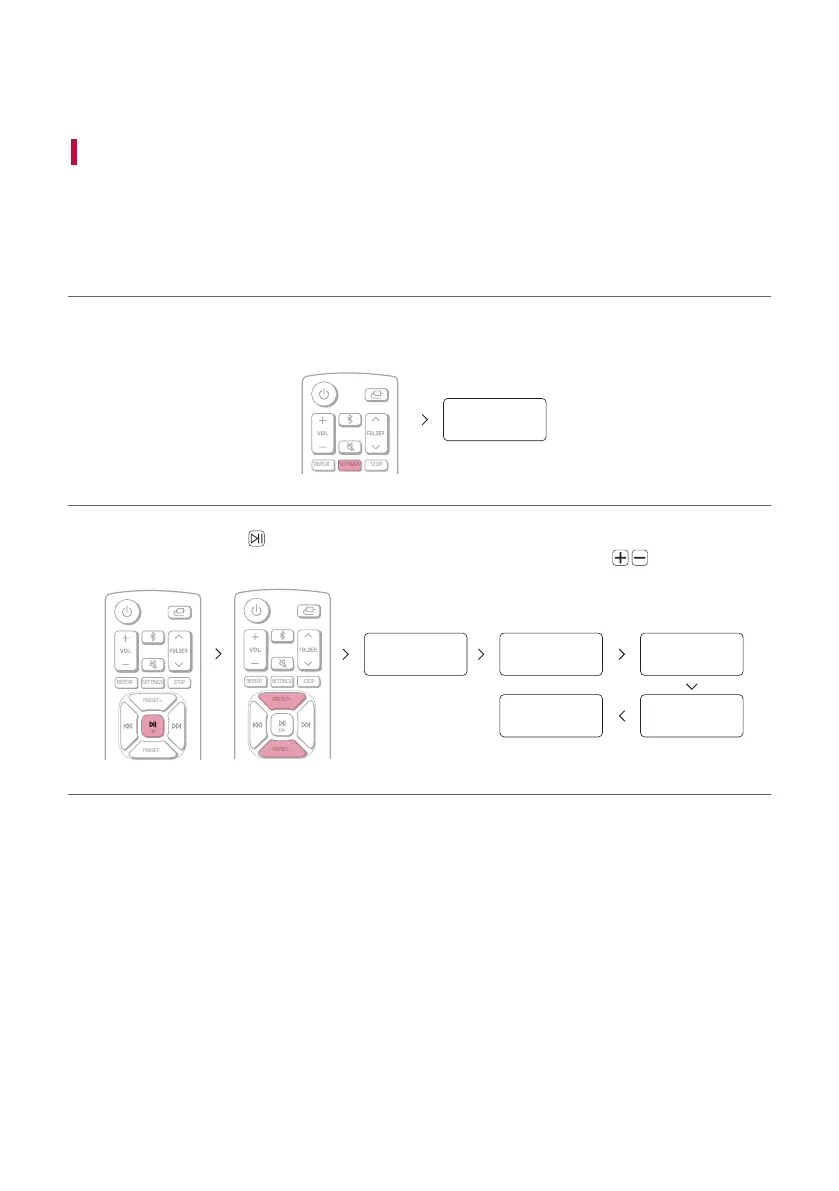
You can check the speakers tone by listening to the test tone from your listening position.
a Press the SETTINGS button on the remote control. “TEST TONE” appears on the status display.
SETTINGS
TEST TONE
b When you press the OK button on the remote control, the test tone is emitted from each speaker in
sequence as follows: You can select desired speakers manually by pressing PRESET
repeatedly.
LEFT RIGHT REARL
REARRWF
SETTINGS STOPREPEAT
PRESET+
OK
PRESET-
OK
SETTINGS STOPREPEAT
PRESET+
OK
PRESET-
PRESET+
PRESET-
c You can verify each speakers tone.
d Press SETTINGS button to exit the setup menu.


 To Next Page