Getting Started12
Getting Started
1
Connections to Your
TV
Antenna connection to your
TV and this unit
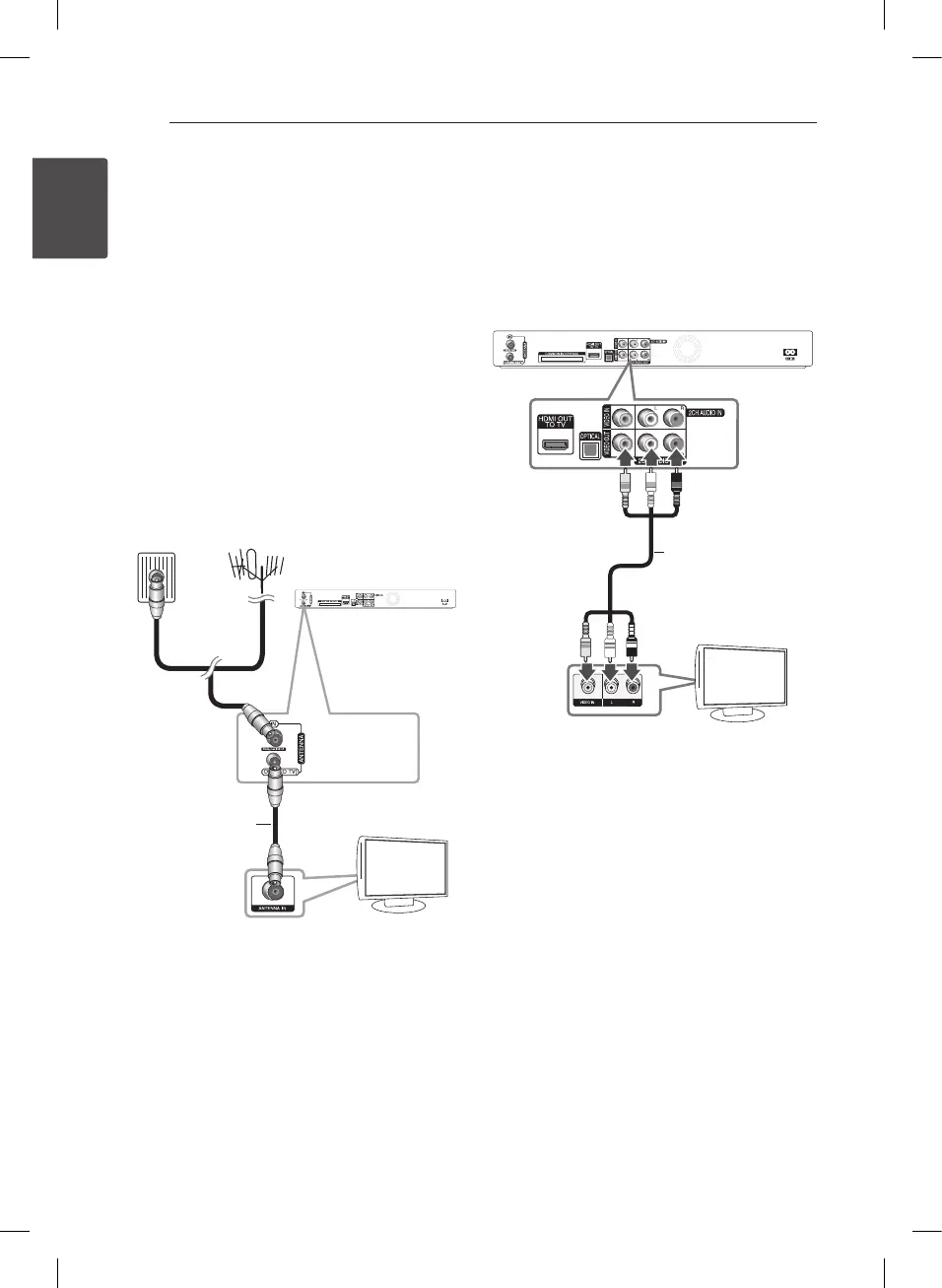
Connect one end of the RF cable to ANTENNA
OUT(TO TV) jack on the unit and other end to
ANTENNA IN jack on your TV. Passes the signal from
the ANTENNA IN jack to your TV/monitor.
Connect the CATV line or Terrestrial TV antenna to
the ANTENNA IN jack on the unit. If you want to use
an indoor antenna, use one with a signal amplier
rated at 5V, 100 mA and set [Antenna 5V] to [ON] in
the setup menu.
RF Cable
Rear of this unit
TV
ANTENNA
Video/Audio (Left/Right)
Connection
Connect the VIDEO OUT jack on the unit to the
video in jack on the TV using the video cable
supplied. Connect the Left and Right AUDIO OUT
jacks on the unit to the audio left/right in jacks on
the TV using the supplied audio cables.
TV
Video/Audio Cable
TV
Rear of this unit


 To Next Page