System Setting14
System Setting
2
Auto Set Up
You can reset the recorder to all its factory settings.
The [Auto Set up] menu appears on the screen after
the factory settings.
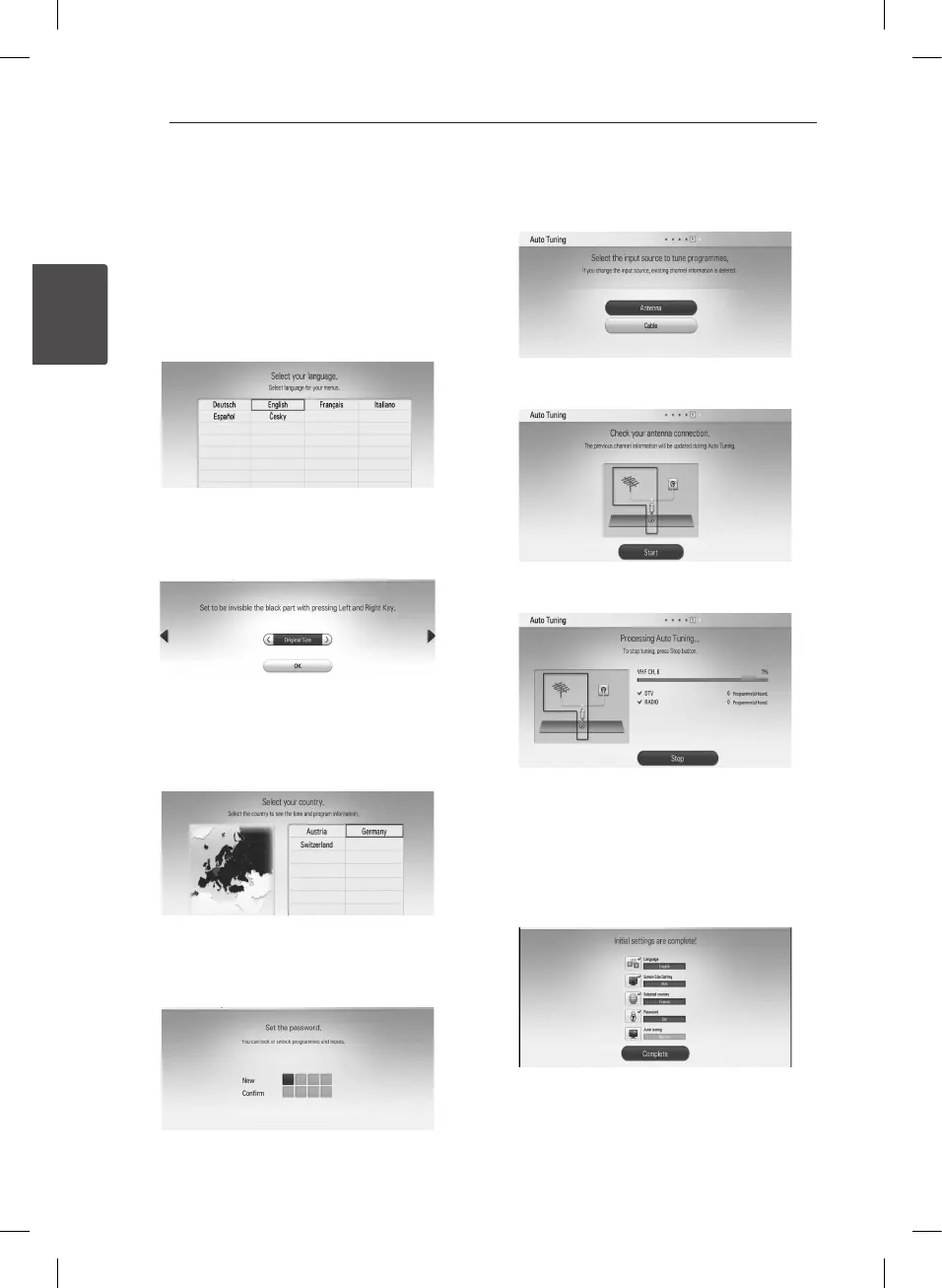
Step 1. Language Selection
Use
w/s/a/d
to select a language for the on-
screen display, and press ENTER (
b
).
Step 2. Screen Size Setting
Use
a/d
to select a screen size, and press ENTER
(
b
).
Step 3. Country Selection
Use
w/s/a/d
to select a country, and press
ENTER (
b
).
Step 4. Password Setting
Input the new password using numerical buttons.
Enter it again to verify.
Step 5. Auto Tuning
1. Use
w/s
to select the [Antenna] or [Cable]
and press ENTER (
b
).
2. While the Start option is selected, and press
ENTER (
b
) to begin the channel search.
The recorder automatically searches for and
saves the programmes.
If you select [Stop], the [Auto Tuning] function
will be skipped.
3. Press ENTER (
b
).
Step 6. Setting is complete
Check all the settings that you have set in the
previous steps.
Press ENTER (
b
) while [Complete] is highlighted to
nish the auto set up settings.


 To Next Page