System Setting 15
System Setting
2
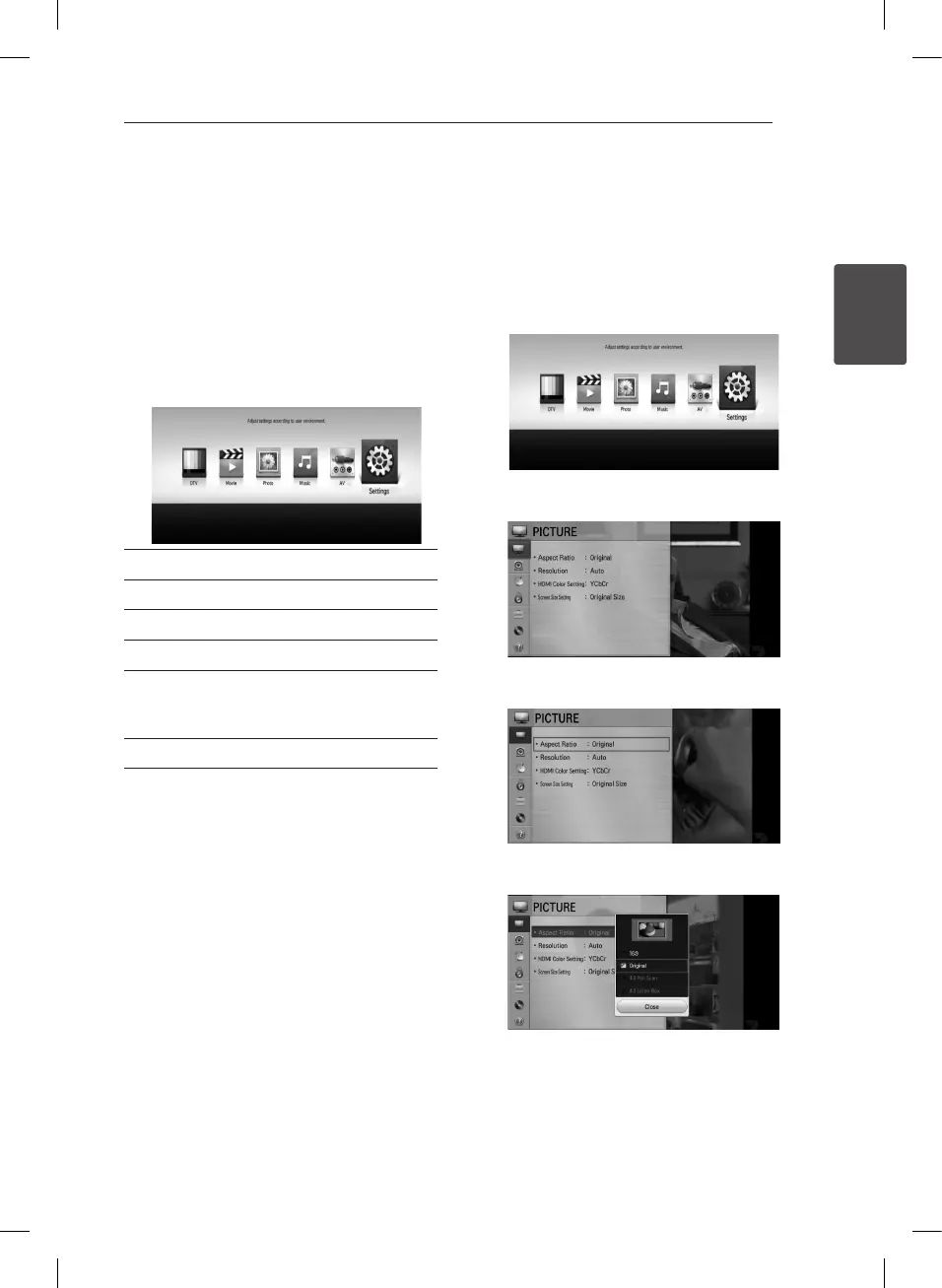
Home Menu Overview
To access numerous functions of the unit, press
HOME (
n
) on the remote.
Basic button operations
HOME (
n
): Accesses or removes the Home Menu.
w/s/a/d
: Used to navigate on-screen displays.
ENTER (
b
): Acknowledges menu selection.
BACK (
1
): Exits the menu.
[DTV] - You can watch digital broadcasts.
[Movie] - Plays video contents.
[Photo] - Plays photo contents.
[Music] - Plays audio contents.
[AV] - You can watch video from external input
mode. When you use the recording mode, you
can’t enter the AV mode.
[Settings] - Adjusts the system settings.
Settings
Adjust the Setup Settings
You can change the settings of the player in the
[Settings] menu.
1. Press HOME (
n
).
2. Use
a/d
to select [Settings] and press ENTER
(
b
). The [PICTURE] menu appears.
3. Use
w/s
to select the first setup option, and
press ENTER (
b
) to move to the second level.
4. Use
w/s
to select a second setup option, and
press ENTER (
b
) to move to the third level.
5. Use
w/s
to select a desired setting, and press
ENTER (
b
) to conrm your selection.


 To Next Page