Getting Started 11
Getting Started
1
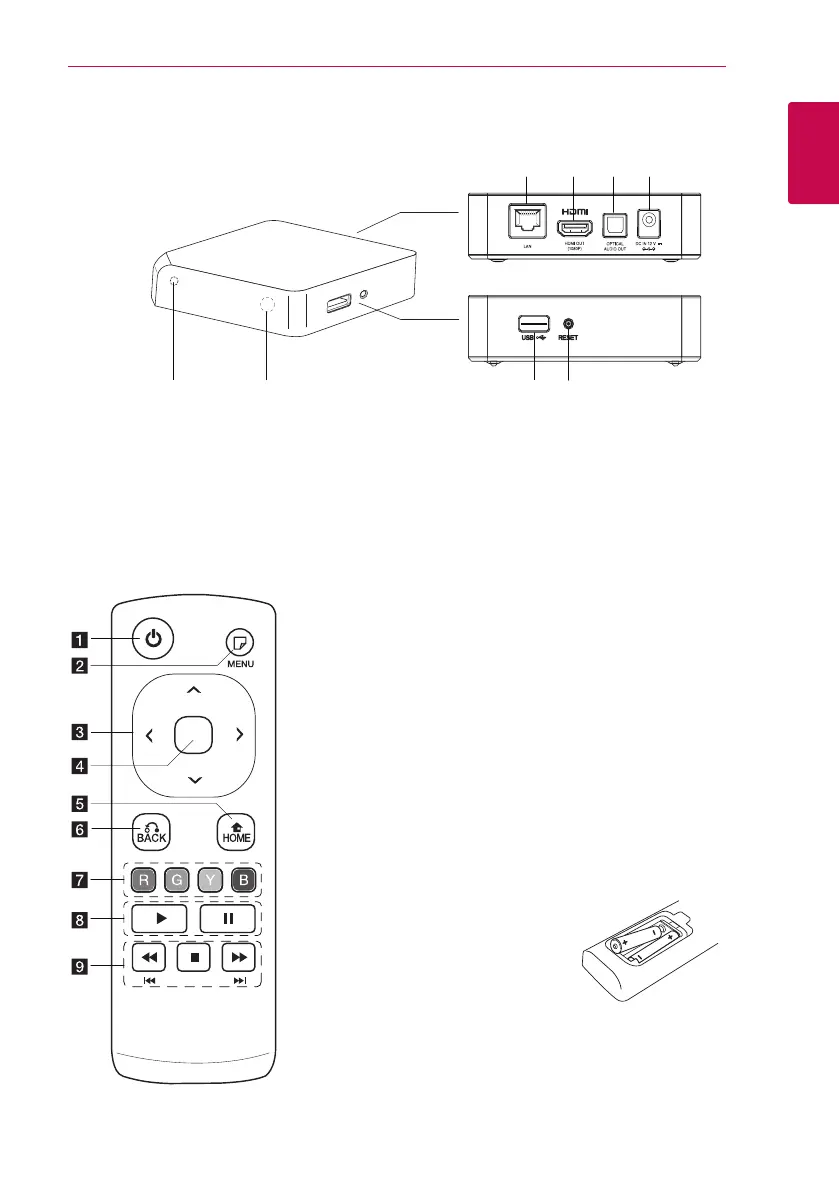
Main Unit
a
LAN port
b
HDMI OUT (1080p)
c
OPTICAL AUDIO OUT
d
DC IN 12V (AC adapter input)
e
Power indicator
f
Remote sensor
g
USB port
h
RESET
a
1
(POWER): Switches the
unit ON or OFF.
b
m
(MENU): Displays or exits
On-Screen Display.
c
Direction buttons: Selects
an option in the menu.
d
Center buttons (Touch
Sensors): Enters the selected
item.
In web browser menu, You
can control this button
displayed cursor in all
directions.
Note: If you leave the unit
without touching, the touch
function will be disable for
energy saving. To activate
the touch function, press
direction button and touch
the sensors.
e
HOME (
n
): Displays or exits
the Home Menu.
f
BACK (
x
): Exits the menu
or resumes playback.
g
Colored (R, G, Y, B) buttons:
They are also used for [Smart
Share], [Premium], [LG Apps]
and [Web Browser] menu.
h
d
(Play): Starts playback.
M
(Pause): Pauses playback.
i
c/v
: Searches
backward or forward.
C/V
: Press and hold for
two seconds to skip previous/
next chapter or le.
Z
(Stop): Stops playback.
Battery Installation
Remove the battery cover on the
rear of the Remote Control, and
insert two R6 (size AA, alkaline)
batteries with
4
and
5
matched
correctly.
Remote control



 To Next Page