Operating34
Operating
4
Listening to music while slide
show
You can display photo les while listening to audio
les.
1. While viewing a photo in full screen, press
m
(MENU) to display the option menu.
2. Use
W/S
to select [Music Select] option, and
press Center button to display the [Music
Select] menu.
3. Use
W/S
to select a device, and press Center
button.
Device that you can select are dier depending
on the location of the photo le you are
displaying in full screen.
Photo location Available Device
USB USB
Share Folder (PC) Share Folder (PC)
DLNA server DLNA server
4. Use
W/S
to select a le or a folder you wish to
play.
Select
g
and press Center button to display
the upper directory.
When selecting the audio le from a server,
folder selection is not available. Only le
selection is available.
,
Note
5. Use
D
to select [OK], and press Center button
to complete music selection.
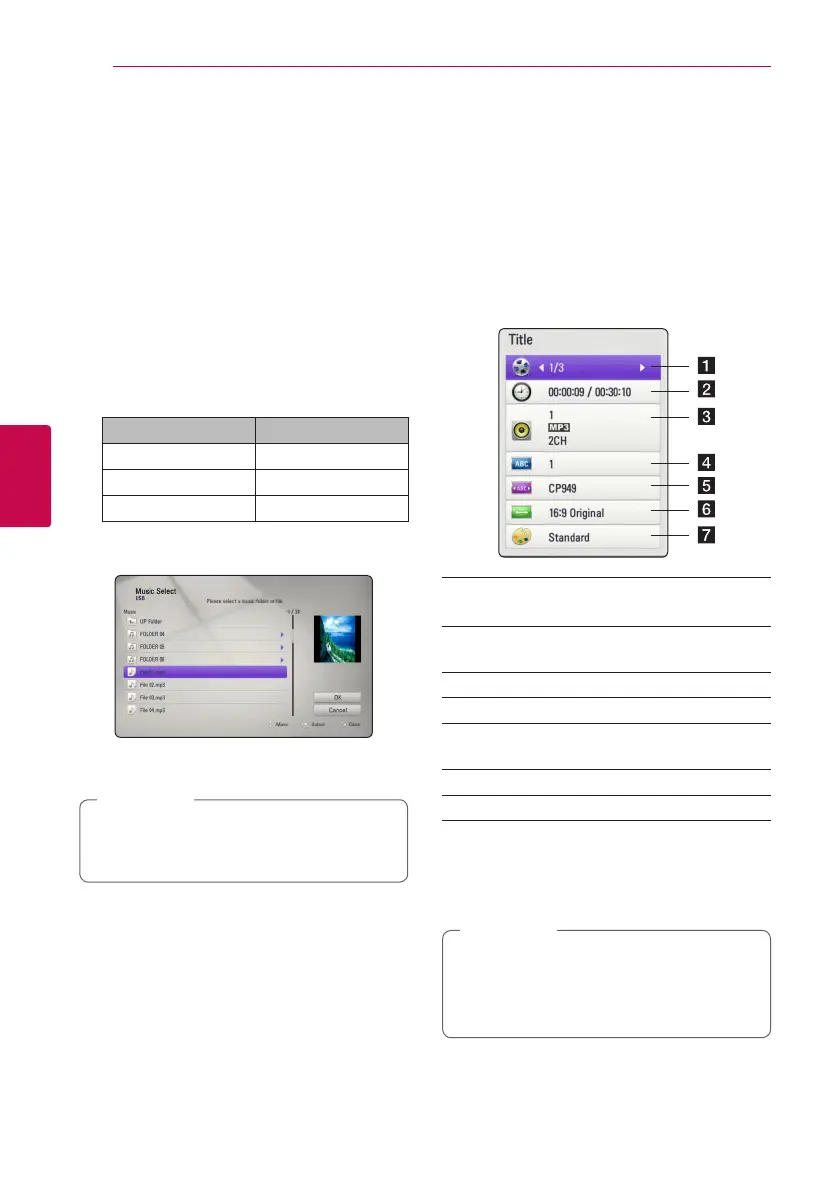
On-Screen display
You can display and adjust various information and
settings about the content.
Displaying content information
on-screen
1. While playback, press
m
(MENU) to show
various playback information.
a Title – current title number/total number of
titles
b Time – elapsed playing time/total playback
time
c Audio – selected audio language or channel
d Subtitle – selected subtitle.
e Code Page – selected subtitle code page
(page 33).
f TV Aspect Ratio – selected TV aspect Ratio.
g Picture Mode – selected picture mode.
2. Select an option using
W/S
.
3. Use
A/D
to adjust the selected option value.
4. Press BACK(
x
) to exit the On-Screen display.
y
If no button is pressed for a few seconds,
the on-screen display disappears.
y
Available items may dier depending on
titles.
,
Note



 To Next Page