Operating32
Operating
4
Advanced Playback
Zoom in & out during slide
show
1. During playback, press
m
(MENU) to display the
option menu.
2. Select the [Zoom] option using
W/S
, and
press Center button to display the [Zoom]
menu.
3. Use red (R) or green (G) colored button to zoom
out or in the picture. You can move through the
zoomed picture using
W/S/A/D
buttons.
4. To return to the normal picture size, press yellow
(Y) colored button.
5. Press BACK (
x
) to exit the [Zoom] menu.
Repeat Playback
During playback, press red (R) colored button
repeatedly to select a desired repeat mode.
Music les
;
Track– The current track or le will be played
back repeatedly.
:
All – All the tracks or les will be played back
repeatedly.
l
– The tracks or les will be played back in
random order.
l:
All – All the tracks or les will be played
back repeatedly in random order.
To return to normal playback, press red (R) colored
button repeatedly to select [O ].
Viewing content information
The unit can display the content information.
1. Select a le using
W/S/A/D
.
2. Press
m
(MENU) to display the option menu.
3. Select the [Information] option using
W/S
,
and press Center button.
The le information appears on the screen.
The information displayed on the screen
may not correct comparing actual content
information.
,
Note
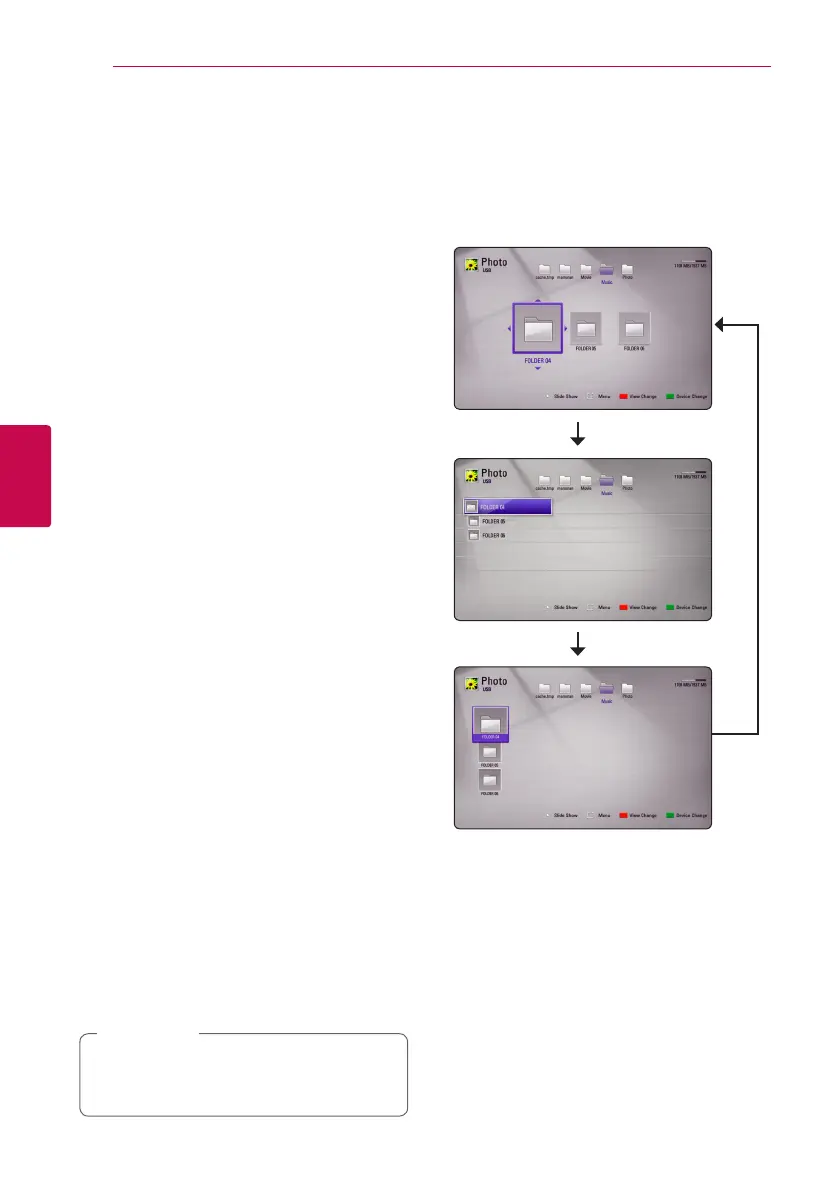
Changing content list view
On the [Movie], [Music] or [Photo] menu, you can
change the content list view.
Method 1
Press red (R) colored button repeatedly.
Method 2
1. On the content list, press
m
(MENU) to display
the option menu.
2. Use
W/S
to select the [View Change] option.
3. Press Center button to change the content list
view.



 To Next Page