4 Operating
Operating 27
Operating
4
General Playback
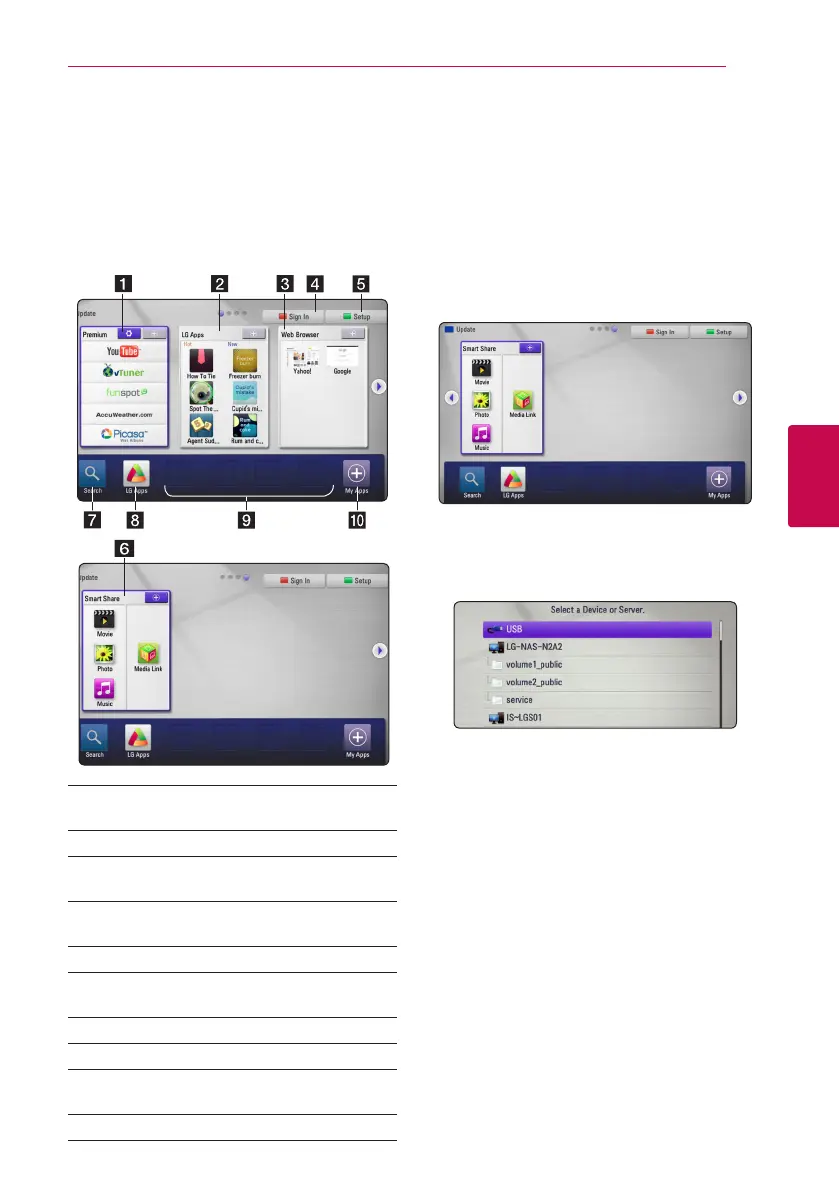
Using [HOME] menu
The home menu appears when you press HOME
(
n
). Use
W/S/A/D
to select a category and
press Center button.
a [Premium] - Displays the Premium Home or
[Edit Premium Card] screen.
b [LG Apps] - Displays the [LG Apps] screen.
c [Web Browser] - Displays the Browser Home
screen.
d [Sign In] - Displays the [Premium] or [LG
Apps] Login menu screen.
e [Setup] - Adjusts the system settings.
f [Smart Share] - Plays [Movie], [Photo],
[Music] or [Media Link] contents.
g [Search] - This function will be updated later.
h [LG Apps] - Displays the [LG Apps] screen.
i [Favorite Apps] - Shortcut for user’s favorite
Apps.
j [My Apps] - Display the [My Apps] screen.
Playing a file media from a
USB device
This unit can play video, audio and photo les
contained in the USB device.
1. Insert a USB device into the USB port until it ts
into place.
2. Press HOME (
n
).
3. Select [Smart Share] using
A/D
, and press
Center button.
4. Select [Movie], [Photo] or [Music] using
W/S/
A/D
, and press Center button.
5. Select [USB] option using
W/S
, and press
Center button.
6. Select a le using
W/S/A/D
, and press
d
or Center button to play the le.



 To Next Page