Operating38
Operating
4
Using the Browser
Home
You can browser, search web pages using the web
browser feature over the Internet.
y
Web browser on this unit is dierent
with a web browser on your PC. The web
browser on this unit does not support
additional plug-ins and platform-dependant
technology such as ActiveX.
y
Compatible Flash version on this unit is up
to Flash 8.
y
Playing a movie on the web browser can be
restricted depending on a movie source.
y
The web browser will force quit when the
unit runs out of memory.
,
Note
1. Check the network connection and settings
(page 16).
2. Press HOME (
n
).
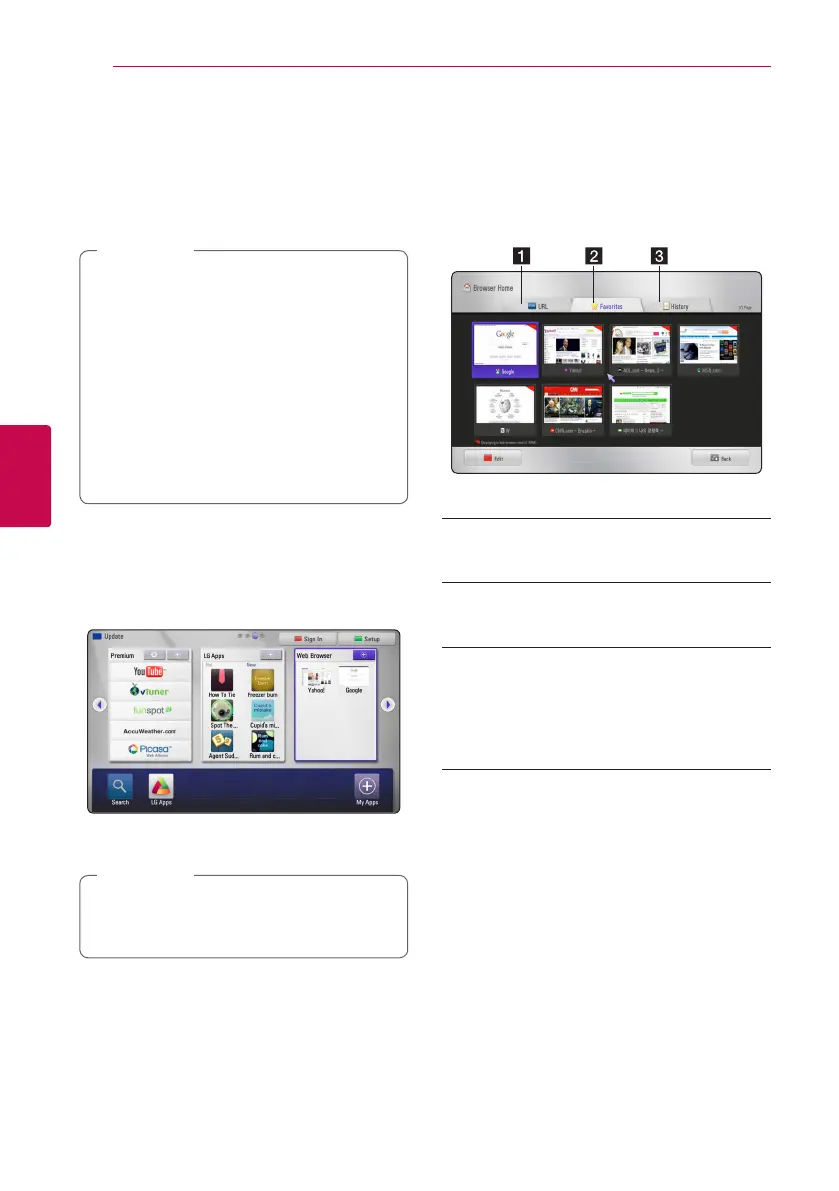
3. Select the [Web Browser] using
A/D
, and
press Center button.
4. Select an web page using
W/S/A/D
, and
press Center button.
Press
S
and
W/S/A/D
to select the
desired web page in the web browser menu.
Press Center button to enter the web page.
,
Note
About the Browser Home
menu
There are various options on the Browser Home
menu. Use
W/S/A/D
to select an option
and press Center button to select the options as
described below.
Options available within the browser menu include.
a URL – You can nd a web page entering a
web site address. The virtual keyboard will be
displayed and enter a web address.
b Favorites – You can directly open your
favorites web pages without entering web
address.
c History – Displays web address list of
previously opened web pages. Use
W/S
to
select a website address, and press Center
button to open the web page.
Press the red (R) colored button to clear
history.



 To Next Page