ENGLISH
Playing Music
Functions Description
Play
Briey press the Play/Pause/Stop button.
Music will play from the activated player of the connected device.
Pause Briey press the Play/Pause/Stop button.
Stop Press and hold the Play/Pause/Stop button for 1 second.
Play Previous/Next Song Briey press the Previous ( ) button or the Next ( ) button.
Fast Rewind/Forward
Press and hold the Previous ( ) button or the Next ( ) button
until you reach the desired part.
Change Equalizer Mode
Briey press the Play/Pause/Stop button twice. Changes modes with a
beeping sound in the following order:
Bass (default) > Normal > Treble.
(The Equalizer Mode cannot be changed in Speaker Mode.)
NOTE: To switch to a different music playback device when multiple devices are connected, stop
the currently playing music and then play music from the device of your choice.
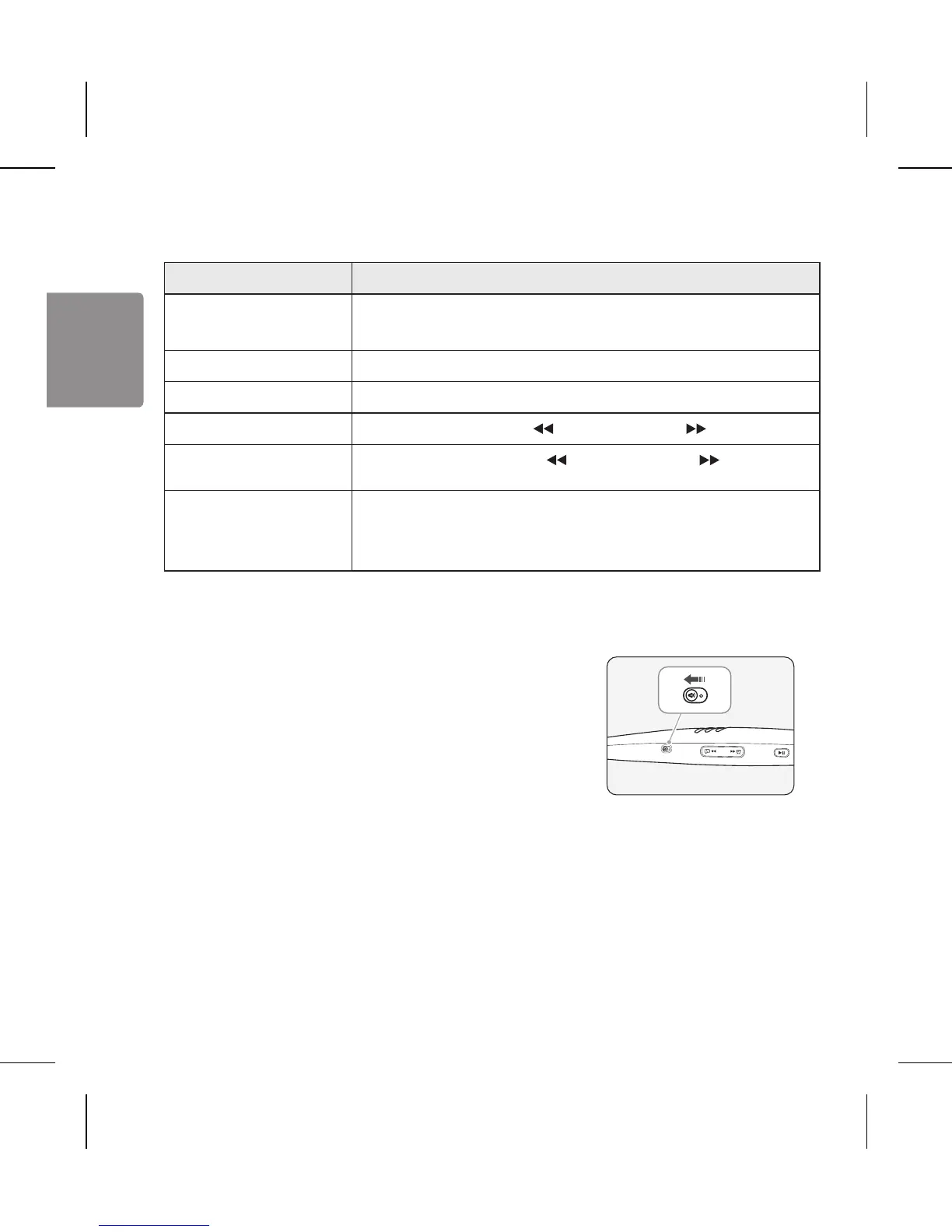
Speaker Mode
If you slide the Speaker mode switch to the ON position, the
device will enter Speaker mode.
(Only the right speaker will work during a voice call.)
Vibration Alert Settings
Press and hold the Volume (+) button for 2 seconds when the HBS-A100 is not in use
(for playing music, etc.).
If you turn off the vibration alerts, it will not vibrate even when a call is being received or you are
out of communication range.
NOTE: The vibration alert is automatically set to the ON position when you turn on the power.


 To Next Page