ENGLISH
Multiple Connections
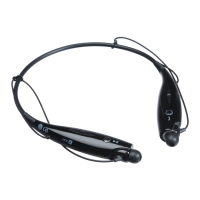
The HBS-A100 can be connected to a mobile phone and a PC simultaneously.
The HBS-A100 can be connected to an additional device while it is already connected to a device.
1 Press and hold the Call button and slide the Power switch to the ON position to turn it on.
2 The blue Indicator lamp turns on and the HBS-A100 switches to Search mode.
3 From the mobile phone or device list, select LG HBSA100 to connect.
4 A voice message will indicate that the connection is completed. This device becomes the
“Main Connected Device.”
5 Try to connect to HBS-A100 using a previously connected device. This device becomes the
“Sub Connected Device.”
NOTE: If simultaneously connected to two devices, the device that was connected most recently is
the “Main Connected Device.” The main functions work based on the “Main Connected Device.”
Automatic Reconnection
If you turn on HBS-A100, it will automatically connect to the most recent (main or peripheral)
device it was connected to. (If a device cannot be found, Search mode will be activated.)
If the product does not automatically connect to the device you want, Search for your product on
the device you want to connect to and connect it manually.
Indicator Lamp
HBS-A100 Status Description
Power On The blue Indicator lamp ashes four times.
Power Off The blue Indicator lamp ashes four times.
Search Mode The blue Indicator lamp is on.
Connected to a device The Indicator lamp will ash blue once every 5 seconds.
LG Health/ LG Tone & Health
Feature On
The green Indicator lamp ashes once every 5 seconds.


 To Next Page