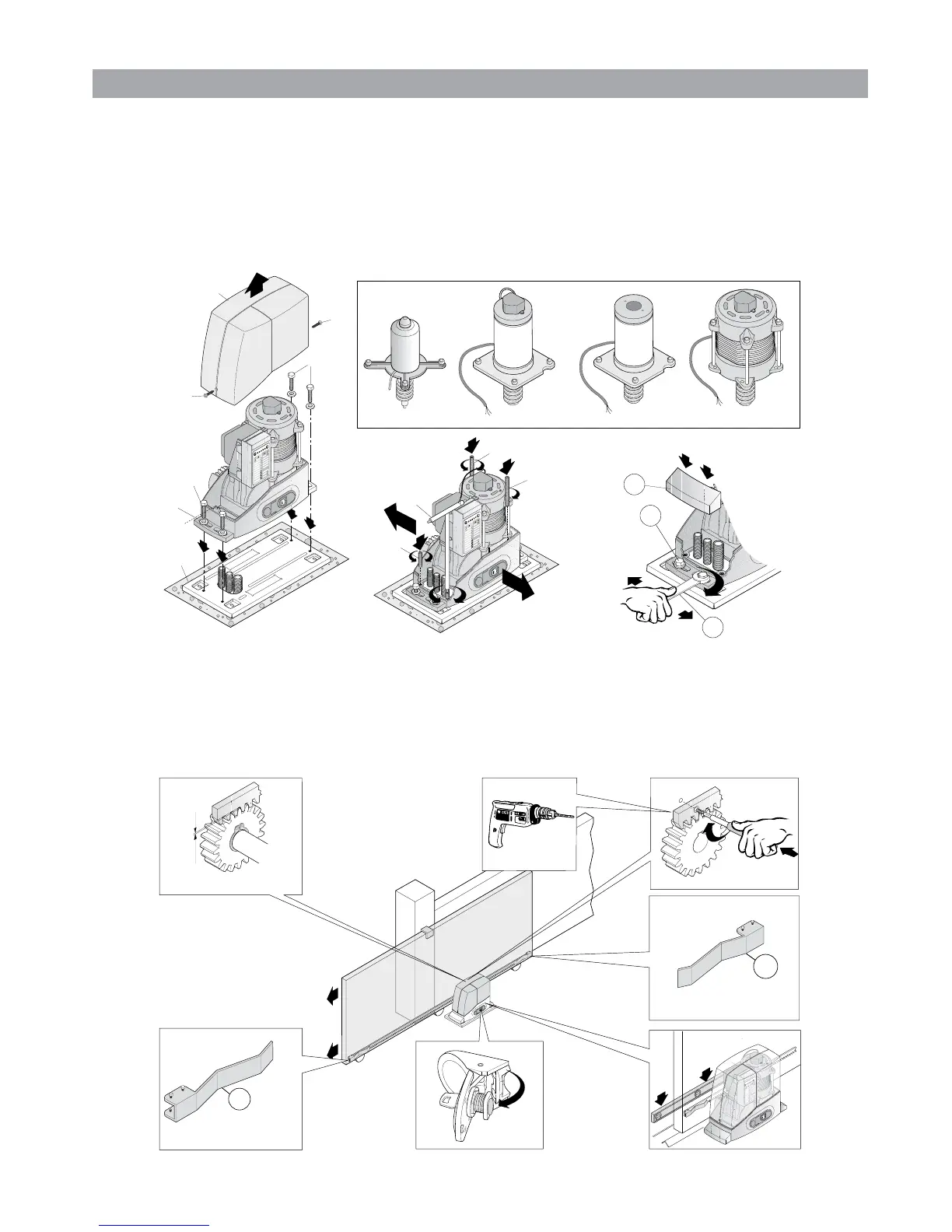
1.3 Installing operator components: positioning and installation of the operator
a) R
emove the lid (2) of the operator by loosening the screws (1); rest the operator on the anchorage plate and manually turn the 4 M10 screws (7) with
the relative washers through 3/4 of a revolution. See g. (5.1).
b) V
ertically adjust the operator using the 4 dowels (8) levelling it with the spanner (9); adjust the operator so that it is parallel to the gate. See g. (5.2).
c) D
enitively fasten the operator by blocking the 4 M10 screws (7) and the relative washers with a xed or tube wrench (10). Assemble the covers
on the clamping feet (4). See g.(5.3).
Fig. (5)
AC037
AC4 24P
AC6 24 AC8 24 AC4-AC6-AC8
AC012
7
7
AC013
10
7
&
&
4
Fig.5.1
Fig.5.2
Fig.5.3
1.4 Installing operator components: rack assembly
Assemble the “gate open” (A) and “gate closed” (B) limit switch brackets at the ends of the rack, fastening them with the screws provided in the pack
a
s indicated in g. (6). Remember that the gate will travel 2-3 cm more, after the intervention of the limit switch, consequently adjust the position of
the brackets so that the gate does not collide with the mechanical stop plates.
Fig. (6)
B
mm 1
A






 To Next Page