OPERATING INSTRUCTIONS
Please read the operating instructions
before using the Axis. Keep this manual for
reference.
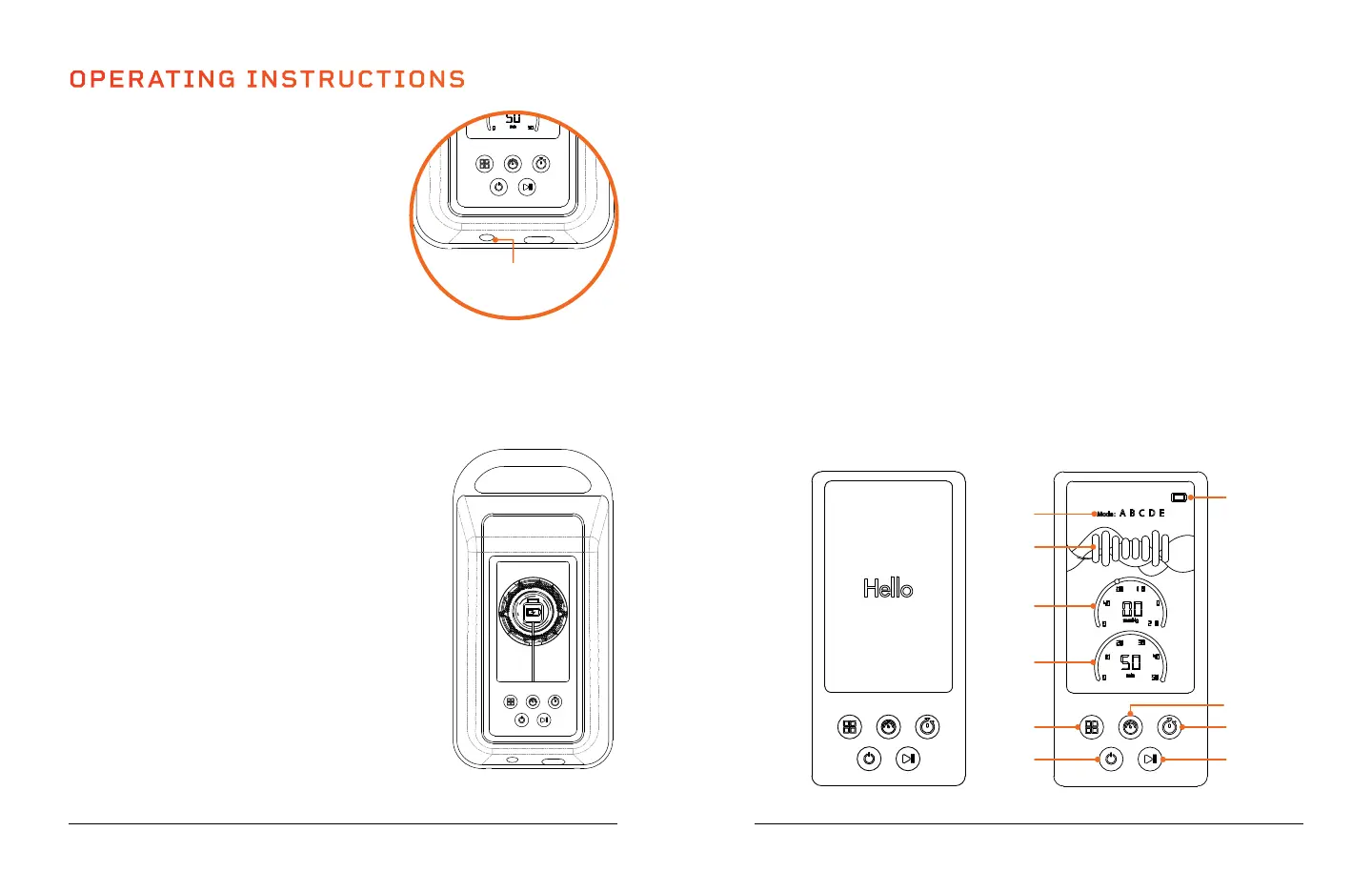
CHARGING THE BATTERY
• Fully charge the battery, for up to 5 hours,
before using it for the first time.
• To charge the battery:
• Connect the charging adapter to the
DC charging port on the base of the
controller.
• Plug the charging adapter into a wall outlet.
• After the first charge, it will typically take 1–1.5 hours to charge the battery.
• The Battery Indicator LEDs on the controller screen indicate the current
battery level:
• 4 LEDs lit = 76–100% • 2 LEDs lit = 26–50%
• 3 LEDs lit = 51–75% • 1 LED lit = <25%
• When one Battery Indicator LED remains, the
Power Indicator LED will turn red and the buzzer
will sound once. We recommend charging the
battery right away.
• When the battery is completely drained, the
buzzer will sound once and the device will
automatically shut down. For best results, do not
allow the battery to completely drain.
• Average run-time on a full battery charge is
1–1.5 hours.
• Disconnect the charging cable immediately after
charging and before cleaning or storing.
• For best results, only charge the battery at
temperatures of 32–104° F.
NOTE: The Axis may be used while it is charging,
except when the battery is extremely low. When the
battery is very low, the controller will not turn on.
OPERATING THE AXIS CONTROLLER
1. Mode Indicator LEDs: LEDs show the selected mode, A, B, C, D, E.
2. Air Chamber Indicator LEDs: LEDs show the air chambers that are
currently inflating in the selected mode.
3. Pressure Display: Shows the selected air pressure level in mmHg.
4. Time Display: Shows the selected working time during setup and the
time remaining during the massage.
5. Mode Button: Press to toggle through the five massage modes, A, B, C,
D, E. Mode A is the default mode.
6. Power Button: Press to power on / off.
7. Start/Pause Button: Press to start/pause the massage. The controller
will automatically shut down if paused for longer than one minute.
8. Time Button: Press to toggle through the time options, 10, 20, 30, 40,
50 minutes. 10 minutes is the default.
9. Pressure Button: Press to toggle through the five air pressure levels,
50, 100, 150, 200, 250. 50 mmHg is the default.
10. Battery Indicator LEDs: 4 LEDs show the current battery level.
Wellness Recovery 11 10 Axis User Manual Lifepro
DC Charging
Port
Controller is
Charging
Welcome Screen
1
2
3
4
5
6
10
9
8
7
Main Screen



 To Next Page