CREATING A WORKOUT
14 Waver Mini Press User Manual Lifepro Recovery + Fitness Collection 15
Use the Waver Mini Press in program or manual mode. To get the best results,
alternate between the preset programs and custom workouts created in manual
mode to keep your body guessing. Your body tends to adapt to a workout routine
over time, so you want to change up your workouts to keep improving your fitness.
PROGRAM MODE
In program mode, you can select from ten preset programs: P00, P01, P02,
P03, P04, P05, P06, P07, P08, P09. Each preset program is 15 minutes long
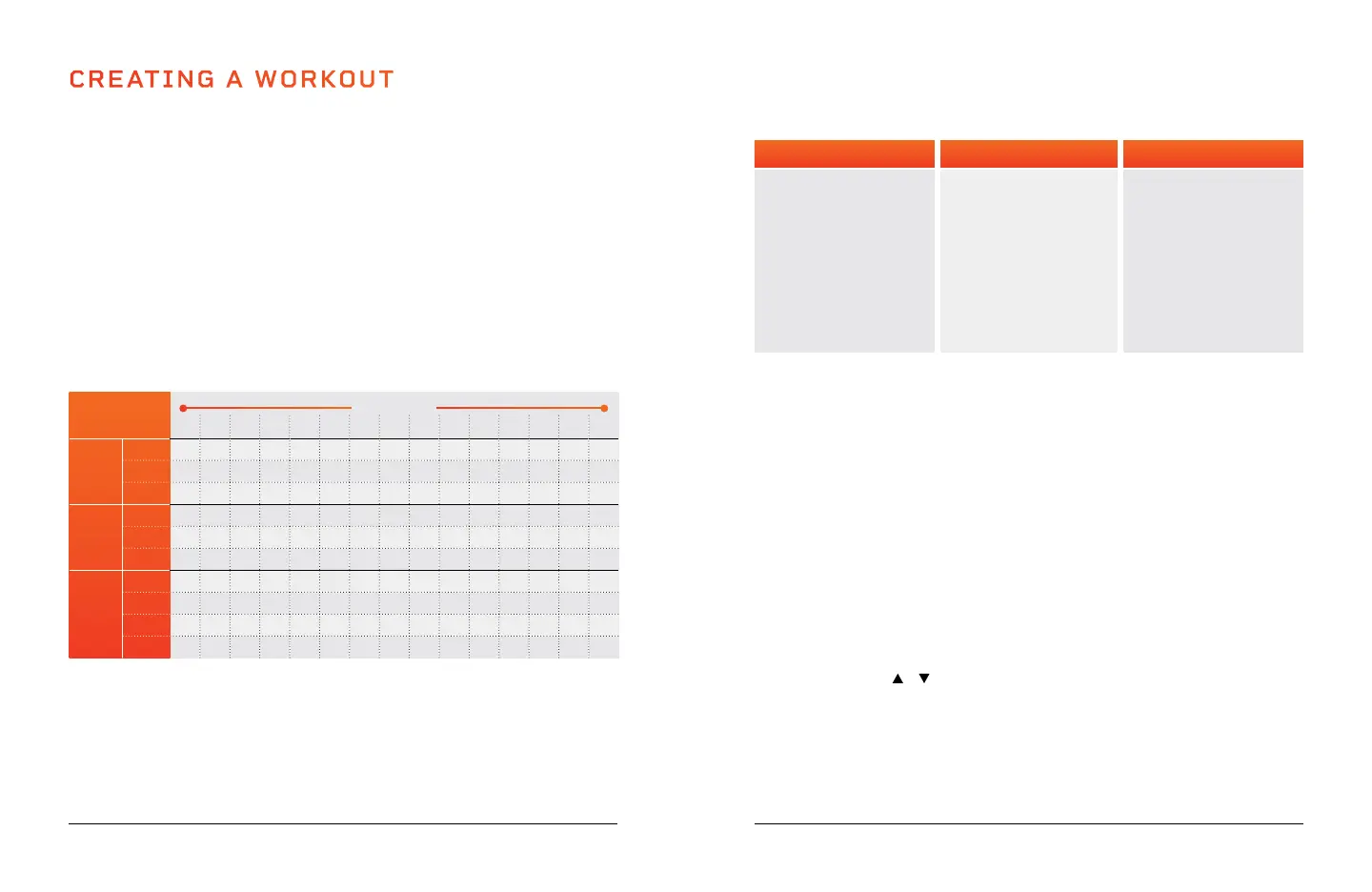
and changes the workout speed every minute. See PRESET PROGRAM SPEEDS
below for a speed breakdown of each preset program. See PRESET PROGRAM
BENEFITS on the next page for an explanation of program benefits.
PRESET PROGRAM SPEEDS
Each program changes speed once per minute, as outlined in the chart below.
CHOOSING A PROGRAM IN PROGRAM MODE
1. Press the Power button on the remote control to turn on the control panel.
2. Press the Set button on the remote control or the Program Mode button
control panel, to toggle through the ten preset programs, P00–P09.
3. While standing in position on the Waver Mini Press, press the Start button on
the remote control to activate the selected program.
MANUAL MODE
In manual mode, you can create a custom workout, with a duration of 1–15
minutes, in one-minute increments, while in standby mode. Once you begin the
manual workout, you cannot adjust the workout time.
The speed for your manual workout will begin automatically at level 1. Once your
workout has begun, you may adjust the speed, at any time, from 1–99.
CREATING A CUSTOM WORKOUT IN MANUAL MODE
1. Press the Power button to turn on the control panel (to standby mode).
Manual mode is automatically selected.
2. Use the Time + / - buttons to set a time duration for the workout, from 1 to
15 minutes.
3. While standing in position on the Waver Mini Press, press the Start button on
the remote control to begin the manual workout.
4. The vibration speed will automatically begin at level 1. To adjust the speed,
press the Speed
/ buttons on the remote control.
5. Press the Stop button on the remote control at any time to stop the workout.
VIBRATION SPEED INTENSITY
In manual mode, vibration speeds correspond to the following intensities:
Easy
(1–33)
Intermediate
(34–66)
Advanced
(67–99)
SPEED PRG
MINUTES
15 14 13 12 11 10 9 8 7 6 5 4 3 2 1
Low
P00
4 8 10 12 17 20 24 20 17 6 12 17 20 24 20
P01
2 4 6 8 10 13 15 12 9 8 8 10 13 15 12
P02
8 14 8 14 8 20 8 14 8 14 14 8 20 8 14
Med
P03
12 23 29 38 49 6 68 76 48 29 38 49 56 68 76
P04
9 13 16 21 24 35 67 50 38 30 21 24 35 67 50
P05
23 55 23 55 23 55 23 55 23 55 55 23 35 23 55
High
P06
11 11 25 25 38 38 48 48 25 25 25 38 38 48 48
P07
30 30 50 50 70 70 40 40 60 60 50 70 70 40 40
P08
55 40 55 40 50 77 80 65 65 99 40 50 77 80 65
P09
40 85 75 65 25 96 78 60 65 80 65 25 96 78 60
Low Settings (P00-P02)
Great for people
starting out.
• Detoxification
• Increased bone
density
• Improved balance
• Lymphatic drainage
• Improved postural
control
Medium Setting (P03-P05)
Perfect for people
with arthritis and
fibromyalgia.
• Joint maintenance
• Improved postural
control & balance
• Fat loss
• Increased bone
density
• Cellulite removal
High Settings (P06-P09)
Great for
increased intensity.
• Fat loss
• Muscle growth
• Highly-increased bone
density
• Power accumulation
• HGH release
4. Press the Stop button on the remote control at any time to stop the workout.
NOTE: Time duration and vibration speed cannot be adjusted for preset programs
PRESET PROGRAM BENEFITS







 To Next Page