25
OVERVIEWINSTALLATION
PLANNING
SPEAKER LOCATION &
INSTALLATION
SET UP &
INTEGRATION
INSTALLING OPTIONAL
EQUIPMENT
TROUBLESHOOTING
24
Life Safety Solutions
The following components are included when the
PageFirst option is purchased as an add-on:
• PageFirst sensor clip with wire pigtail (PFSC50)
• 50’ length of shielded plenum wire*
HANGING THE SENSOR CLIP
LOCATE PAGING SPEAKER AND SENSOR CLIP
If possible, the paging sensor should be hung around the lead wires that are
connected directly to the speaker. If it is a sealed ceiling speaker where only the
70-volt wire is accessible, connect to the exposed 70-volt wires.
1. Locate the paging speaker in the classroom.
NOTE: PageFirst does not work with telephone or IP-based intercom systems.
2. Locate the PageFirst sensor clip. This clip is designed to hang around the wire
connected to the paging speaker.
CONNECTING SENSOR TO SPEAKER WIRE
1. Gain access to the back of the speaker either up in the ceiling or on the wall.
NOTE: There is no need to disconnect any wires.
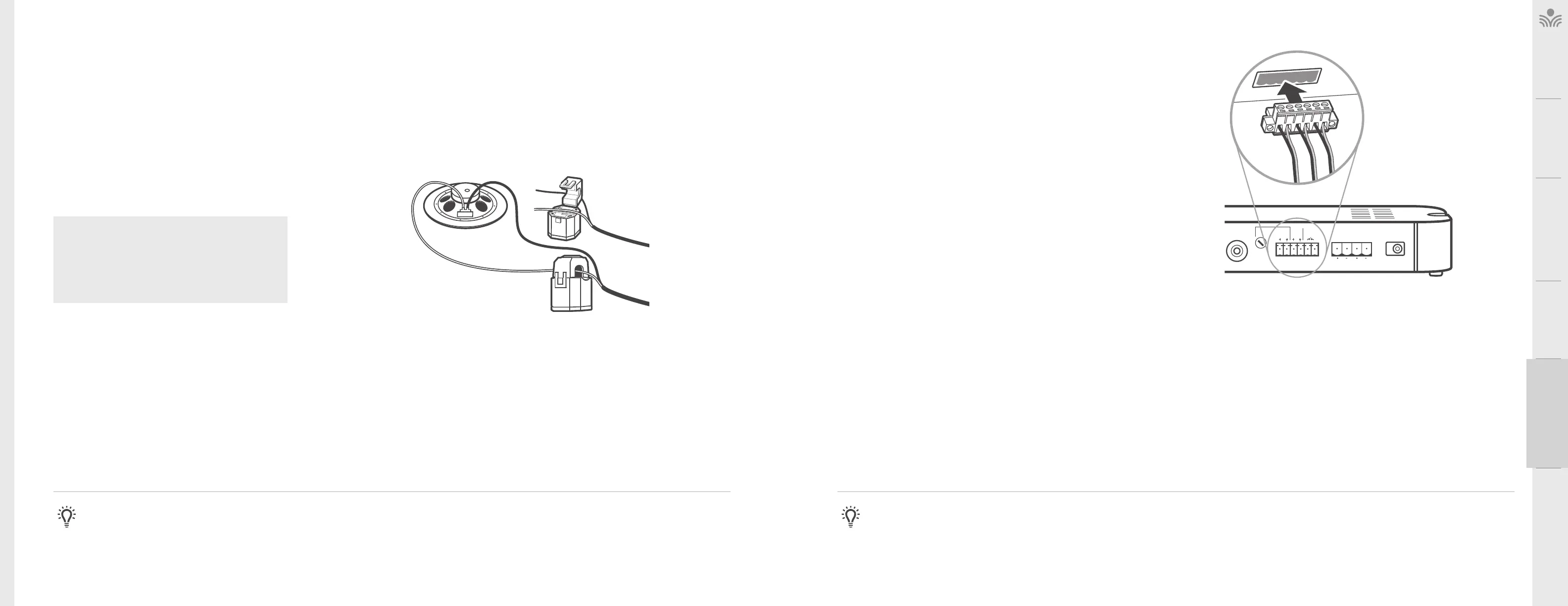
2. Unclip and open the top loop of the PageFirst sensor. Hang it around one of
the lead wires connected to the paging speaker and clip it back together.
INSTALLING OPTIONAL EQUIPMENT
CONNECT PAGEFIRST SENSOR TO AMPLIFIER
The sensor needs to be hard-wired back to the amplifier.
1. For 975, insert the PageFirst wire into the le side of the six pin euro-block
connector on the amplifier. Insert the connector into the back of the 975.
2. Route the wire from the amplifier to the paging speaker. NOTE: when routing
wire, make sure to secure to the building structure, as electrical and building
codes require.
3. If the system mutes during times when a page is not being broadcast, turn the
sensitivity down by turning the ADJ knob counterclockwise, and test again.
CONNECTING PAGEFIRST TO AMPLIFIER
Input
Priority
Power
24VDC / 2.5A
Speaker Outputs
12
Class 2 Wiring
Adjust
Page
First
Relay
Input
Contact
Closure
ADJUSTING THE SENSITIVITY
1. The sensitivity adjustment (labeled “ADJ”) is pre-set to the 12 o’clock position. This
should be the appropriate setting for the majority of installations.
2. If the system does not mute while the page is being broadcast, turn the sensitivity
adjustment up by turning the ADJ knob clockwise and test again.
TESTING PAGEFIRST
A page will need to be broadcast through the system to verify PageFirst is properly
sensing the audio signal.
1. Turn on the system and begin speaking.
2. Broadcast a page through the central paging system.
3. The system should mute as the page is broadcast. When the broadcast is over, the
system should amplify the mic as normal.
4. While walking around the room, continue talking into the microphone. Verify that
the system is not muting during times there is no page being broadcast.
NOTE: The P ageFirst function works via current induction. The above
instructions represent the most common method to achieve suicient
induction. If suicient induction is not achieved to trigger this function, please
contact Lightspeed regarding alternate installation methods.
Take precautions as necessary to prevent and guard against electromagnetic and
electrostatic noise interference. Unshielded and / or poorly shielded cable, multiple
ground paths and improper grounding may all contribute to the production of a low
frequency noise which could result in the PageFirst clip muting incorrectly.
PAGEFIRST
The PageFirst™ function passively detects the audio signal of a page coming
through the PA system. As an audio signal is sent to the PA speaker, the
PageFirst™ detects that signal and immediately mutes the 975.



 To Next Page