12
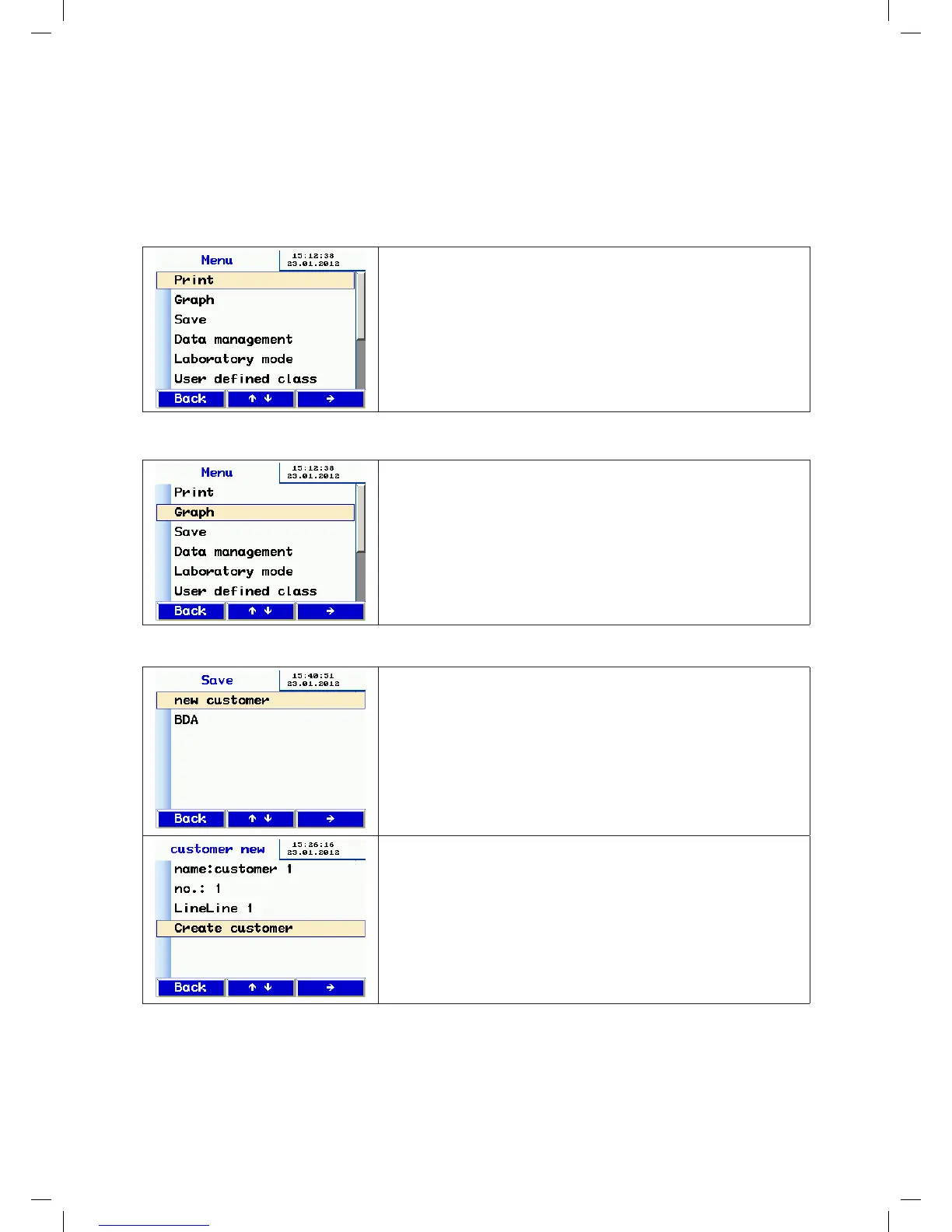
10. Main menu
• Press the or key to move to a different menu entry.
• Press the key to select a menu entry.
• Press the MENU key to open the input screen for a new test.
10.1 Print
• Print the report of the most recent test. Described above on page 11.
• Not available if the device has been switched off in the meantime.
• You can use the or key to scroll through the report.
• Press the Back key to exit the menu or press OK to start printing.
10.2 Chart
• Shows the chart for the most recent test. As described above on page
12.
Not available if device has been switched off in the meantime.
10.3 Save
• Press the key to choose Save from the menu – the customer admin
screen appears.
• On this screen you can create a new customer or save the current test
under existing customers.
• For example, press the key to select the New customer option.
• First create the customer, with any sequence/measuring point name.
• Change lines by pressing the and keys.
• Press the key to select a line.
manual-LTEST-1082_EN-DE-FR-SE.indd 12 2012-03-28 12:32:39


 To Next Page
 Loading...