13
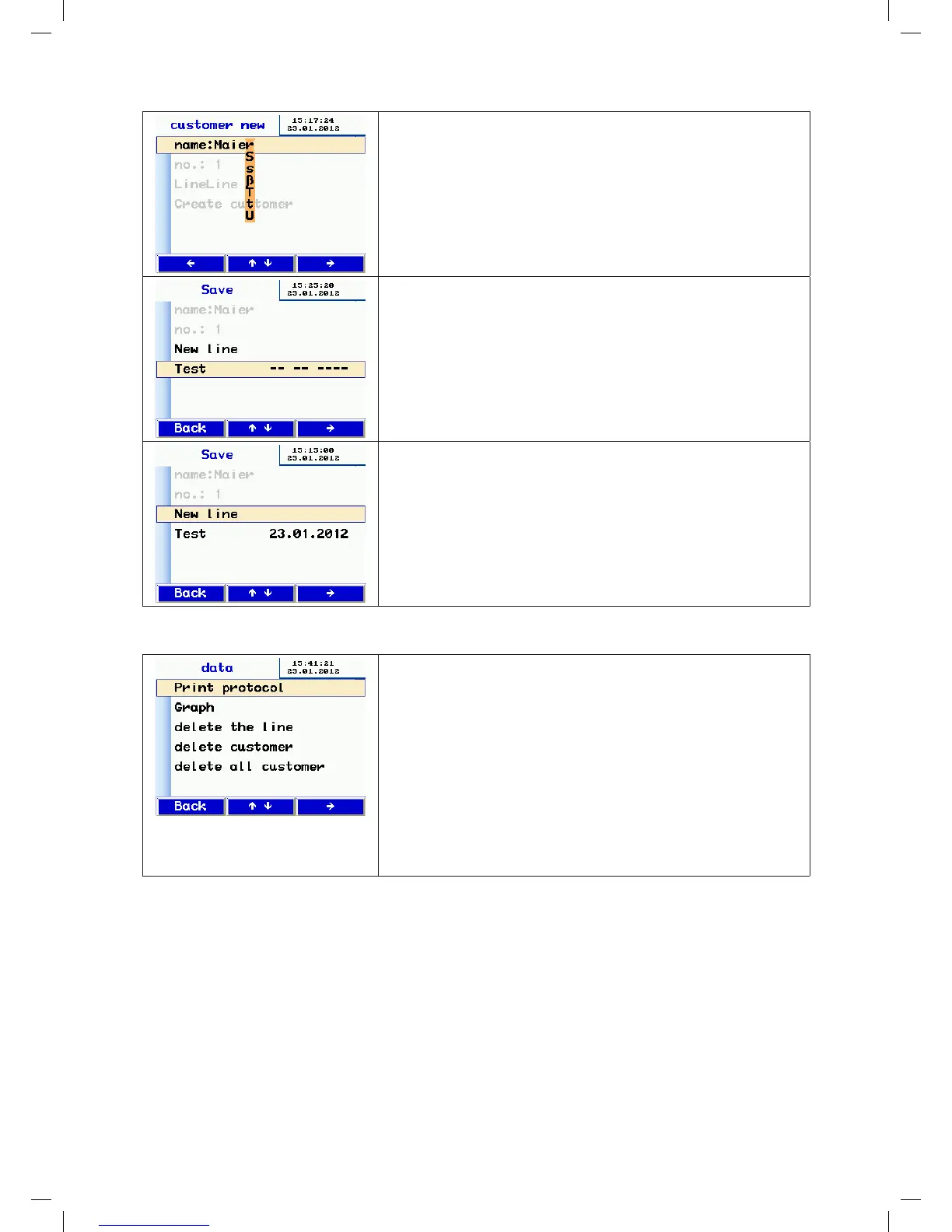
• Press the or key to move to the letter/digit you want to change.
Press the and keys to change the letter/digit.
• To exit, press the -or key to move to the end of the line.
• Specify the customer number and sequence name in the same way.
• Select the Create customer line again and press the key.
• Press the Back key to go to the list of customers.
• The new customer appears in the list of customers – select the new
customer by pressing the key.
• The display now shows the available sequences that have been created
for that customer.
• Press the and keys to select the sequence and press the key to
save.
• Saving takes a few seconds.
• The test date is displayed, to confirm that the data have been saved.
• You can create another new sequence in this input screen.
10.4 Data admin
Options for viewing/modifying saved data.
• Change lines by pressing the and keys.
Select a line with the key
Functions:
♦ View/print report or chart
♦ Select sequences/measuring points
♦ Delete customer
♦ Delete all customers
The individual functions are dialog-driven so they are not described
in more detail here.
manual-LTEST-1082_EN-DE-FR-SE.indd 13 2012-03-28 12:32:39


 To Next Page
 Loading...