9
7.3 First test
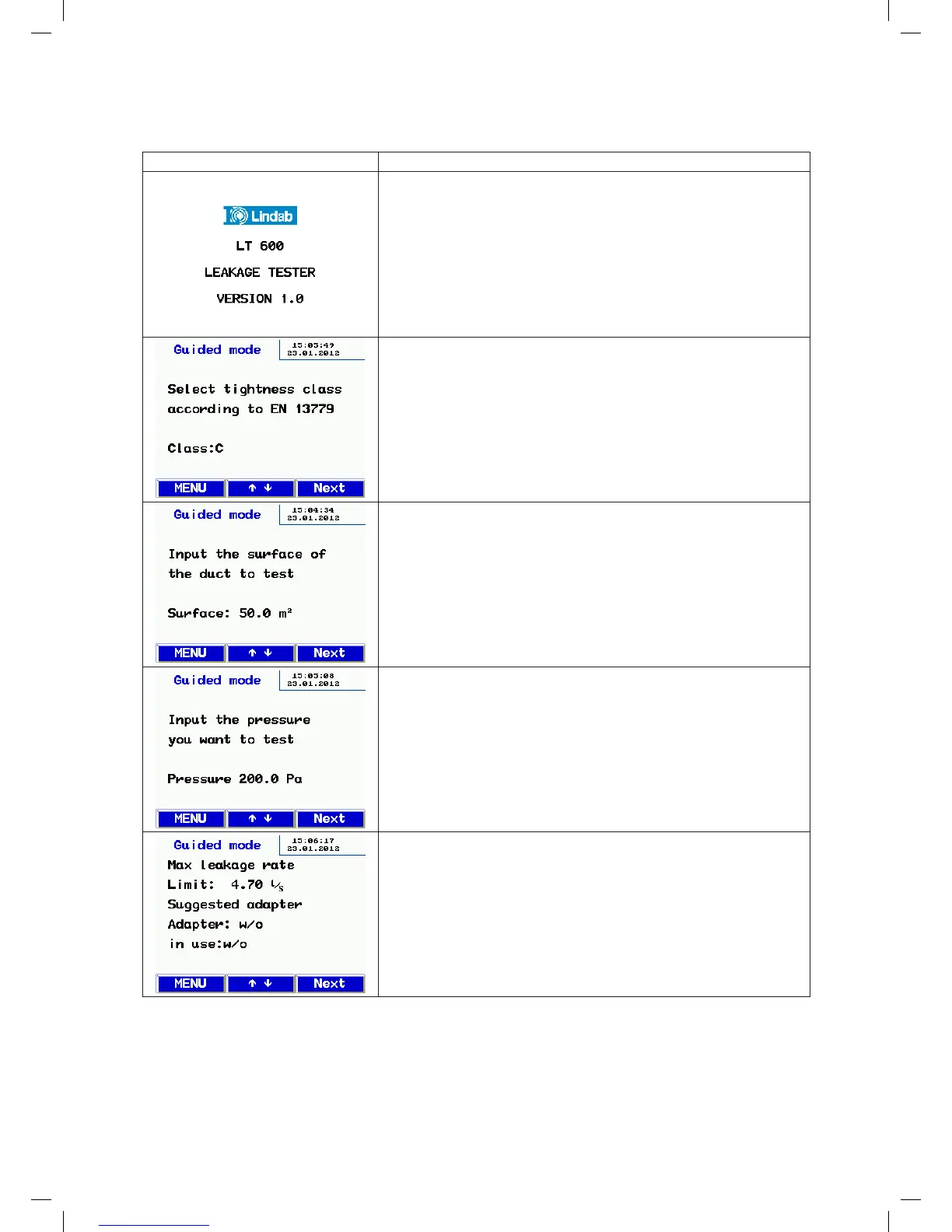
Display Description
Start screen
Display of device type and firmware version
The device automatically starts in user prompt mode:
• Follow the prompts and select the airtightness class for the test using
the or key.
• Then press the Next key.
• Enter the duct surface area for the test using the or key
Calculated according to DIN EN 14239 or from a CAD system.
(Note: Not the m² calculated according to DIN 18379)
• Then press the Next key.
• Enter the test pressure you want using the or key. (Be careful with
the plus or minus sign)
• Attach the 50 mm air hose depending on the selected pressure (nega-
tive pressure > top of case, positive pressure > front of case).
• Always attach the pressure measuring tube to "+".
• Then press the Next key.
The preliminary calculation of the maximum permitted leakage flow rate
appears here.
The suggested adapter and the current adapter are shown.
• If necessary, change the adapter that is "In use" to the
suggested type using the or key.
Check the installed adapter.
• Then press the Next key.
From here the display is the same in user prompt mode and in expert mode.
Follow the further instructions or adjust the parameters as described in 9. Expert mode.
manual-LTEST-1082_EN-DE-FR-SE.indd 9 2012-03-28 12:32:39


 To Next Page
 Loading...