11
8. Expert mode
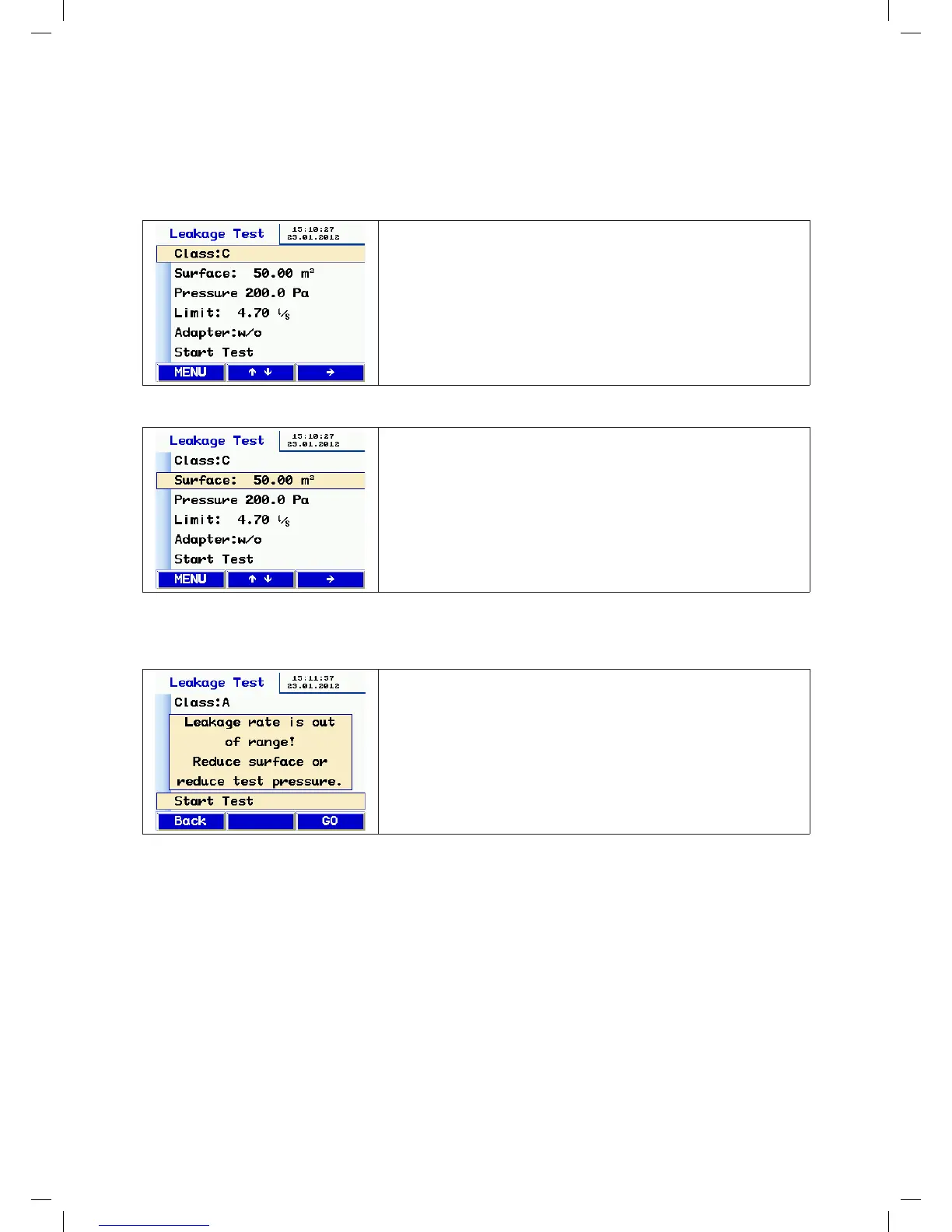
If you select expert mode in setup, the device displays the following input screen when it starts up.
You can enter your input or change the displayed parameters directly, as illustrated below using the airtightness class
and the surface area as examples:
Entering/changing the airtightness class:
• Use the or key to select a particular line (the airtightness class in
this example).
• Press the key to change the airtightness class.
• Press the or key to select another line.
• To start the test, select the bottom line and press the key.
Entering/changing the surface area:
• Use the key to select the digit directly for fast input.
• Press the or key to change the selected digit.
• To leave the current input line, press or until you reach the end of
the line.
• Press the or key to select the next input line you want to change.
9. Messages:
If the leakage flow rate calculated in advance exceeds the maximum
output of the device, the following message appears:
"Leakage flow rate too high. Reduce the surface area or the test pressure."
• Change the test conditions by pressing the Back button.
• Press the Next button to skip the message and start the test anyway.
Other messages include:
• "Sensor error" during self test. Switch off the device and restart it. If the error message appears again, the device
needs to be serviced,
• "Overheat" If the device is used for a long time at very high speeds, a safety cutout may be triggered. You can start
using the device again after it has cooled down.
manual-LTEST-1082_EN-DE-FR-SE.indd 11 2012-03-28 12:32:39


 To Next Page
 Loading...