TrainMaster Command Control operations
Operating your locomotive in the Command Control environment
1. Turn off track power and plug-in the Command Base. Be sure that the
Command Base is connected to the outside rail or to the Common/Ground/U terminal on
your track power supply.
2. Place your locomotive on Lionel or Lionel-compatible O-36 or larger
track.
3. Increase track voltage to full power (no more than 19 volts AC). On
PowerMasters, slide the CMD/CONV switch to CMD. Program Track Power Controllers to
Command Control operation.
Power your locomotive with an alternating-current (AC) transformer only.
Powering your locomotive with a direct-current (DC) transformer, or in excess
of 19 volts AC, may result in damage to sensitive electronic components.
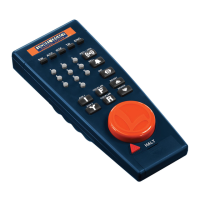
4. Press ENG and enter the ID# to address your locomotive with your CAB-1
Remote Controller. All Lionel locomotives come factory-programmed as ID# 1. To
change the ID#, see page 20.
5. Throttle up and move ‘em out! Your locomotive will respond to every command from
your CAB-1 Remote Controller.
14
Caution!








 To Next Page