34
Activating the CrewTalk dialog and TowerCom announcements in
the Command Control environment
W
ith the LEGACY RailSounds sound system, CrewTalk dialog and TowerCom
announcements feature a variety of brief radio conversations between the engineer and
dispatcher. All dialog is intelligible, and each comment is followed by at least one automatic
response.
CrewTalk dialog is an engineer-initiated radio conversation with the dispatcher. TowerCom
announcements are a dispatcher-initiated radio conversation with the engineer. Be sure to listen
for the different combinations of words and phrases that comprise these exchanges.
Refer to Table 1 below for the dialog commands. The dialog in the table provides examples
of the conversations you can trigger. The actual phrasing will vary.
Locomotive Commands Example dialog
AUX1, 2 Crew: Can we go?
Tower: No, please standby
AUX1, 7 Tower: Stand by for clearance.
Crew: Roger.
Stopped 2 Crew: Can we go?
Tower: Roger, you are clear.
7 Tower: You are clear for departure.
Crew: Roger, we are clear.
AUX1, 5 Crew: Signing off!
Shutdown sequence
AUX1, 2* Crew: Train is arriving.
Tower: Roger, you are clear inbound.
AUX1, 7* Tower: You are clear for arrival.
Crew: Roger.
Moving 2 Crew: Are we clear ahead?
Tower: You are all clear.
7 Tower: You are all clear.
Crew: Roger.
AUX1, 5 Tower: Come to an immediate stop.
Crew: We are stopping now.
5 Tower: Slow to caution speed.
Crew: Roger, slowing now.
* Activating either AUX1, 2 or AUX1, 7 while the locomotive is in motion enables a “train has now
arrived” conversation for 15 seconds. If the train stops within this time, pressing 2 or 7 will play this
special conversation.
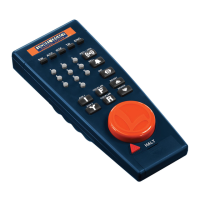
Table 1. CAB-1 Remote Controller dialog commands
LEGACY RailSounds sound system operations








 To Next Page