Assigning your locomotive a new ID#
A
s your roster of TrainMaster Command Control-equipped locomotives grows, you
will want to give each unit a unique ID#. The locomotive will respond to commands
associated with its ID# while all other units will disregard these commands.
To restore your locomotive’s functions, see page 22.
1. Slide the Command reverse unit switch on your locomotive to the PGM position.
2. Place the locomotive on the track.
3. Connect the Command Base and plug it in.
4. Power up the track.
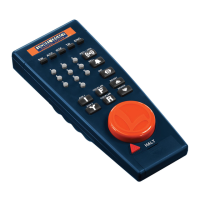
5. Press ENG.
6. Enter the unique ID#. Choose any number from 1 to 99 that has not been assigned to
another locomotive (ENG). We recommend using a part of your locomotive’s cab number.
7. Press SET. The locomotive’s horn will sound if the RailSounds sound system is on and the
headlights will flash.
8. Slide the Command reverse unit switch back to the RUN position.
The locomotive’s ID# has been set. Be sure to record the new ID# for your reference.
Note!
20
TrainMaster Command Control operations








 To Next Page