12 | Moku:Go Laser Lock Box User Manual © 2023 Liquid Instruments. All rights reserved.
PID controllers
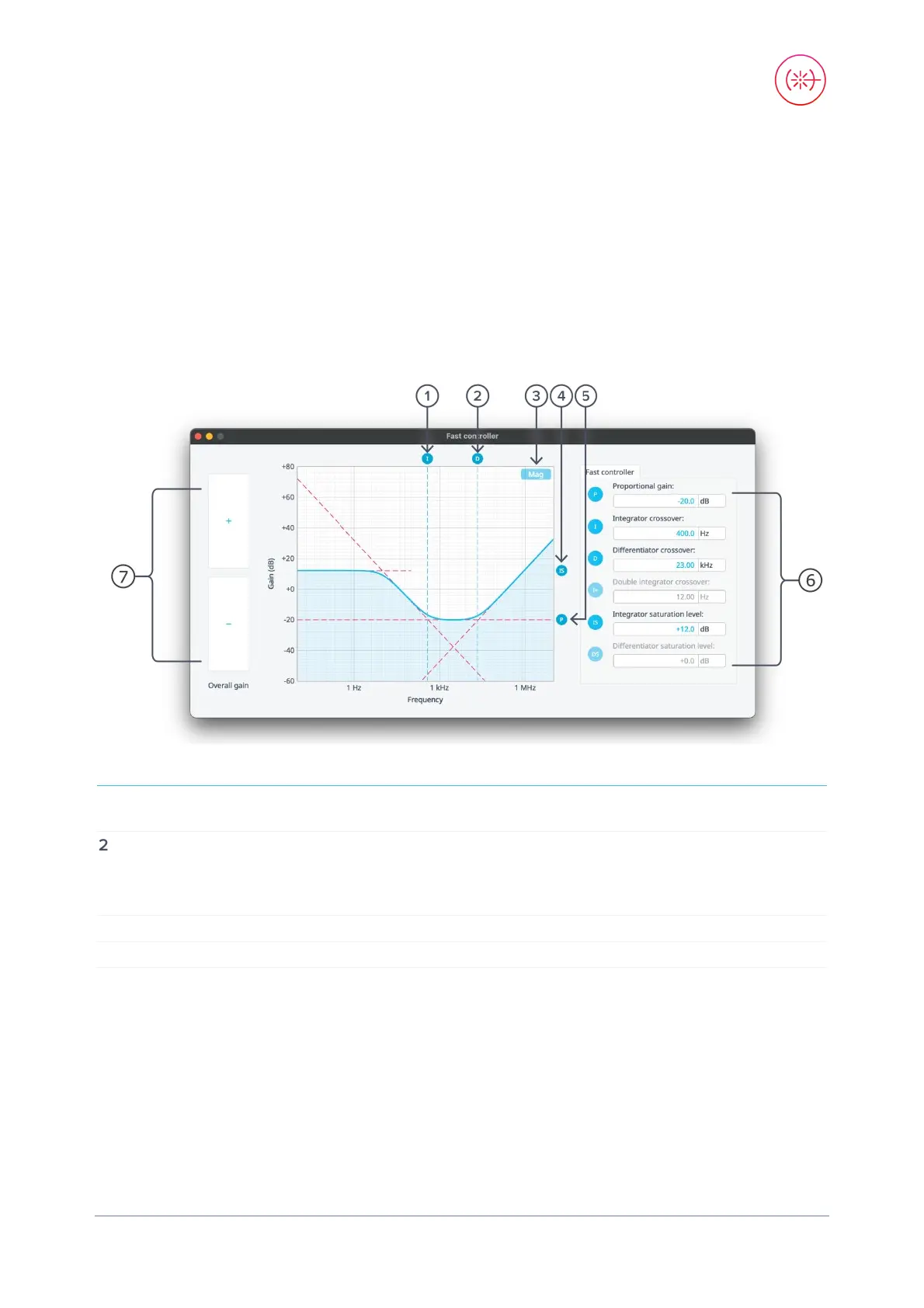
The Moku:Go Laser Lock Box implements two cascaded PID controllers: a fast controller and a
slow controller. The input of the slow PID controller is the output of the fast PID controller.
Both the fast and slow PID controllers can be configured graphically by dragging interactively on
the magnitude chart or by tapping on cross-over tabs and entering frequency or gain on the soft
keypad.
The PID controller provides full control over proportional, integral, and derivative gain profiles with
saturation levels available for the integral and derivative components. The PID controller’s transfer
function is updated in real time.
1
Drag or tap to enter integrator crossover
frequency
5
Drag or tap to enter proportional gain
2
Drag or tap to enter differentiator crossover
frequency
6
Proportional, integrator, differentiator,
double integrator (only on the fast
controller), integrator saturation, and
differentiator saturation settings
3
Toggle between magnitude or phase plots
7
Swipe to adjust selected PID parameter
4
Drag or tap to enter integrator saturation


 To Next Page